12 13
Charge this product via the USB type-C input from the wall socket or other 5V-8V
output devices.
When this product is being charged, its LCD will display “Charging” message. When
it’s fully charged, the LCD will display a “100%” message.
Please charge this product for at least 8 hours before the rst use.
5V USB Charger Rating
1A
Time 12hr
6hr
4hr
2A
3A
Battery Charging
Use the LED Light as Flashlight or SOS, strobe:
Hold the “Power” button for 3 seconds to turn on LED Light;
Press the “Power” button to cycle the LED modes, from Steady Light, to “SOS”, and to Strobe.
1
.
2
.
Charging the external electronic devices:
Press the “Power” button;
Use the USB cable to charge mobile devices as cellphones, tablets etc.;
Use the 12V DC output to power appliances as air-compressors, vehicle refrigerators;
Disconnect when the charging is completed.
1
.
2
.
3
.
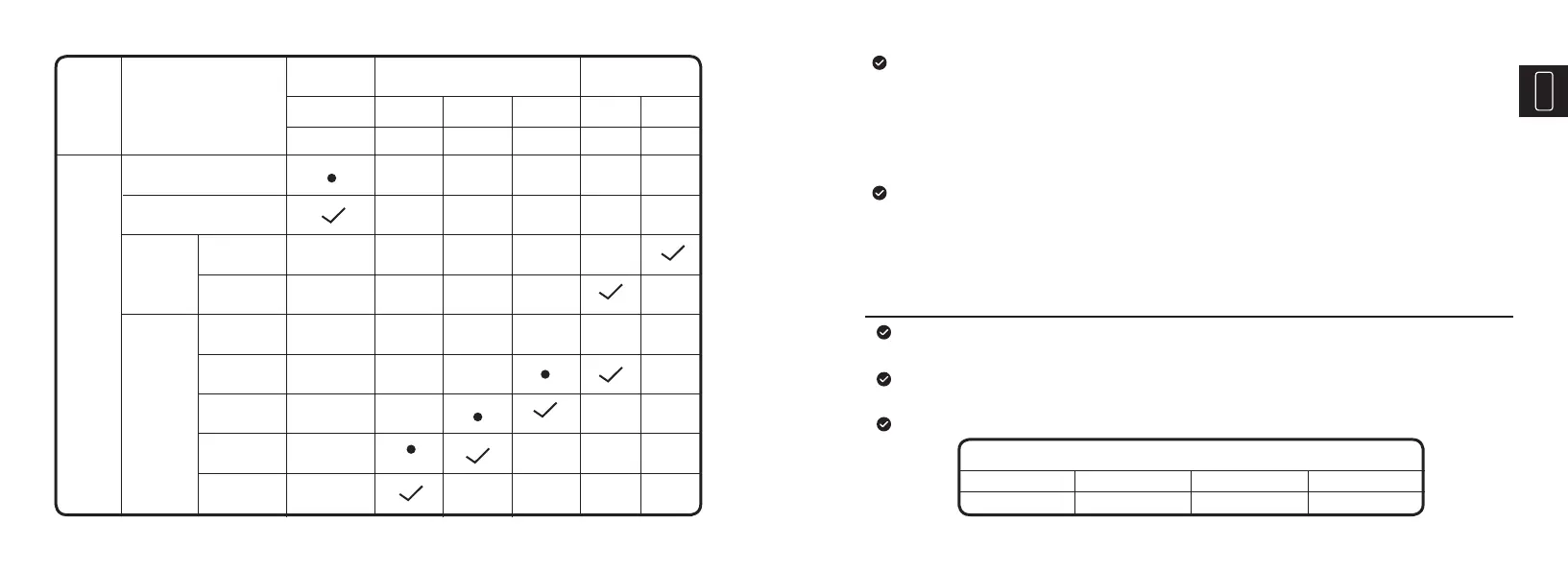
LED In-
dicator
Connection
State
Bluetooth Pairing
Bluetooth Connected
Note: √ means solid, • means flashing
V2000
battery
Vehicle
Battery
0-14V
>14V
0-4.2V
4.2-11.5V
11.6-12V
12.1-13V
13V
Connect Full
Green Orange Red
OK
Green
Fault
Red
Middle Low
Blue
Battery State
Jump Starter
State
Expla-
nation


 To Next Page