Warranty Claim Requirements
To obtain warranty service, you must have your original sales receipt. Items returned without a
sales receipt will assume that the warranty begins on the date of manufacture. All warranties
will be void if the SmartHead digital gauge damaged due to user crash, abuse, system
alteration, modification, or used in any way not intended as described in this operating manual.
Topeak products are available only from professional bicycle shops.
Please contact your nearest Topeak authorized bicycle dealer for any
questions.
For customers in the USA, call: 1-800-250-3068
Website: www.topeak.com
Copyright © Topeak, Inc. 2011
M-TSG02-GB 10/11
HOW TO USE SMARTGAUGE D2
WARRANTY
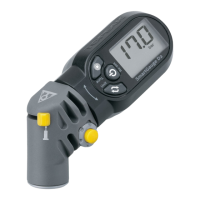
1. Air Release Button
2.
Air Pressure Units Selection Button
3. Reset and on/off Button
4. Adjusting Button
5. LCD Display Screen
6. SmartHead for Presta or
Schrader valve
7. Selector Button for Presta or
Schrader valve
8. Battery Cover
1-year Warranty: All mechanical components against manufacturer defects only. Battery is not covered under any implied warranty.
* The specifications and design are subject to change without notice.
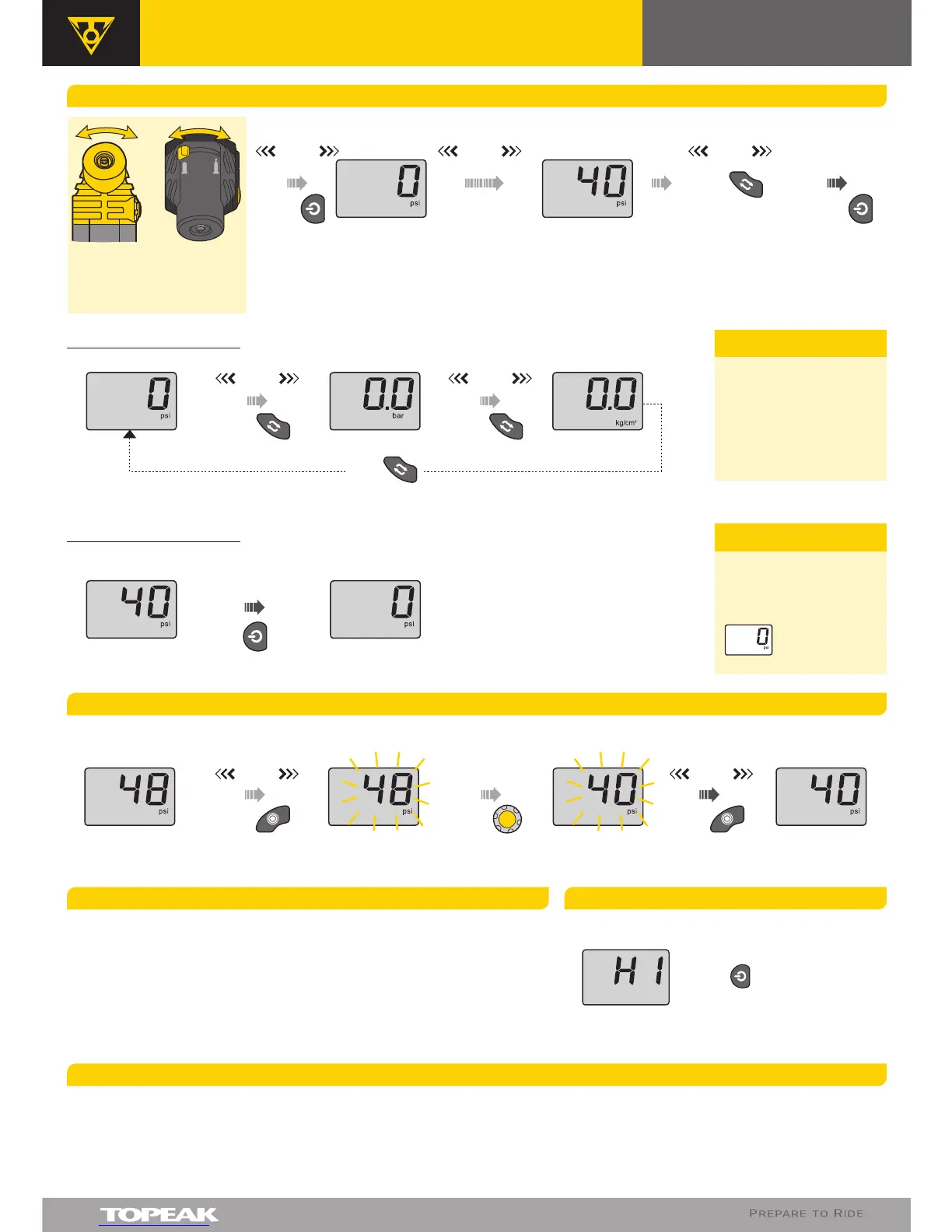
Beep
UNIT SELECTION
measure tire pressure
press
3 Sec to
TURN OFF
press
to TURN ON
press
psi bar
Beep
press
Beep
kg/cm
2
press
press
to SELECT UNIT
HOW TO USE AIR RELEASE BUTTON
press press press
Beep Beep
Air Releasing...
Pressure decreasing...
In Adjusting Mode In Normal ModeIn Normal Mode
BeepBeep
LCD display screen will automatically turn off after 30 seconds of
non-use.
1 ~ 1.5psi may be lost after each pressure measurement.
For proper use of the Topeak SmartGauge D2, make sure the Presta/
Schrader switch button is fully selected.
If it's difficult to engage the tire valve, slide the Presta/ Schrader
selector button back from side to side a few times to reset the
function. "Re-engage" the tire valve after gauge is reset.
1.
2.
3.
4.
RESET SMARTGAUGE D2
press
1 Sec
After completing the
measurement, the tire
pressure units can still
be changed by pressing
the air pressure units
selection button.
NOTE
For precise
measurement, reset the
SmartGauge D2 until
the screen displays
before starting
next
measurement.
NOTE
IMPORTANT NOTE IMPORTANT NOTE
If "HI" appears when measuring,
the gauge is over the pressure
range.
Press to reset the gauge.
If "HI" appears when turning
on the gauge, the gauge has
been damaged.
Select valve
by sliding
selector
button.
Select unit
and adjust
proper
angle first.
User's Guide
SMARTGAUGE D2


 To Previous Page
 Loading...