38 Listing Services
services list after adding radio services, press the button
again.
With your favourite services list, you can select your favourite
services more easily. Refer to § 5.2.2 for detailed description.
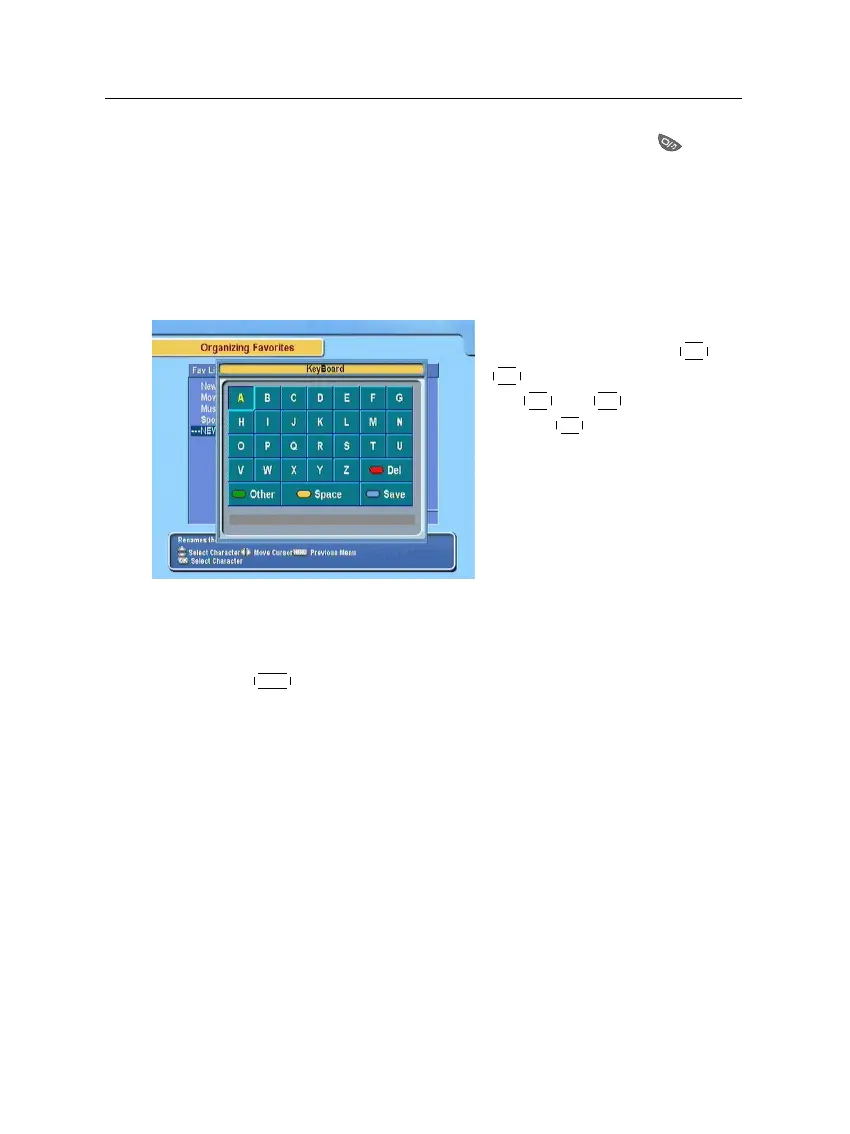
6.2 How to use on-screen keyboard
You can move the highlight key
horizontally with the
V−
and
V+
buttons and vertically with
the
P+
and
P−
buttons. Press-
ing the
OK
button on a key en-
ters its letter in the input line. To
type a space, select the Space
key. To type lower case letters or
numerals, select the Other key.
To delete a letter, put the cursor to the right of the desired letter
on the input line and then select the Del key. You must select
the Save key to complete naming; otherwise, if you press the
EXIT button, it will not be named.
6.3 Transferring receiver data
The digital receiver retains the following data:
• Services list
• Favourite lists
• Preference settings
It is possible to transfer the receiver data from the digital re-
ceiver to another same digital receiver by connecting them with
a RS-232 cable. To have the receiver data transferred, perform
the following steps:













 To Next Page