
 Need help?
Do you have a question about the TopXGun T1-A and is the answer not in the manual?
Critical safety warnings and usage restrictions for the product.
Information on registered trademarks and copyright ownership.
Product compliance with quality standards like FCC, CE, RoHS.
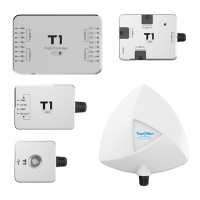
Overview of the T1-A flight controller and its key agricultural UAV functions.
List of all components included in the product package.
Explanation of universal symbols used in the manual for clarity.
Description of LED indicator patterns and their meanings.
Steps for confirming multi-rotor type and installing the controller unit.
Requirements for mounting the main controller and connecting ESCs.
Guidelines for installing the PMU module and its port usage.
Instructions for mounting and connecting the GPS/COMPASS module.
Guidance on positioning and connecting the LIU module.
Placement and connection details for the DCU module and its ports.
Preparation and steps for installing and testing the flight controller.
PC requirements and setup for adjusting parameters.
Guide on selecting the correct mixer type for the multi-rotor.
Steps for selecting the receiver type and performing calibration.
Instructions for adjusting flight control gains for optimal performance.
Configuration of low-voltage alert and protection levels for battery safety.
Setting the appropriate return-to-home altitude for the aircraft.
Setting general working parameters for agricultural operations.
Configuring the effective width of the spray nozzle in intelligent mode.
Setting the maximum flying speed for the drone during operation.
Calibrating spraying pump speed for optimal liquid delivery.
Procedures for unlocking and locking the aircraft for flight.
Procedure for calibrating the Electronic Speed Controller and compass.
Steps for performing horizontal calibration of the flight controller.
Explanation of flight modes and how the aircraft responds to stick inputs.
Description of LED indicator status for GPS and flight modes.
Steps to update the firmware for the flight controller modules.
Pre-flight checks and procedures for the initial test flight.
Pre-flight checks to ensure safe operation.
Steps for powering on the system and performing initial checks.
Procedure for conducting a low-altitude test flight and checking controls.
Details on the intelligent flight mode and its work route operations.
How to control the aircraft manually for spraying operations.
Functionality for resuming spraying from a recorded breakpoint.
How to activate the one-key return to home function.
Explanation of fail-safe behavior and return-to-home procedures.
How low voltage protection is triggered and managed.
 General
| Brand | TopXGun |
|---|---|
| Model | T1-A |
| Category | Controller |
| Language | English |

 To Next Page