This document outlines the features and operation of a Toshiba television, including its various functionalities, technical specifications, and maintenance guidelines.
General Operation and Setup
The television is designed to be environment-friendly, with several energy-saving options. Users can set the Energy Saving mode to Minimum, Medium, Maximum, or Auto to reduce power consumption. A custom backlight setting is also available. The TV will automatically enter standby mode if no input signal is received for 3 minutes or if no operation is detected for a set period (1-8 hours, configurable).
Initial Setup: During the first-time installation, users will define a PIN (default 0000 or 1234) which is required for certain functions like formatting the disk or parental control. The TV performs an automatic search for available broadcasts of selected types.
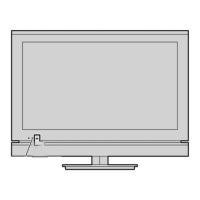
TV Control Switch & Operation: The TV features a control button for basic operations:
- Volume: Push up to increase, down to decrease.
- Channel: Press the middle button, then push up or down to scroll through channels.
- Source: Press the middle button twice, then push up or down to select.
- Power Off: Press and hold the middle button for a few seconds.
- Power On: Press the middle button.
Remote Control Operation: The remote control provides comprehensive navigation and control:
- Menu: Displays the main menu.
- Directional Buttons & OK: Navigate and select menu items.
- Return/Back: Quits a menu screen.
- Source: Selects different input sources.
- Programme +/- & Volume +/-: Change channels and adjust volume.
- Exit: Closes the main menu.
- Home: Customizable menu bar for quick access to options.
The TV supports various input sources and connectivity options:
- VGA/PC: For connecting computers.
- HDMI: For high-definition devices.
- USB: For media playback and recording.
- LAN (Ethernet): For wired network connection.
- Wireless (WLAN): For wireless network connection (802.11 a,b,g & n type modems recommended).
Connecting to a Wired Network:
- Connect a modem/router to the TV via an Ethernet cable.
- Configure network settings in the Settings menu.
Connecting to a Wireless Network:
- Set Network Type to Wireless Device in the Network menu.
- Scan for wireless networks, select the desired network, and enter the password if required.
- WPS (Wi-Fi Protected Setup) is supported for direct connection without a password.
FollowMe TV: Stream current broadcasts from your Smart TV to a mobile device using the Smart Center application. Both devices must be on the same network.
CEC (Consumer Electronics Control): Control CEC-enabled devices connected via HDMI using the TV remote. Enable CEC in Settings>System>More. The TV supports ARC (Audio Return Channel) via HDMI2 input.
AVS (Audio Video Sharing): Share files from a smartphone or tablet to the TV. Both devices must be connected to the same network.
Picture and Sound Settings
Picture Menu Contents:
- Mode: Cinema, Game (optional), Sports, Dynamic, Natural.
- Contrast, Brightness, Sharpness, Colour: Adjusts image quality.
- Energy Saving: Custom, Minimum, Medium, Maximum, Auto, Screen Off, Off.
- Backlight: Controls backlight level (inactive if Energy Saving is not Custom).
- Dynamic Contrast: Adjusts contrast ratio.
- Noise Reduction: Reduces noise from weak signals.
- Colour Temp: Cool, Normal, Warm, Custom.
- White Point: Adjusts picture warmth/coolness (when Colour Temp is Custom).
- Picture Zoom: Sets image size format and allows shifting.
- Film Mode: Enhances fast motion scenes for films.
- Skin Tone & Colour Shift: Adjusts skin tone and colour tone.
- HDMI Full Range: Enhances blackness from HDMI sources.
- PC Position (VGA/PC mode only): Autoposition, H Position, V Position, Dot Clock, Phase.
- Reset: Resets picture settings to factory defaults (except Game mode).
Sound Menu Contents:
- Volume: Adjusts volume level.
- Equalizer: Custom settings available in User mode.
- Balance: Adjusts sound from left or right speaker.
- Headphone: Sets headphone volume.
- Sound Mode: Selects a sound mode.
- Bluetooth (optional): Connects Bluetooth wireless technology enabled sound devices.
- AVL (Automatic Volume Limiting): Obtains fixed output level between programmes.
- Headphone/Lineout: Configures output for headphones or external amplifiers.
- Dynamic Bass (optional): Enables/disables dynamic bass.
- DTS TruSurround: Enables/disables DTS TruSurround.
- DTS DRC: Adjusts dynamic range control.
- Digital Out: Sets digital audio output type.
USB Recording (optional):
- Connect a USB storage device (FAT32 format recommended) to the TV.
- Timers: Set timers for future events, edit, or cancel them.
- Recordings: Playback, edit, delete, or sort recorded events.
- Recording Settings: Configure recording preferences (Start early, End late, Max Timeshift, Auto discard).
- Hard disk information: View details about the connected USB device.
- Format Disk: Deletes all files and converts disk format to FAT32 (requires PIN).
Supported File Formats for USB Mode:
- Video: .mpg, .mpeg, .dat, .vob, .ts, .trp, .m2ts, .avi, .mp4, .m4a, .m4v, .mov, .qt, .3gp, .3g2, .3gpp, .mkv, .flv, .ogm, .ogg, .asf, .wmv, .rm, .rmvb, .webm.
- Video Codec: MPEG1/2, H.264, VC1, MPEG4, MJPEG, H.263, Sorenson Sp, WMV3, RV30, RV40, VP9, VP8, HEVC/H.265.
- Max. Resolution & Frame Rate & Bit Rate: H.264: 1080Px2@30fps - 50Mbps, 1080P@60fps - 50Mbps. Other: 1080P@60fps - 50Mbps.
- Picture: .jpg, .jpeg (Baseline, Progressive), .bmp (RGB, RLE), .gif (87a, 89a), .png (Grayscale, Interlace, Progressive), .tiff, .tif (Tagged image file), .webp (Lossy/Lossless compression).
- Resolution: 8192 x 8192 (jpg, jpeg, png), 3000 x 3000 (bmp).
- Audio: .mp3, .ac3, .aac, .wma, .amr (AMR-NB, AMR-WB), .wav (MPEG La, AAC, PCM), .flac.
- External Subtitles: .ssa, .ass, .srt, .sub, .sub + .idx, .txt, .mpl, .smi, .jss, .ttml, .txt /.sub, .Irc.
- Internal Subtitles: .mkv (VOBSub, ASS/SSA/TEXT), .dat, .mpg, .mpeg, .vob (DVD Subtitle), .mp4 (DVD Subtitle, TEXT).
DVI Resolutions (via DVI to HDMI cable):
- Supports various resolutions from 640x400 to 1920x1080 at different refresh rates (56Hz, 60Hz, 66Hz, 70Hz, 72Hz, 75Hz).
Smart TV Features
Smart Center: A mobile application for Android and iOS devices that allows streaming TV, controlling the TV remotely, and accessing media from your mobile device.
- Auto-lock (Only in iOS): Screen turns off after a certain amount of time.
- Auto enable FollowMeTV: FollowMeTV function enabled/disabled.
- Auto-connection to TV: TV automatically connects to last connected TV.
- Change TV (Only in iOS): Switches the currently connected TV.
- Edit custom channel list: Edit your custom channel list.
- Choose channel list source: Select source for channel list.
- Version No: Displays current version of the application.
- Detail Page: Provides detailed information about programmes.
- FollowMe TV Feature: Stream content from TV to mobile device.
- Mirror Mode: Streams content from selected TV sources and Media Browser to mobile device.
- Smart Remote Feature: Use mobile device as a remote control.
- Voice Recognition: Control TV with voice commands (Android only).
- Keyboard Page: Open virtual keyboard on mobile device.
Internet Browser: Access websites, add speed dials, and search the web. USB mice are compatible for easier navigation. Flash content and downloads are not supported.
HbbTV System (Hybrid Broadcast Broadband TV): Combines broadcast and broadband TV services, offering catch-up TV, VOD, interactive advertising, and more. HbbTV applications are signalled by broadcasters and often launched via a red button icon.
Alexa Ready Feature (optional): Control TV functions (power, channel, input, volume) using voice commands via Amazon Alexa devices. Requires Smart Center and Amazon Alexa apps, a home network with WLAN, and an Amazon account.
DVD Mode (optional)
The TV may include an integrated DVD player.
- Safety Information: Class 1 laser product.
- Handling Discs: Handle by the edge, do not touch the surface, do not stick paper/tape, remove glue if present. Avoid direct sunlight or heat. Store in case after use.
- Cleaning Discs: Wipe from center out with a cleaning cloth. Do not use solvents.
- Watching a DVD: Insert disc labelled side up. Switch to DVD source, press play.
- DVD Control Panel Buttons:
- Play/Pause: Plays/pauses disc, selects highlighted item in DVD menu.
- Stop/Eject: Stops playing, ejects/loads disc.
- Basic Play: Press Standby, insert disc. Disc will load and play automatically if no menu. Use directional buttons or numeric buttons to select titles.
- Troubleshooting:
- Poor picture quality: Check disc surface, clean disc, ensure disc is in tray correctly, check for condensation.
- Disc does not play: Ensure disc is in loader, correctly loaded, and is a supported type (DVD, not CD-ROMs). Region code must match.
- Wrong OSD language: Select language in setup menu.
- No picture/sound: Check remote control buttons, volume, mute.
- Distorted sound: Check listening mode setting.
- If nothing works: Power cycle TV, contact supplier/technician.
Disc Types Compatible:
- DVD: Audio + Video, 12 cm, Single-sided (240 min), Double-sided (480 min). Excellent sound/video (Dolby Digital, MPEG-2).
- AUDIO-CD: Audio, 12 cm, 74 min. Analog signal with more distortion, digital signal with better audio quality.
- MP3-CD: Audio (xxxx.mp3), 12 cm, depends on MP3 quality. Digital signal with better audio quality.
- PICTURE-CD: Video (still picture), 12 cm, depends on JPEG quality. JPEG is recorded with better picture quality.
Specifications (DVD):
- Types of Discs Supported: DVD (SS/SL 4.7", DS/SL 4.7", DS/DL 4.7"), CD-DA, CD-R, CD-RW, MP-3/JPEG.
- Video Type: MPEG-2 Video Standard Decoding (MPEG-1 supported). Full-Screen Video Display of 720 x 576 (PAL) & 720 x 480 (NTSC) pixels. 50 and 60 Hz frame refresh rates. Digital bit-stream processing rate up to 108Mbits/sec. Line resolution >500 lines.
- Audio Type: MPEG Multichannel Decoding, LPCM.
- Audio Output: Analog Outputs: 24 bit /48, 44.1kHz down-sampling DAC.
Maintenance and Troubleshooting
Software Upgrade:
- The TV can automatically find and update firmware via broadcast signal or Internet.
- Manual Search: Go to Settings>System>More>Software upgrade>Scan for upgrade.
- 3 AM Search: If Automatic scanning is enabled and TV is connected to aerial/Internet, TV searches for upgrades at 3:00 AM and installs on next power on.
- Important: Do not unplug power cord during reboot after upgrade.
Troubleshooting & Tips:
- TV will not turn on: Check power cord connection, press Power button.
- Poor picture: Check TV tuning, signal level, antenna connections, manual tuning frequency.
- No picture: Check source selection, antenna connection, cable damage, suitable plugs.
- No sound: Check mute, volume, balance settings.
- Remote control - no operation: Replace batteries, check battery insertion.
- No signal on an input source: Check device connection, AV cables, device power.
- Recording unavailable (optional): Check USB device connection, formatting, sufficient space.
- USB too slow (optional): Restart recording, try different USB device.
- PC Input Typical Display Modes: Table provided for supported resolutions and frequencies.
- AV and HDMI Signal Compatibility: Table provided for supported signals and availability.
General Maintenance:
- Disposal of products: Products with crossed out wheeled dust bin symbol must be collected and disposed of separately from household waste. Integrated batteries/accumulators are separated at recycling centers. Products placed on market after August 13, 2005, are marked with a black bar.
- Disposal of batteries/accumulators: Batteries/accumulators with crossed out wheeled dust bin symbol must be collected and disposed of separately. Chemical symbols (Pb, Hg, Cd) appear below the symbol if values exceed European Battery Directive limits.
- Participate in separate collection programs to ensure proper disposal and prevent negative environmental/health consequences. Contact local city office or shop for details.

 Need help?

 To Next Page
 General