This document provides a comprehensive service manual for the Toshiba 32WLG66s LCD Color Television, covering its functions, technical specifications, usage, and maintenance procedures.
Function Description
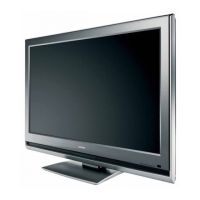
The Toshiba 32WLG66s is an LCD Color Television designed for home entertainment. It supports both analogue and digital broadcasting, offering a variety of input options for external devices. The television incorporates a "green product" design philosophy, emphasizing environmental responsibility through the use of lead-free solder and green procurement practices for parts.
Key functions include:
- Analogue and Digital Tuning: The television can automatically or manually tune into available analogue and digital channels.
- Programme Sorting and Skipping: Users can sort and skip programmes, customizing their channel list.
- Multiple Input Sources: Supports various input sources including RF, SCART (Full and S+AV), Component/Composite, PC, HDMI (HDMI1, HDMI2), and DTV.
- Audio Output: Features headphone output and sound amplification.
- Service Mode: A dedicated service mode allows for adjustments, self-diagnosis, version checks, and memory initialization.
- Hotel Mode: Provides specific settings for use in hotel environments, including options to disable front keys, input selector keys, and user remote control operations, as well as forced volume and picture mode settings.
- LED Indication: Front panel LEDs provide status indications for power, on-timer, and abnormal operations (e.g., BUS line errors).
Important Technical Specifications
General:
- Model: 32WLG66s
- Type: LCD Color Television
- Green Product: Yes (uses lead-free solder and green procurement parts)
- Service Manual Version: 1.01
Broadcasting Systems/Channels:
- PAL-I: UHF UK21-UK69
- PAL-B/G: UHF E21-E69, VHF E2-E12, S1-S41
- SECAM-L: UHF F21-F69, VHF F1-F10, B-Q
- SECAM-D/K: UHF R21-R69, VHF R1-R12
- Video Input: PAL, SECAM, NTSC 3.58/4.43
External Connections:
- EXT1 (Input/Output): 21-pin SCART (RGB, A/V Selectable output)
- EXT2 (Input/Output): 21-pin SCART (A/V, S-video Selectable output)
- EXT3 (Input): Phono jacks (Y, PB/CB, PR/CR, A/V)
- EXT3 (Input Side): Phono jack (Video, Audio L+R)
- HDMI 1/2 (Input): HDMI connector
- PC (Input): Mini D-sub 15-pin (Analog RGB signal)
- PC/HDMI Audio: Phono jacks (Audio L+R)
- Audio Output (Fixed/Variable): Phono jacks (Audio L+R)
- Headphone Socket: 3.5mm stereo
Display:
- Visible Screen Size (approx.): Model 26: 66cm, Model 32: 80cm, Model 37: 94cm
- Display: 16:9
Audio:
- Sound Output (at 10% distortion): Main 10W + 10W
- Stereo: Nicam, 2 carrier system
Power:
- Power Consumption: Model 26: 135W, Model 32: 159W, Model 37: 188W
- Standby (approx.): Model 26: <1W, Model 32: <1W, Model 37: <1W
Physical:
- Dimensions (approx.):
- Model 26: 56cm (H) 66cm (W) 28cm (D)
- Model 32: 61cm (H) 80cm (W) 30cm (D)
- Model 37: 69cm (H) 92cm (W) 30cm (D)
- (Height dimension includes floor stand)
- Weight (approx.): Model 26: 12kg, Model 32: 20kg, Model 37: 25kg
Accessories:
- Manual Owners, Euro
- Remocon Hand Unit, CT-8002
- Holder, Wire, Nylon66 D6.8
Operating Environment (for Service Manual):
- PC: Pentium III or higher recommended
- Monitor: 1024 x 768 or higher resolution recommended
- Mouse: With wheel recommended
- OS: Microsoft Windows 2000/XP
- Browser: Microsoft Internet Explorer 6.0 or later
- Drawing Viewer: Autodesk DWF Viewer 6.0 (version 6.0 recommended for full functionality)
Usage Features
Remote Control: The remote control (CT-8002) provides comprehensive control over the television's functions, including power, volume, channel selection, menu navigation, input selection, and specific VCR/DVD controls.
On-Screen Menus: The television uses on-screen menus for configuration and adjustments. Navigation is typically done using the directional buttons and an OK/MENU button.
Tuning:
- First Time Installation: A "Quick Setup" guides the user through initial language, country, and auto-tuning settings.
- Auto Tuning (Analogue & Digital): Automatically searches and stores available channels. A warning is displayed if previous digital programmes will be deleted.
- Manual Tuning (Analogue & Digital): Allows for manual selection of system, channel, search, fine tuning, and station identification. This is useful for specific tuning requirements or when connecting media recorders/decoders.
Programme Management:
- Programme Sorting: Channels can be reordered according to user preference.
- Programme Skipping: Allows users to skip unwanted channels in the programme list.
Input Selection: The remote control allows switching between various external input sources.
Hotel Mode: This mode offers restricted functionality, useful for public or hotel environments. Settings include disabling front panel keys, input selector keys, and user remote control, as well as forcing specific volume and picture modes.
Maintenance Features
Service Mode: The service mode is a critical tool for technicians, providing access to:
- Adjustment Menu: Allows for fine-tuning of various parameters (e.g., RCUT, GCUT, BDRV, BRTC, COLC, UVTT, CNTX, VOLUX, PLL WAIT TIME, OPTION settings, MODEL ID, BORDER WIDTH/HEIGHT).
- Memory Initialization (QA02): Required after replacing the QA02 IC or signal board. This process involves setting the Model ID and then performing an initialization, which includes writing model name and panel vendor information.
- Self-Diagnostic Function: Checks the interface among internal ICs and displays status information, including firmware version, total TV on-time, bus line status, and block status (e.g., TV reception, video input modes, PC, YUV, DTV). Abnormal statuses are indicated in red.
- Version Check Mode: Displays version information for the main MPU, EEPROM, SUB MPU, OPTION, HDMI ID, SW Ver, MW Ver, 100 Hz FPGA Software Version, Memory Data Version, CD number, Model Name, and LCD Panel Vendor.
- Status Check Mode: Displays information about the main source, main format, main PLL, sub source (for double window models), sub format, sub PLL, screen size (Exact Scan, Wide, Super Live 2, Cinema 2, 4:3, Cinema 1, Subtitle, 14:9), and other status data.
- I2C Bus Off: A function to temporarily disable I2C communication between IC700 and IC400 for troubleshooting.
Lead-Free Solder: The product is manufactured using lead-free solder. It is crucial to use lead-free solder for all servicing and repairs. Lead-free solder has a higher melting temperature (30ºC to 40ºC higher than leaded solder), requiring careful use of appropriate soldering irons to avoid component or PCB damage.
Green Product Procurement: Toshiba emphasizes the use of "green parts" for both manufacturing and replacement, aligning with WEEE & RoHS Directives.
Safety Precautions:
- Isolation Transformer: Always connect an isolation transformer in the power line before servicing with power on.
- Power Disconnection: Disconnect the power plug before disassembling the product.
- Protective Devices: Ensure all protective devices (knobs, covers, shields, etc.) are reinstalled correctly after repair.
- Child Safety: Keep tools and components away from children.
- Replacement Parts: Use only specified replacement parts, especially for components with special safety characteristics (marked with " " in diagrams/parts lists).
- Wiring: Maintain original wiring routes and clamping to prevent electrical leakage, fire, or other hazards.
- No Remodeling: Do not modify the product in any way.
- Touch Current Check: Perform a touch current check after completing work to prevent electric shock.
LCD Module Handling:
- Damaged Screen/Liquid Crystal Leakage: Do not breathe in or drink liquid crystal fluid. Avoid skin/clothing contact; if contact occurs, rinse thoroughly with water/alcohol. If fluid enters eyes, rinse immediately with running water.
- Attachment: When attaching the LCD module, position it appropriately and fasten carefully, avoiding strong pressure.
- Cleaning: Wipe soiled panel surfaces with cotton or a soft cloth. For extreme soiling, use a CRT cleaner applied to a cloth, not directly to the panel. Avoid scratching the surface.
- Fluid Removal: Immediately remove any fluids from the screen to prevent discoloration or stripes.
- Physical Impact: Avoid dropping or striking the panel with hard objects, as it is made of glass.
- Static Electricity: CMOS-LSI circuitry is used; use a wrist ground or anchor ground when handling to prevent static damage.
- Sunlight/UV Exposure: Do not expose the LCD module to direct sunlight or strong ultraviolet rays.
- Storage Temperature: Do not store below specified temperature conditions to prevent liquid crystal freezing or resilience loss.
- Disassembly: Do not disassemble the LCD module.
- Transport Packing: Do not use packing materials containing epoxy resin (amine) or silicon resin (alcohol or oxim), as gases from these materials can cause polarity loss.

 Need help?





 To Next Page
 General