EasyManua.ls Logo

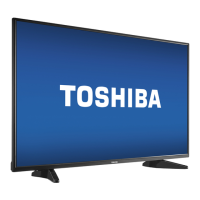
Toshiba 43L420U - User Manual

Toshiba 43L420U
2 pages
Print Icon
To Next Page IconTo Next Page
Loading...
START HERE
How do I attach the stand to my TV? (not for wall mounting)
You’ll need : Soft surface and a Phillips screwdriver.
A Carefully place your TV face-down on a cushioned, clean surface.
Secure the TV stand to the back of your TV with the provided screws.
B
1
INCLUDED ACCESSORIES
OR
Stand legs
32" 49"
Power cord
Note: The power cord for the 43" model is
permanently attached to the TV.
50"
50"
(Sample Illustration)
43L420U - TV
32" 43" 50"
32"
M4 type (24 mm) screws
43"
M5 type (27 mm) screws
50"
M5 type (17 mm) screws
49"
The lightning flash with arrowhead symbol within an equilateral
triangle is intended to alert the user to the presence of uninsulated
“hazardous voltage” within the product’s enclosure, which may be
of sufficient magnitude to induce a risk of electric shock to persons.
The exclamation mark inside an equilateral triangle is intended to
alert the user to the presence of important operating and
maintenance (servicing) instructions in the literature accompanying
the product.
CAUTION
RISK OF ELECTRIC SHOCK
DO NOT OPEN
CAUTION: TO REDUCE THE RISK OF ELECTRIC SHOCK, DO NOT
REMOVE COVER (OR BACK). NO USER-SERVICEABLE PARTS
INSIDE. REFER SERVICING TO QUALIFIED SERVICE PERSONNEL.
WARNING: To reduce the risk of fire or electric shock, do not
expose this apparatus to rain or moisture.
FIND YOUR USER GUIDE ONLINE!
Go to www.tv.toshiba.com and follow the
online instructions.
IMPORTANT: See the online User Guide before installing the
TV on a wall.
URL: www.tv.toshiba.com
(Sample Illustration)
43L420U - TV
(Sample Illustration)
43L420U - TV
(Sample Illustration)
43L420U - TV
MAKING CONNECTIONS
How do I watch TV (cable, satellite, or antenna) or connect a device such as a DVD or Blu-ray disc player or game console?
Features
Left side
Front
2
Quick Setup Guide | 32L220U/43L420U/49L420U/50L420U
32" 720p, 60Hz, LED TV
43"/49"/50" 1080p, 60Hz, LED TV
AAA
+
AAA
+
Remote control and
two AAA batteries
Stand legs
Stand legs
Coaxial
(GOOD)
AV (GOOD)
M5 screws
(10 mm length)
(4 pcs.)
M5 screws
(27 mm length)
(4 pcs.)
32" 43" 49"
43"
Stand legs
M4 screws
(24 mm length)
(4 pcs.)
32"
49"
ANT /
CABLE IN
DIGITAL OUTPUT
(Optical)
ANT /
CABLE IN
AV IN
AUDIO/VIDEO OUT
HDMI® (BEST)
Best video quality
2
1
(ARC)
3
ANT /
CABLE IN
M5 type (10 mm) screws
Your TV has four VESA mounting holes on the back. If you attach a wall-mount bracket to the back of your TV, the bracket must
be securely attached, using all four holes. If you do not use all four mounting holes, your TV may fall and cause property
damage or personal injury. See the documentation that came with your wall mount for complete mounting instructions.
Note: Connect an ARC-enabled home theater
receiver to HDMI 1.
50"
M5 screws
(17 mm length)
(4 pcs.)
WALL MOUNT
How do I prepare my TV for wall mounting? (not for use with a TV stand)
You’ll need: Soft surface and a Phillips screwdriver.
Before you mount your TV, make sure that:
You remove the stand legs.
The wall-mount bracket is listed by an independent laboratory (such as UL, CSA, or ETL).
The bracket supports the weight of your TV.
A Carefully place your TV face-down on a cushioned, clean surface.
B
See the instructions that came with your wall mount for more information about how to
correctly mount your TV.
VESA Mounting Pattern
VESA mount (mm): 100 × 100 - M4 type screws
VESA Mounting Pattern
VESA mount (mm): 200 × 300 - M6 type screws
VESA Mounting Pattern
VESA mount (mm): 400 × 200 - M6 type screws
32"
43"
49"
50"
A
43"
49"
50"
32"
(Sample Illustration)
49L420U - TV
B
A
B
A
B
Back
Power On/Standby LED
Remote sensor
Power On/Standby LED
Remote sensor
2
1
(ARC)
3
USB
(ARC)
INPUT
AV IN
LAUDIOR
DIGITAL OUTPUT
(Optical)
ANT /
CABLE IN
VIDEO
32" 43" 49" 50"
DIGITAL OUTPUT
(Optical)
ANT /
CABLE IN
32" 43" 49" 50"
43" 32"
49" 50"
Before using your new product, please read these instructions to prevent any damage.
(Sample Illustration)
32L220U - TV

C
M
Y
CM
MY
CY
CMY
K
Toshiba_32L220U_43L420U_49L420U_50L420U_16-0431_QSG_V4_ENG_Final.ai 1 7/6/2016 11:08:40 AMToshiba_32L220U_43L420U_49L420U_50L420U_16-0431_QSG_V4_ENG_Final.ai 1 7/6/2016 11:08:40 AM

Other manuals for Toshiba 43L420U

Questions and Answers

  • S
    Sheri WilsonSep 18, 2025
    How to prevent after images on my Toshiba 43L420U?
    • J
      Jennifer NunezSep 18, 2025
      To prevent after images on your Toshiba TV, avoid displaying a still image, such as a logo, game, or computer image, for an extended period of time.
  • A
    Amy YoungAug 25, 2025
    How to fix a Toshiba 43L420U TV remote that is not working?
    • E
      Emily DiazAug 25, 2025
      If your Toshiba TV remote control isn't working, first ensure the TV's power cord is plugged into a working outlet. Then, make sure there are no obstructions between the remote and the sensor on the front of the TV. Point the remote directly at the sensor. Remove the clear plastic wrapping from the supplied batteries, ensure they are installed correctly, and replace dead batteries with new ones.
  • E
    Elizabeth WoodsAug 25, 2025
    Why is my Toshiba TV screen dark but the sound is good?
    • X
      xbyrdAug 26, 2025
      If your Toshiba TV displays a dark, poor, or no picture but the sound is good, try changing the channel. Make sure the antenna or cable TV is connected correctly and securely. Adjust the brightness. Press the PIC SIZE button to change the aspect ratio. If using an antenna, adjust it for better signal strength. Check that the video cables are connected correctly and securely. The video cables themselves might be faulty, so try a new set.
  • V
    Vanessa TaylorAug 27, 2025
    Why do the control buttons on my Toshiba 43L420U not work?
    • M
      Melissa EatonAug 27, 2025
      If the control buttons on your Toshiba TV do not work, make sure that the Panel Lock option is set to Off. If that doesn't work, unplug the power cord, wait a few seconds, then plug the cord back in and turn on your TV.
  • M
    Morgan RamosSep 22, 2025
    Why does my Toshiba 43L420U have bright or dark spots?
    • J
      Joel SimmonsSep 22, 2025
      A few bright or dark spots on an LCD screen of Toshiba TV is normal.
  • S
    Sarah CarterSep 23, 2025
    Why is a retail banner displayed on my Toshiba 43L420U?
    • D
      Danny BrownSep 23, 2025
      If a retail banner is displayed on your Toshiba TV, it means you selected Store Mode when you ran the Initial Setup wizard.
  • A
    Amy McgeeSep 9, 2025
    Why doesn't my device turn off when I turn off my Toshiba 43L420U?
    • J
      Justin KirbySep 9, 2025
      If your device doesn't turn off when you turn off your Toshiba TV, make sure that the HDMI-CEC Control feature is turned on and that Auto Standby is set to On.
  • A
    Andrew LopezSep 12, 2025
    How to fix black bars on Toshiba TV screen?
    • C
      Courtney SandovalSep 12, 2025
      If the picture on your Toshiba TV doesn't fill the screen and there are black bars around it, press the PIC SIZE button to change the aspect ratio.
  • M
    Mario LawrenceSep 3, 2025
    What to do if my Toshiba TV has no channels after auto channel search?
    • A
      Anna WoodSep 3, 2025
      After running Auto Channel Search on your Toshiba TV, if there are no channels, reception can vary depending on the broadcast power level of a given station. Make sure that the antenna or cable/satellite TV is connected securely to your TV. Try replacing the cable between the antenna/cable or cable/satellite box and your TV.
  • J
    Jill WalkerSep 1, 2025
    Why doesn't my Toshiba TV turn on when I turn on my device?
    • S
      Samantha FranklinSep 1, 2025
      If your Toshiba TV is not turning on when you turn on your device, ensure that the HDMI-CEC Control feature is enabled and that TV Auto Power is set to On.

Toshiba 43L420U Specifications

General IconGeneral
BrandToshiba
Model43L420U
CategoryTV
LanguageEnglish

Related product manuals