This document is the Owner's Manual for Toshiba LED TVs, specifically covering models 50C450NS, 50M450NS, 55C450NS, 55M450NS, 65C450NS, 65M450NS, 75C450NS, and 75M450NS. It provides essential information for the safe and proper use, installation, and maintenance of the television sets.
Function Description:
The Toshiba LED TV is a display device designed for home entertainment, featuring an LCD panel with LED backlighting. It supports various input sources for audio and video content, including external A/V equipment, digital audio systems, USB devices for media browsing, and network connections for internet access and streaming. The TV includes a built-in microphone for voice control, enabling interaction with Google Assistant. It also offers recording functionality to USB storage devices, subject to certain conditions and legal considerations. The TV is equipped with both an owner's manual and an embedded E-Manual for comprehensive user guidance.
Important Technical Specifications:
The manual provides specifications for different screen sizes: 50", 55", 65", and 75".
- Dimensions (W x H x D):
- 50": Without Stand: 1119 x 653 x 79 mm; With Stand: 1119 x 692 x 274 mm
- 55": Without Stand: 1233 x 718 x 80 mm; With Stand: 1233 x 757 x 273 mm
- 65": Without Stand: 1453 x 842 x 76 mm; With Stand: 1453 x 893 x 318 mm
- 75": Without Stand: 1676 x 965 x 87 mm; With Stand: 1676 x 1021 x 337 mm
- Weight:
- 50": Without Stand: 8.7 kg; With Stand: 8.8 kg
- 55": Without Stand: 10.9 kg; With Stand: 11.0 kg
- 65": Without Stand: 14.6 kg; With Stand: 14.9 kg
- 75": Without Stand: 22.9 kg; With Stand: 23.2 kg
- Active Screen Size (Diagonal):
- 50": 125.7 cm
- 55": 138.7 cm
- 65": 163.8 cm
- 75": 189.3 cm
- Screen Resolution: 3840 x 2160 (for all models)
- Audio Power:
- 50"/55": 8W + 8W
- 65": 10W + 10W
- 75": 15W + 15W
- Power Supply: 100-240V AC, 50/60Hz (refer to rating label for specific consumption).
- Receiving Systems: Analog (NTSC, PAL M/N), Digital (ATSC, ISDB-T with EWBS (only for Philippines), ISDB-T, DVB-T2(6M)). Note: Receiving systems may differ by model/country/region.
- Environmental Conditions: Temperature: 5°C - 45°C; Humidity: 20% - 80% RH; Atmospheric pressure: 86 kPa - 106 kPa.
- HDMI Input Support: RGB/60Hz (640x480, 800x600, 1024x768), YUV/50Hz (576i, 576p, 720p, 1080i, 1080p), YUV/60Hz (480i, 480p, 720p, 1080i, 1080p), 24Hz 25Hz 30Hz 50Hz 60Hz (3840x2160).
- Wireless Connectivity: Built-in Wireless LAN Adapter supporting IEEE 802.11a/b/g/n/ac communication protocols. Bluetooth™ for remote control.
Usage Features:
- Installation: The TV can be installed on a stand or wall-mounted. Specific instructions are provided for attaching the base stands for 50"/55", 65", and 75" models, including different screw hole options for 75" models based on table length. Wall mount bracket installation requires removing the TV stand and using nuts and spacers. A P-Clip installation method is also described for securing the TV to a wall or pillar, especially for 50"/55"/65" models.
- Front Panel Controls: Includes a remote sensor, light sensor, power indicator, and a single power/source button. A built-in microphone and control button enable voice commands and Google Assistant functionality, requiring an internet connection and Google account sign-in.
- Rear Panel Connections: Features HDMI (including eARC), AV IN (composite video and L/R audio), USB ports for media, Digital Audio Out (optical), LAN (Ethernet), and Headphone output.
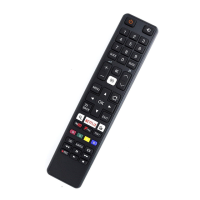
- Remote Control: A comprehensive remote control is provided, featuring buttons for power, input source selection, channel navigation, program information display, decimal point input, special functions, accounts/profile switching, settings access, D-pad navigation, return to previous menu, Live TV access, Google Assistant, volume control, mute, Home screen, PVR quick access, media content controls, and quick access to apps. Bluetooth pairing is required for the remote control.
- Network Connectivity: Supports both wired (LAN via Ethernet cable) and wireless (built-in Wireless LAN Adapter) network connections. DHCP-enabled modems/routers are recommended for easier setup.
- Recording Function: Allows recording to USB storage devices. Users are advised to perform test recordings and be aware of potential data loss if the USB device is disconnected or power is lost during operation. Commercial use of recording is discouraged due to copyright infringement risks.
- E-Manual: An embedded E-Manual is accessible via
Settings > System > Advanced System > E-Manual for detailed information. QR code scanning and search functions are available for the E-Manual.
Maintenance Features:
- Cleaning: The TV cabinet should be cleaned with a soft, dry cloth. The LED display panel should be wiped gently with a soft, dry cloth. Solvents, air fresheners, or cleaning agents are to be avoided as they may damage the cabinet or finish.
- Power Plug: Periodically disconnect and check the power plug for dust accumulation, cleaning it with a dry cloth if necessary, to prevent fire hazards.
- Battery Handling: Instructions for inserting and replacing AAA or AA batteries in the remote control are provided. Users are warned against incorrect use, mixing old and new batteries, or disposing of them as domestic waste. Depleted batteries should be removed promptly to prevent leakage.
- Safety Precautions: The manual emphasizes numerous safety precautions, including stable installation, avoiding unstable locations, proper power cord connection (100-240V AC, 50/60Hz), never inserting or removing the power plug with wet hands, ensuring proper ventilation, avoiding placement near heat sources or in high humidity, and careful handling when moving the TV.
- Service: Users are advised not to repair, modify, or disassemble the TV themselves. In case of malfunction, smoke, unusual odor, dropping, or cabinet damage, the TV should be immediately turned off, unplugged, and a service technician contacted.
- Disposal: At the end of its useful life, the TV should be disposed of by a qualified service technician. Packaging and electrical goods should be recycled appropriately, not treated as household waste, and handed over to an authorized re-cycler.
- LCD Screen Care: Avoid pressing or scratching the LCD screen. Be aware that some pixels may not light up, which is not a sign of malfunction. Afterimages from still pictures are temporary and not a malfunction.
- Wireless LAN Safety: Wireless LAN products emit electromagnetic energy, but within safety guidelines. Use of Wireless LAN may be restricted in certain environments to prevent interference with other devices.

 Need help?

 To Next Page
 General