EasyManua.ls Logo

Toshiba 55L310U - User Manual

Toshiba 55L310U
90 pages
Print Icon
To Next Page IconTo Next Page
Loading...
Before using your new product, please read these instructions to prevent any damage.
43"/49"/55" 1080p 60Hz LED TV
43L310U/49L310U/55L310U

Table of Contents

Other manuals for Toshiba 55L310U

Questions and Answers

  • J
    James DuarteSep 18, 2025
    How to prevent after images on my Toshiba 55L310U?
    • A
      Alexis LeeSep 18, 2025
      To prevent after images on your Toshiba TV, avoid displaying a still image, such as a logo, game, or computer image, for an extended period of time.
  • R
    Ryan HendersonAug 25, 2025
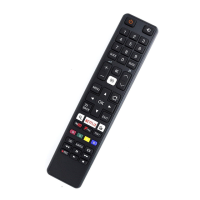
    How to fix a Toshiba 55L310U remote that is not working?
    • J
      Joseph MorrowAug 25, 2025
      If your Toshiba TV remote control isn't working, first ensure the TV's power cord is plugged into a working outlet. Then, make sure there are no obstructions between the remote and the sensor on the front of the TV. Point the remote directly at the sensor. Remove the clear plastic wrapping from the supplied batteries, ensure they are installed correctly, and replace dead batteries with new ones.
  • T
    Tammy MuellerAug 25, 2025
    Why is my Toshiba 55L310U TV screen dark but the sound is good?
    • M
      mark26Aug 26, 2025
      If your Toshiba TV displays a dark, poor, or no picture but the sound is good, try changing the channel. Make sure the antenna or cable TV is connected correctly and securely. Adjust the brightness. Press the PIC SIZE button to change the aspect ratio. If using an antenna, adjust it for better signal strength. Check that the video cables are connected correctly and securely. The video cables themselves might be faulty, so try a new set.
  • A
    Amber JohnsonAug 26, 2025
    Why do the control buttons on my Toshiba TV not work?
    • S
      Sean NelsonAug 27, 2025
      If the control buttons on your Toshiba TV do not work, make sure that the Panel Lock option is set to Off. If that doesn't work, unplug the power cord, wait a few seconds, then plug the cord back in and turn on your TV.
  • E
    Emily JohnsonSep 22, 2025
    Why does my Toshiba TV have bright or dark spots?
    • D
      Daniel ParkerSep 22, 2025
      A few bright or dark spots on an LCD screen of Toshiba TV is normal.
  • M
    Mrs. Laura GardnerSep 23, 2025
    Why is a retail banner displayed on my Toshiba 55L310U?
    • D
      donaldalvarezSep 23, 2025
      If a retail banner is displayed on your Toshiba TV, it means you selected Store Mode when you ran the Initial Setup wizard.
  • S
    Stephanie EdwardsSep 9, 2025
    Why doesn't my device turn off when I turn off my Toshiba TV?
    • R
      Robin FergusonSep 9, 2025
      If your device doesn't turn off when you turn off your Toshiba TV, make sure that the HDMI-CEC Control feature is turned on and that Auto Standby is set to On.
  • K
    Kathryn JohnsonSep 12, 2025
    How to fix black bars on Toshiba 55L310U screen?
    • E
      Elizabeth CurtisSep 12, 2025
      If the picture on your Toshiba TV doesn't fill the screen and there are black bars around it, press the PIC SIZE button to change the aspect ratio.
  • E
    Elizabeth SpearsSep 3, 2025
    What to do if my Toshiba 55L310U has no channels after auto channel search?
    • N
      Nicole IngramSep 3, 2025
      After running Auto Channel Search on your Toshiba TV, if there are no channels, reception can vary depending on the broadcast power level of a given station. Make sure that the antenna or cable/satellite TV is connected securely to your TV. Try replacing the cable between the antenna/cable or cable/satellite box and your TV.
  • R
    Rhonda ThomasSep 1, 2025
    Why doesn't my Toshiba 55L310U turn on when I turn on my device?
    • K
      Kevin AlexanderSep 1, 2025
      If your Toshiba TV is not turning on when you turn on your device, ensure that the HDMI-CEC Control feature is enabled and that TV Auto Power is set to On.

Summary

Child Safety

Proper Television Placement Matters

Guidelines for safe television placement and installation to prevent injury.

Tune in to Safety

Essential safety instructions for operating the television.

Important Safety Instructions

Handling the LCD Panel

Installing the Stands or Wall-Mount Bracket

Installing a Wall-Mount Bracket

Instructions for mounting the TV using a wall bracket.

What Connection Should I Use?

Connecting Devices

Picture and Sound Adjustment

Adjusting the Picture

Guide to adjusting picture settings for optimal quality.

Adjusting the Sound

Guide to adjusting sound settings and playing TV audio only.

System Settings

Turning on Your TV for the First Time

Guide to the initial setup wizard for new TVs.

Troubleshooting

Specifications

Toshiba 55L310U Specifications

General IconGeneral
Screen Typeled
Featuresgametimer
Tunerdigital
Screen Size54.6 inches, 55 inches
Refresh Rate60hz
Brightness300 candela per square meter
Surround Sounddts trusurround
Speakers Output20 watts
Number Of Speakers2
USB Ports1
RF Antennayes
Headphones Outputyes
Digital Optical Audio Outputs1
Analog Audio Outputs1
Component Video Inputs1
Composite Video Inputs1
3Dno
Power Consumption175 kilowatt hours
Depth with Stand9.6 inches
Height with Stand30.7 inches
Width with Stand49.1 inches
Net Weight with Stand30.9 pounds
Depth without Stand3.6 inches
Height without Stand29.1 inches
Net Weight without Stand29.8 pounds

Related product manuals