EasyManua.ls Logo

Toshiba 65U775 Series - Pedestal Stand Installation; Assembly Instructions and Warnings

Toshiba 65U775 Series
27 pages
Print Icon
To Next Page IconTo Next Page
To Previous Page IconTo Previous Page
Loading...
Introduction
I
Getting
Started
Pedestal
Stand
Assembling
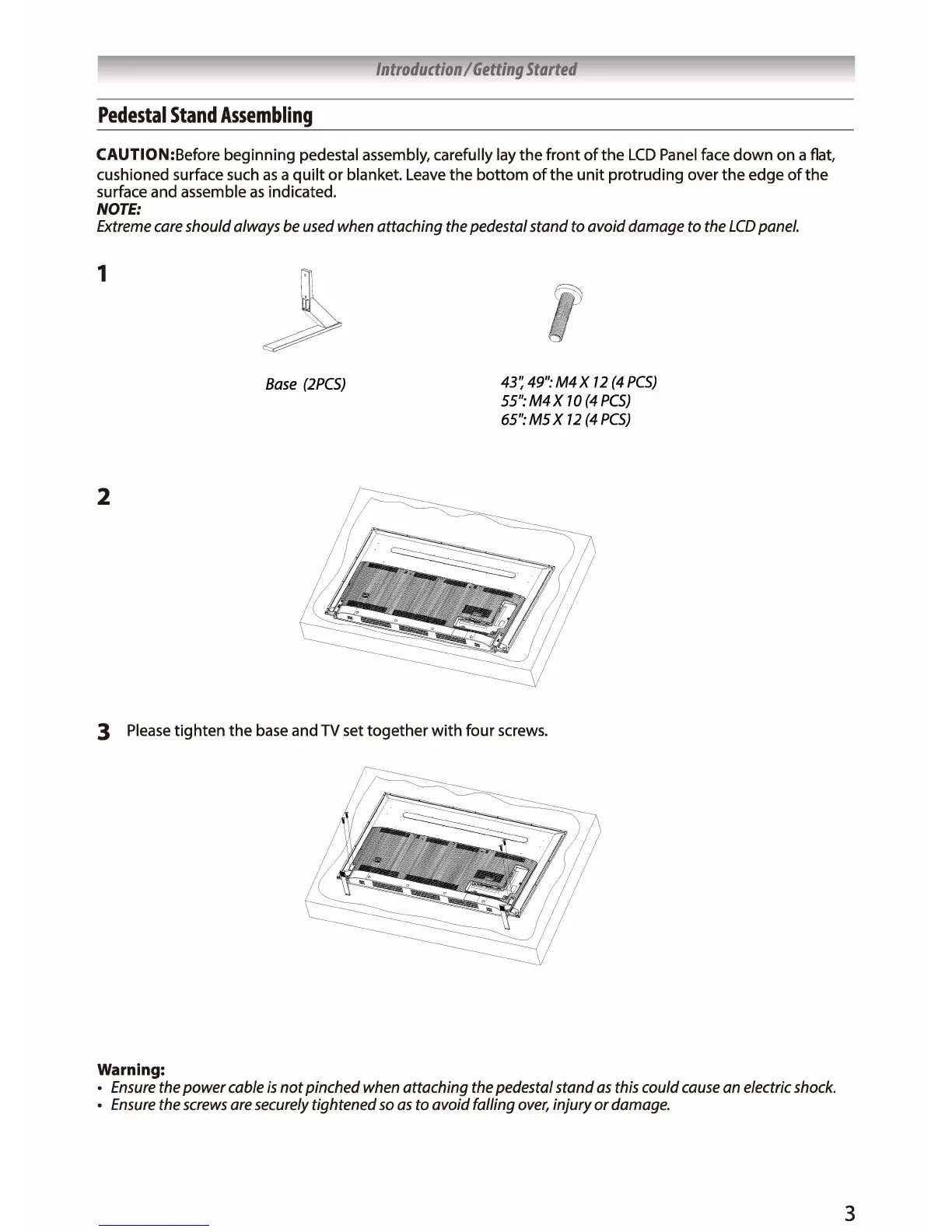
CAUTION:Before beginning pedestal assembly, carefully
lay
the
front of
the
LCD
Panel face down
on
a
flat,
cushioned surface such as a quilt or blanket. Leave
the
bottom
of
the
unit protruding over
the
edge
of
the
surface
and
assemble as indicated.
NOTE:
Extreme
care
should always
be
used
when
attaching
the
pedestal stand to avoid damage
to
the
LCD
panel.
1
2
Base
(2PCSJ
43~
49":
M4X
12
(4
PCS)
55":M4X
70
(4PCS)
65":
MS
X
12
(4
PCS)
3 Please tighten
the
base and
TV
set
together
with four screws.
Warning:
Ensure
the
power
cable
is
not pinched
when
attaching
the
pedestal stand
as
this
could
cause
an
electric
shock.
Ensure
the
screws
are
securely
tightened
so
as
to avoid falling
over,
injury or
damage.
3

Related product manuals