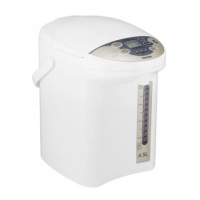
The Toshiba Electric Hot Pot is a household appliance designed for boiling water. This manual provides comprehensive instructions for its safe and proper use, maintenance, and troubleshooting.
Function Description
The electric hot pot's primary function is to boil water and keep it warm at selected temperatures. It features a control panel with various indicators and buttons for operation:
- REBOIL TIMER button: Used to reboil water or set a timer for warming.
- TEMP. CLEAN button: Used to select the desired warming temperature (98°C, 85°C, or 60°C) and initiate the cleaning process.
- UNLOCK button: Unlocks the water dispenser for pouring.
- PUMP button: Dispenses water from the pot.
- REDUCE CHLORINE indicator: Lights up when the chlorine reduction function is active.
- EMPTY indicator: Flashes when the water level is very low.
- TIMER indicator: Lights up when the timer function is set.
- UNLOCK indicator: Lights up when the dispenser is unlocked.
- WARM indicator: Lights up to indicate the selected warming temperature.
- BOIL indicator: Lights up when the water is boiling.
- CLEAN indicator: Lights up during the cleaning cycle.
The hot pot is equipped with a rotating base, allowing it to rotate up to 360 degrees, with the power cord rotating along with it. The inner pot has a fluorocarbon-resin coat for easy cleaning.
Usage Features
First-Time Use / After Long Periods of Disuse:
- Fill the inner pot with water up to the maximum water level gauge and close the lid.
- Connect the power plug and boil the water at 98°C.
- Press the PUMP button to pour out approximately half of the water.
- Unplug the power cord, detach the lid, and pour out all remaining water directly from the pot (do not use the PUMP button for this step).
Boiling and Warming:
- Fill the pot with water and close the lid.
- Connect the power plug.
- Press the TEMP. CLEAN button to select the desired warming temperature (98°C, 85°C, or 60°C). The BOIL indicator will light up, and the selected TEMP indicator will flash for about 2 seconds before displaying the current water temperature. The display shows the water temperature rising in 5°C increments; "Lo" appears if the temperature is below 15°C.
- Once the water boils, the BOIL indicator turns off, and the WARM indicator lights up, indicating the pot is maintaining the selected temperature.
Timer Function:
The timer function allows the pot to automatically turn to the selected warming temperature after a set period (approximately 6 hours). This feature helps conserve electricity.
- While keeping the temperature at 98°C or 85°C, press the REBOIL TIMER button. The TIMER indicator will light up.
- "6" will be displayed as the hour timer, and the WARM indicator will flash. The display will count down the remaining hours until the timer ends.
- After the timer ends, the TIMER indicator will turn off, and the temperature indicator will display the current temperature. The WARM indicator will light up when the selected warm temperature is reached.
- To cancel the timer, press the REBOIL TIMER button once; it will switch back to BOIL mode.
Reboiling:
To reboil water while it is being warmed:
- Press the REBOIL TIMER button once. The BOIL indicator will light up.
Reducing Chlorine:
To reduce chlorine in the water:
- Press the REBOIL TIMER button once while boiling, or twice while warming. The REDUCE CHLORINE indicator will light up, and the BOIL indicator will flash.
- The chlorine will be reduced after the water has been boiling for 3 minutes.
Pouring Water:
- Press the UNLOCK button to unlock the dispenser. The UNLOCK indicator will light up. The dispenser remains unlocked for about 2 minutes before automatically locking.
- Place a cup under the water dispenser.
- Press the PUMP button to dispense water. The UNLOCK indicator will light up during pouring.
- To lock the dispenser immediately after pouring, press the UNLOCK button again; the UNLOCK indicator will turn off.
Low Water Level Prevention:
If the water level is very low, the EMPTY indicator will flash, and the heating element will be cut off to prevent overheating. Refill the pot with water and press the REBOIL TIMER button to resume operation.
Maintenance Features
Regular maintenance ensures the longevity and proper functioning of the electric hot pot.
Daily Maintenance:
- Filter: The filter is located at the bottom of the inner pot. Pull it out, clean it with a brush, and remove any water slime. Push it down firmly to re-install.
- Inner Pot: Wipe the inner pot gently with a sponge and wash with water. For thorough cleaning, use citric acid once a month or every three months.
- Main Body and Lid: Wipe these parts with a damp cloth.
Cleaning with Citric Acid:
This process helps remove water slime, white stains, and odors caused by minerals in the water.
- Fill the inner pot with water up to the maximum level.
- Add approximately 50 grams of citric acid to the water and close the lid.
- Connect the power cord.
- Press the TEMP. CLEAN button to select "CLEAN." The CLEAN indicator will flash, and the cleaning process will begin, lasting about 90 minutes. The WARM and BOIL indicators will flash, and the display will show the remaining cleaning time in minutes.
- Once cleaning is complete, the WARM indicator, BOIL indicator, and display will flash quickly.
- Unplug the power cord and pour out all the water. Wipe away any dirt and wash the pot with water.
- To remove any residual citric acid smell, fill the pot with water to the maximum level, select 98°C, boil the water, and then pour it out.
Important Maintenance Notes:
- Do not wet the bottom of the pot or immerse the pot in water.
- Do not wet the power cord.
- Do not use benzene, cleanser, scrubbing brushes, dishwashers, or detergents, as these can damage the surface or coating.
- If the pot is not used for a long time, ensure it is naturally dry after maintenance.
- Clean the pot regularly to prevent noise during boiling and ensure proper water dispensing.
Opening and Detaching the Lid for Cleaning:
- To open the lid, push down on the LID LOCK LEVER at the "push" position, then lift the lever up to open the lid.
- To detach the lid, open it up to 60 degrees, then pull it in the direction of the water dispenser and lift it up.
- To install the lid, reverse the detachment process. Ensure the lid is pushed down until a "click" sound is heard to confirm it is closed firmly.

 Need help?
 General

 To Next Page