
 Need help?
Do you have a question about the Toshiba RAS-22PKVSG-E and is the answer not in the manual?
Critical safety warnings about electrical shock, installation, and hazardous gases.
Important safety advice regarding operation, children's use, and refrigerant handling.
Precautions against water damage, misuse, physical injury, and maintenance advice.
Steps to remove, attach, and clean air filters for the indoor unit.
Procedure for setting the current time on the remote control.
Guide to setting the timer for the air conditioner to turn on.
Guide to setting the timer for the air conditioner to turn off.
Steps for cleaning and maintaining the air filters.
Common reasons why the air conditioner may not start or function.
Troubleshooting steps for reduced cooling or heating efficiency.
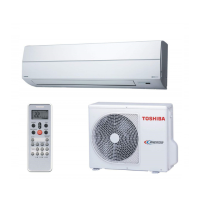
This document is an owner's manual for a Toshiba R32 Inverter split-type air conditioner, intended for general public use. It covers indoor units RAS-18, 22, 24PKVSG-E and outdoor units RAS-18, 22, 24PAVSG-E. The manual provides essential information on safety precautions, preparation before use, various operation modes, and maintenance.
The manual emphasizes safety, classifying precautions as DANGER, WARNING, and CAUTION. It states that the appliance is filled with R32 refrigerant and advises users to read the manual carefully.
Users are warned not to install, repair, open, or remove the cover due to dangerous voltages, recommending these tasks be performed by a dealer or specialist. Turning off the power supply alone will not prevent electric shock. The appliance must be installed according to national wiring regulations, with a disconnection means having a contact separation of at least 3 mm in all poles in the fixed wiring. Storage must be in a room without continuously operating ignition sources like open flames, gas appliances, or electric heaters. Operating the unit when harmful gases (flammable or corrosive) are detected nearby is prohibited to avoid fire, explosion, or injury.
Direct exposure to cool or warm air for extended periods is discouraged. Users should not insert fingers or any articles into the air inlet/outlet. In case of abnormality (e.g., burning smell), the air conditioner must be stopped, and the power supply or breaker turned off. The appliance can be used by children aged 8 and above, and persons with reduced physical, sensory, or mental capabilities or lack of experience and knowledge, if supervised or instructed on safe use and understanding of hazards. Children should not play with the appliance, and cleaning/user maintenance should not be done by children without supervision. The appliance is not intended for use by persons with reduced capabilities or lack of experience unless supervised by a responsible person. Installation, maintenance, repair, and removal must be performed by a qualified installer or service person. Children should be supervised to prevent them from playing with the appliance. Using any refrigerant other than R32 for complement or replacement is strictly prohibited, as it can lead to abnormally high pressure, product failure, explosion, or injury.
The manual advises against using means to accelerate defrosting or cleaning other than those recommended by the manufacturer. The appliance must be stored in a room free of continuously operating ignition sources. Users should be aware that refrigerants may not have an odor. Piercing or burning the appliance is forbidden as it is pressurized. Exposure to heat, flames, sparks, or other ignition sources can cause explosion, injury, or death. The appliance and pipe-work must be installed, operated, and stored in a room with a floor area larger than Amin m². The manual provides a formula to calculate Amin m² based on the refrigerant charge amount (M in kg) and installation height (h0 in m), specifying typical installation heights for different mounting types (floor standing, wall mounted, window mounted, ceiling mounted). For these units, an installation height of 2.5 m is recommended.
Washing the unit with water is prohibited due to electric shock risk. The air conditioner should not be used for purposes like preserving food or breeding animals. Stepping or placing objects on the indoor/outdoor unit can cause injury or damage. Touching aluminum fins can cause injury. Before cleaning, the main switch or circuit breaker must be turned off. If the unit will not be used for a long time, the main switch or circuit breaker should be turned off. Maintenance by a specialist is recommended after long periods of operation. The manufacturer disclaims liability for damages resulting from not observing the manual's instructions.
This section details how to prepare the air filters and load batteries into the remote control. To prepare filters: Open the air inlet grille, remove the air filters, and then attach the filters as detailed in the accessory sheet. To load batteries: Remove the slide cover, insert two new AAA batteries according to the (+) and (-) positions. To set the clock: Press CLOCK with a pencil tip. If the timer indication is flashing, adjust the time using the ON/OFF buttons, then press SET. To reset the remote control: Push RESET with a pencil tip, or remove and reinsert batteries after pressing the power button.
Users can adjust the louver's vertical and horizontal directions. To move the louver vertically: Press FIX. To move the louver horizontally: Press FIX. For louver swing operation: Press SWING. The manual illustrates various air flow directions: vertical (up-down) swing, horizontal (left-right) swing, and options for wide, spot, and return to manually set airflow. A "Pi" sound indicates airflow direction is set, and "Pi Pi" indicates cancellation and return to manual setting. Users should not move the louver manually, as it may automatically position itself in some operation modes.
The indoor unit display shows indicators for Eco (White), Hi-Power (White), Timer (White), and Operation mode (Cool in Blue, Heat in Orange). Display brightness can be adjusted.
The remote control features an infrared signal emitter, Start/Stop button, Mode select button, Temperature button, Fan speed button, Swing louver button, Set louver Up-Down button, On timer button, Off timer button, Setup button, Clear button, Memory and Preset button, AIR FLOW selection button, High power button, Economy button, Set louver Left-Right button, Comfort sleep button, Filter reset button, Set clock button, Check button, and Reset button. The remote control can be used wirelessly or wired; for wired operation, refer to the installation instructions. In wired operation, the remote control will revert to initial conditions (PRESET, TIMER, CLOCK) upon power shutdown.
To automatically select cooling, heating, or fan-only operation:
For dehumidification with moderate cooling performance:
To automatically control room temperature and airflow for faster cooling or heating (except in DRY and FAN ONLY mode): Press HI POWER to start and stop the operation.
To automatically control room temperature to save energy (except in DRY and FAN ONLY mode): Press ECO to start and stop the operation. In cooling, the set temperature increases automatically by 1 degree/hour for 2 hours (maximum 2 degrees increase). In heating, the set temperature decreases.
Users can set ON and OFF timers when the air conditioner is operating. To set the ON Timer: Press ON, set the desired ON timer, then press SET. To set the OFF Timer: Press OFF, set the desired OFF timer, then press SET. To cancel timers: Press CLR. Daily timer: Allows setting both ON and OFF timers for daily activation. Press ON, set the ON timer, then press SET. Press OFF, set the OFF timer, then press SET while the (↑ or ↓) mark is flashing. During daily timer activation, both arrows (↑, ↓) are indicated. The remote control must be in accessible transmission to the indoor unit; otherwise, a time lag of up to 15 minutes may occur. The setting will be saved for the next same operation.
To decrease display lamp brightness or turn it off:
If the remote control is misplaced or discharged: Pressing the RESET button on the indoor unit allows the unit to start or stop without the remote control. The operation mode is set to AUTOMATIC, preset temperature to 24°C, and fan operation to automatic speed.
Users can set their preferred operation for future use, which will be memorized by the unit (except airflow direction).
To automatically restart the air conditioner after a power failure (unit must be on): To set: Press and hold the RESET button on the indoor unit for 3 seconds ("Pi Pi Pi" sound and OPERATION lamp blinks 5 times/sec for 5 seconds). To cancel: Press and hold the RESET button on the indoor unit for 3 seconds ("Pi Pi Pi" sound but OPERATION lamp does not blink). Auto restart does not activate if ON or OFF timers are set.
For comfortable sleep, the unit automatically controls airflow and turns off. Press COMFORT SLEEP to select 1, 3, 5, or 9 hours for OFF timer operation. In cooling, the set temperature increases automatically by 1 degree/hour for 2 hours (maximum 2 degrees increase). In heating, the set temperature decreases.
To protect against bad smell caused by humidity in the indoor unit:
First, turn off the circuit breaker. Indoor Unit and Remote Control: Clean with a wet cloth when needed. Do not use benzine, thinner, polishing powder, or chemically-treated duster. Air Filters: Clean every 2 weeks.
To separate remote control usage for each indoor unit when two air conditioners are installed nearby.
 General
| Cooling Capacity | 2.2 kW |
|---|---|
| Heating Capacity | 2.5 kW |
| Energy Efficiency Class (Cooling) | A++ |
| Energy Efficiency Class (Heating) | A+ |
| Refrigerant | R32 |
| SEER | 6.1 |
| SCOP | 4.0 |
| Power Supply | 220-240V, 50Hz |
| Energy Efficiency Ratio (EER) | 3.21 |
| Indoor Unit Dimensions (W x H x D) | 798 x 293 x 230 mm |
| Indoor Unit Weight | 9 kg |
| Outdoor Unit Weight | 28 kg |
| Type | Split System |


 To Next Page

