EN-16 User’s Manual
STOR.E TV+
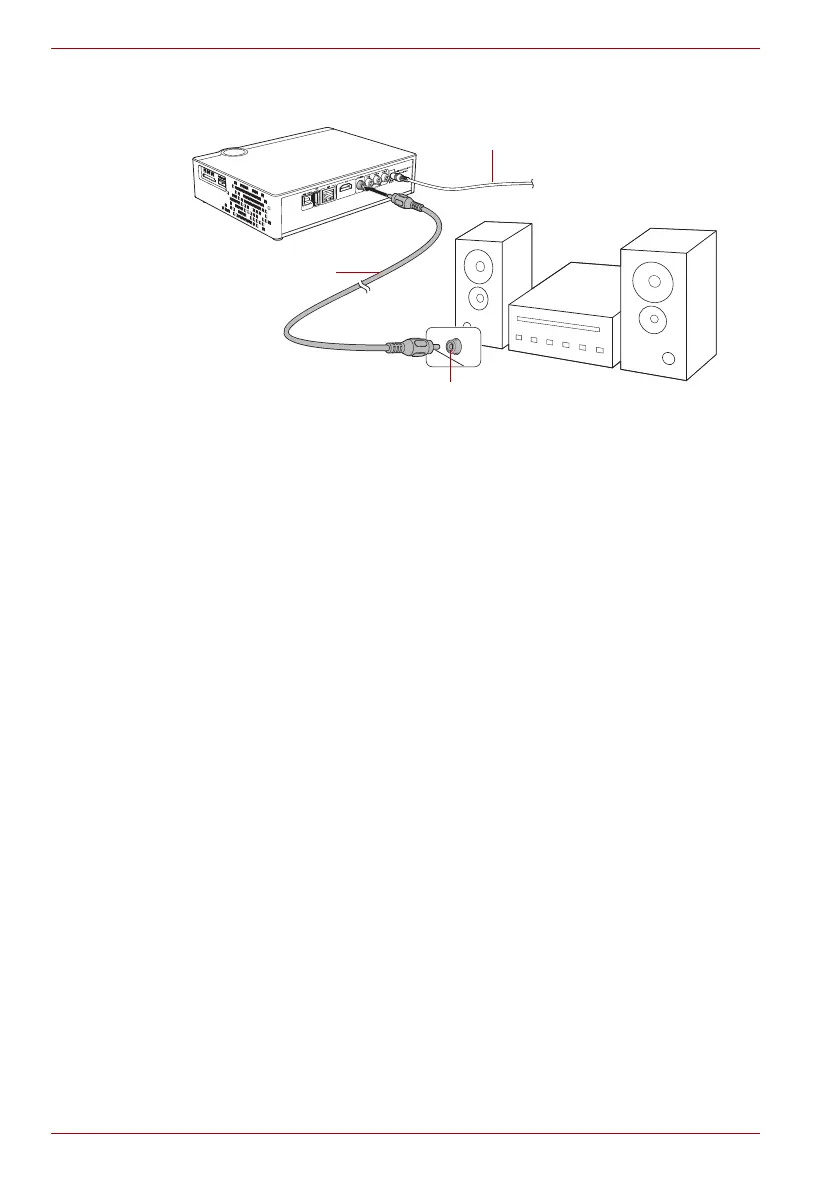
Coaxial output connection
(Sample Illustration) Coaxial output connection
To connect to an audio device via coaxial cable:
1. Connect the coaxial cable to the coaxial cable port on the STOR.E TV+
and the input port of the audio device.
2. Enter the STOR.E TV+’s audio interface and select the Digital Output
SPDIF LPCM or SPDIF RAW option (to access, select Setup -> Audio
-> Digital Output). Refer to “Main Interface” on page 23 about the
interface operation on the LCD.
This will enable you to enjoy 5.1 high quality sound through a multi-channel
decoder/amplifier with coaxial input.
AC adaptor cable
Coaxial cable
Coaxial cable jack



 To Next Page