8
To lock the switch trigger, place the direction of rotation control (6) in the center position.
Forward and reverse rotation control (See Fig. C)
• forward rotation: Push the rotation control back and forth to the left to drill.
• reverse rotation: Push the rotation control back and forth to the right to
remove the bits.
Caveat
Never change the direction of rotation while the tool is rotating, wait until it stops.
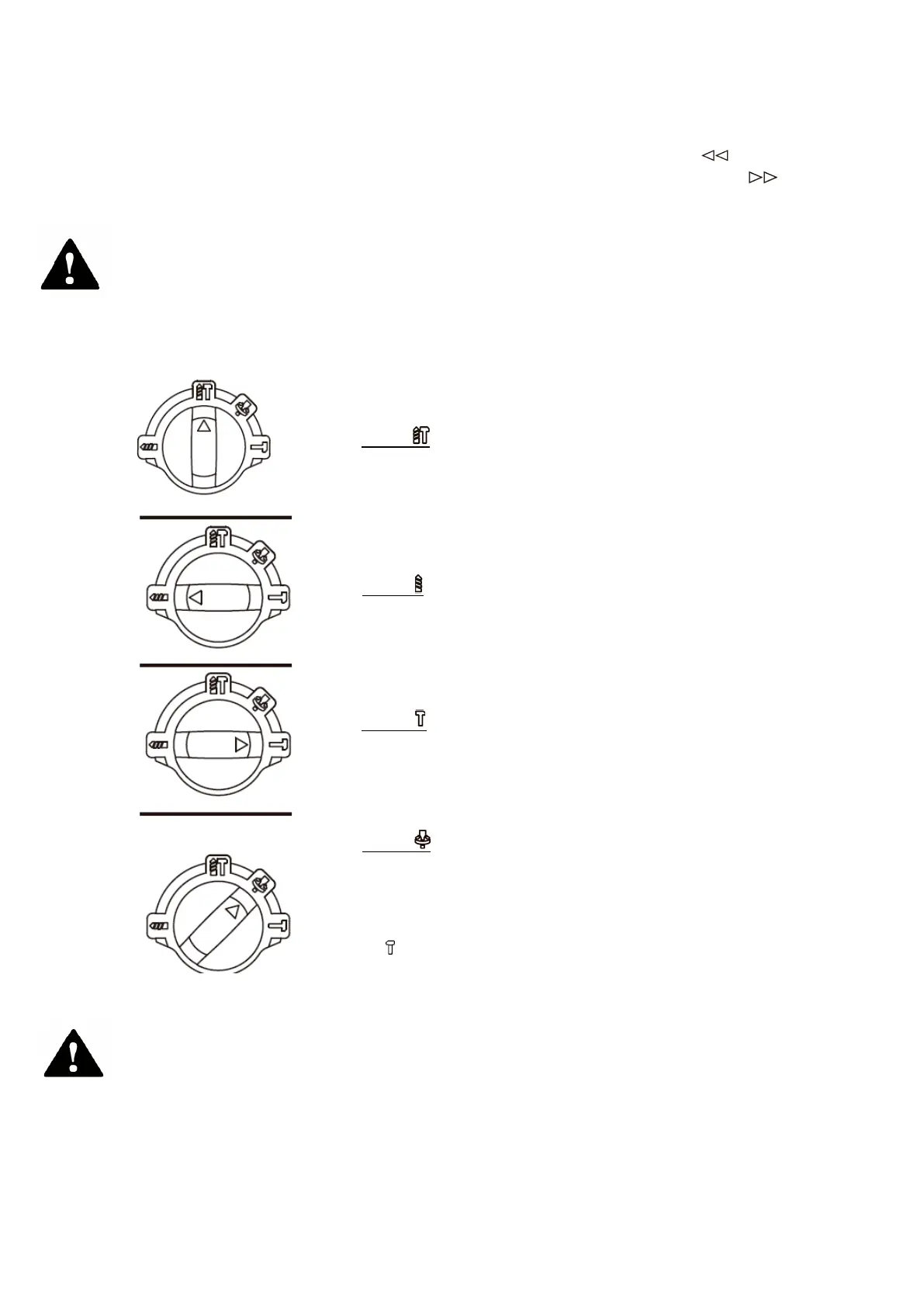
Function mode selection (See Fig. D)
Gearbox operation for each application is adjusted with the function selector (4). To
switch between functions, press the unlock button (a) and turn the dial to the desired
operating mode.
Caveat
The operating mode selector can only be activated when stopped.
overload protection
When overloaded, the motor stops. Immediately unload the load from the machine and
allow it to cool down for approx. 30 seconds at full speed without load.
MODE
For simultaneous drilling and impact of concrete,
masonry
MODE
For drilling steel, wood and plastics
for chiselling
MODE
To adjust the angle of the chiseling chuck.
Note: Select this function mode first, adjust the angle of the
chuck in the desired direction
. Then select the function mode
to “ ”, use the chiseling work mode.



 To Next Page