Need help?
Do you have a question about the TouchElex Encke Series and is the answer not in the manual?
Lists items included in the package.
Provides detailed technical specifications of the smartwatch.
Instructions for downloading the companion mobile application.
Steps for creating an account and logging in.
Guides users through the initial watch pairing process.
Instructions on charging and wearing the smartwatch.
Explains the functions of the watch's physical button.
Describes how to navigate the watch's user interface.
Overview of the watch's control center features.
Overview of the watch's workout tracking capabilities.
How to measure and interpret pressure readings.
How to set up and use the heart rate monitoring feature.
How to measure and understand blood oxygen levels.
How the watch tracks and displays sleep data.
Guide to using the breathing exercise feature.
How to use the feature for tracking menstrual cycles.
Instructions for controlling music playback from the watch.
How to receive and manage call/message alerts.
How to set up and view weather forecasts on the watch.
Details on finding your phone and controlling the camera remotely.
Ways to change the watch face.
Settings for screen brightness and timeout.
How to set and track personal workout goals.
How to change temperature units between Fahrenheit and Celsius.
Instructions for performing Over-The-Air software updates.
Troubleshooting steps for pairing issues.
Solutions for maintaining a stable Bluetooth connection.
Troubleshooting for missed notifications.
Explains why message content might not display on the watch.
How to fix incorrect time display on the watch.
Solutions for not receiving email verification codes.
Explains potential inaccuracies in sleep tracking.
Explains how step counting works and potential inaccuracies.
Causes and solutions for inaccurate heart rate readings.
Causes and solutions for inaccurate blood oxygen readings.
Troubleshooting steps if the watch doesn't count steps.
Reasons for rapid battery drain and expected battery life.
Details of the product's warranty coverage.
Critical safety guidelines for using the device.
Warnings regarding the safe handling and use of the device's battery.
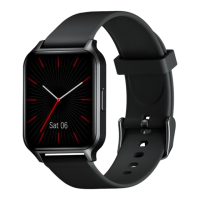
This document outlines the features, usage, and maintenance of the Encke Series Smartwatch.
The smartwatch offers a range of functions designed to support daily activities and health monitoring. It can track various workout modes, monitor heart rate, blood oxygen (SpO2), and sleep patterns. Additionally, it provides breathing training, menstrual cycle tracking, music control, and displays call and message notifications, as well as weather forecasts.
The smartwatch serves as a comprehensive personal assistant on your wrist. Its core functions include:
Workout Mode: The device tracks 13 different workout types, automatically recording data such as time, heart rate, calories burned, steps taken, and distance covered. To start a workout, simply short press the button, navigate to "Workout," select your desired activity, and click "start." During a workout, a short press can pause the exercise, and tapping the "start" icon resumes recording. Swiping left accesses the music control screen. To end a workout, tap the "pause" icon and select "OK." The smartwatch saves up to 20 workout sessions in its cache, which are then synchronized to the TouchElex app when connected to your phone. For optimal music control during workouts, ensure the watch is connected to your phone, "music control" is enabled in the TouchElex app, and music is already playing on your phone.
Pressure Measurement: To measure pressure, short press the button, enter the feature menu, and tap the "pressure measurement" icon. Wear the watch snugly and keep your body balanced for accurate readings.
Heart Rate Monitor: The smartwatch can monitor your heart rate 24 hours a day or measure it manually. To enable 24-hour monitoring, go to the TouchElex app, navigate to "Device," then "Heart rate monitoring," and enable the feature. You can set the monitoring interval (5, 10, 20, or 30 minutes) and enable "Heart rate reminder" to receive alerts for high or low heart rates. For manual measurement, slide up from the Home screen to access the features list, tap the "Heart rate" icon, and the watch will begin measuring. The heart rate monitor works by detecting the absorption of green light by blood flow, which changes with each heartbeat. For more accurate readings, wear the watch one or two fingers' distance from your wrist.
SpO2 Measurement: To measure blood oxygen, go to the menu list, tap "SpO2," and the watch will start measuring. This function relies on detecting the reflectance intensity of red and infrared light, which varies based on oxygenated and deoxygenated hemoglobin levels.
Sleep Monitor: The smartwatch monitors your sleep quality, with detailed data available in the TouchElex app. It tracks sleep throughout the day, calculating duration from when you fall asleep until you wake up. Sleep will not be recorded during the "stand up reminder" period.
Breathing Training: This feature allows you to set a duration (1, 2, 3, 4, or 5 minutes) and a rhythm (fast, moderate, or slow) for breathing exercises. A dynamic graph guides you through inhaling and exhaling.
Menstrual Cycle Tracking: The watch reminds you of important dates like menstruation, ovulation, and safety periods. Reminder settings are configured in the "TouchElex" app under "Device" > "Women's health" > "Menstrual tracking." Ensure "Menstrual tracking" is enabled in the app and accurately set your "Menstrual period," "Cycle time," and "Last menstruation."
Music Control: After enabling "music control" manually in the TouchElex app, the watch can control song playback and volume on your phone. Ensure the watch is connected to your phone and music is playing before using this feature. Note that it is only compatible with music players and cannot control videos (e.g., YouTube).
Call & Messages Notification: The watch vibrates for incoming calls and notifications. You can tap to reject a call or mute it. To receive notifications, ensure "Incoming call notification" and "message notification" are enabled in the TouchElex app, and the watch is connected to your phone. Messages will not display in "DND" mode, for apps not in the "message notification" list, or if your smartphone doesn't show a preview on its banner. Background protection must also be completed.
Weather: To set up weather forecasts, enable "weather synchronization" in the TouchElex app under "Device" > "More device settings" > "Weather Forecast." Ensure the "weather" switch is enabled in the app. You can change the temperature unit (Fahrenheit or Centigrade) via "Me" > "Settings" > "Unit Setting" > "Weather system."
Find Phone: When connected to your phone, tapping "Find phone" on the watch will make your phone ring within 5 meters in an open area.
Camera (Remote Control Photography): Enable "Remote control photography" in the TouchElex app under "Device." Ensure the watch is connected to your phone to use this function.
The smartwatch is designed for intuitive interaction:
Button Functions:
Interface Navigation:
Control Center: Swipe down from the home screen to access quick settings like "Raise to wake," brightness adjustment, DND mode, flashlight, and alarms.
Raise to Wake: When enabled, the watch face automatically turns on when you turn your wrist over. It will not turn on if disabled.
DND Mode: This icon controls the "all day" switch for DND mode. When enabled, message and incoming call notifications will not display. You can set specific "Timing" periods for DND. DND mode stops notifications, while night mode adjusts screen brightness.
Switch Dial: There are three ways to change the watch face:
Screen Display Settings:
Workout Goal: Set goals in the TouchElex app ("Me" > "Set goals"). A congratulatory message will display on your smartwatch upon achievement.
Temperature Unit: Convert between Fahrenheit and Centigrade in the TouchElex app ("Me" > "Settings" > "Unit Setting" > "Weather system").
OTA Upgrade: Update the device firmware via the TouchElex App ("Device" > "More device settings" > "OTA Upgrade").
Proper care and maintenance ensure the longevity and optimal performance of your smartwatch:
Charging: Fully charge the watch upon first use. If the battery is exhausted, charge for at least 10 minutes before the screen turns on. Use a 5V-200mA adapter; fast charging may not be available in all regions. Battery life varies based on settings and usage.
Wearing:
Optimized Heart Rate Tracking: Wear the watch higher on your wrist during exercise to improve heart rate signal. Avoid wearing it too tightly, as this restricts blood flow, but ensure it's snug during exercise.
Troubleshooting Pairing Issues:
Troubleshooting Connection Issues:
Troubleshooting Notification Issues:
Troubleshooting Message Content Not Displaying: The smartwatch displays what is shown in your smartphone's notification bar. If your phone doesn't show a preview, the watch won't either. Enable preview messages in your phone's system settings.
Troubleshooting Incorrect Time: If the watch hasn't been connected to your phone for a long time, the time may be incorrect. Reconnect the watch to your phone via the TouchElex app to sync the time automatically.
Troubleshooting Verification Code Issues:
Troubleshooting Incorrect Sleep Record: Smartwatches use PPG to record sleep, which may have slight deviations from reality. Sleep is judged by movement status and heart rate. If you wake up but remain still in bed, you may still be considered asleep.
Troubleshooting Incorrect Steps: Steps are calculated based on hand swing with a threshold of 15 consecutive steps. If steps are more than two seconds apart, the count restarts. For example, 14 steps followed by a 3-second pause and then another 14 steps will count as zero. 15 steps, a 2-second pause, and another 15 steps will count as 30 steps.
Troubleshooting Fast Battery Drain: Battery life varies with settings and usage. If the battery drains too quickly despite minimal use, the device may be defective. Contact for replacement. Typical conditions for 7-day battery life include: built-in watch face, 60% brightness, 24-hour heart rate monitoring, sleep monitoring, 50 messages pushed daily, 100 wrist raises to check time, and two blood-oxygen measurements daily.
Safety Instructions:
Battery Warning: The device uses a lithium-ion battery. Failure to follow guidelines can shorten battery life, cause fire, chemical burns, electrolyte leaks, or injury.
 General
| Display Type | AMOLED |
|---|---|
| Screen Size | 1.78 inches |
| Resolution | 368 x 448 pixels |
| Water Resistance | 5 ATM |
| Battery Life | Up to 7 days |
| Operating System | Proprietary OS |
| Strap Material | Silicone |
| Bluetooth | 5.0 |
| Sensors | Heart rate, Accelerometer, Gyroscope |
| Compatibility | Android 6.0 and above, iOS 9.0 and above |

 To Next Page