1312
1. Download TOUCHLAND App through the Google play store
(Android) or App store (iOs) by searching for “touchland”.
2. Follow the instructions on the App to activate your Smart
Dispenser.
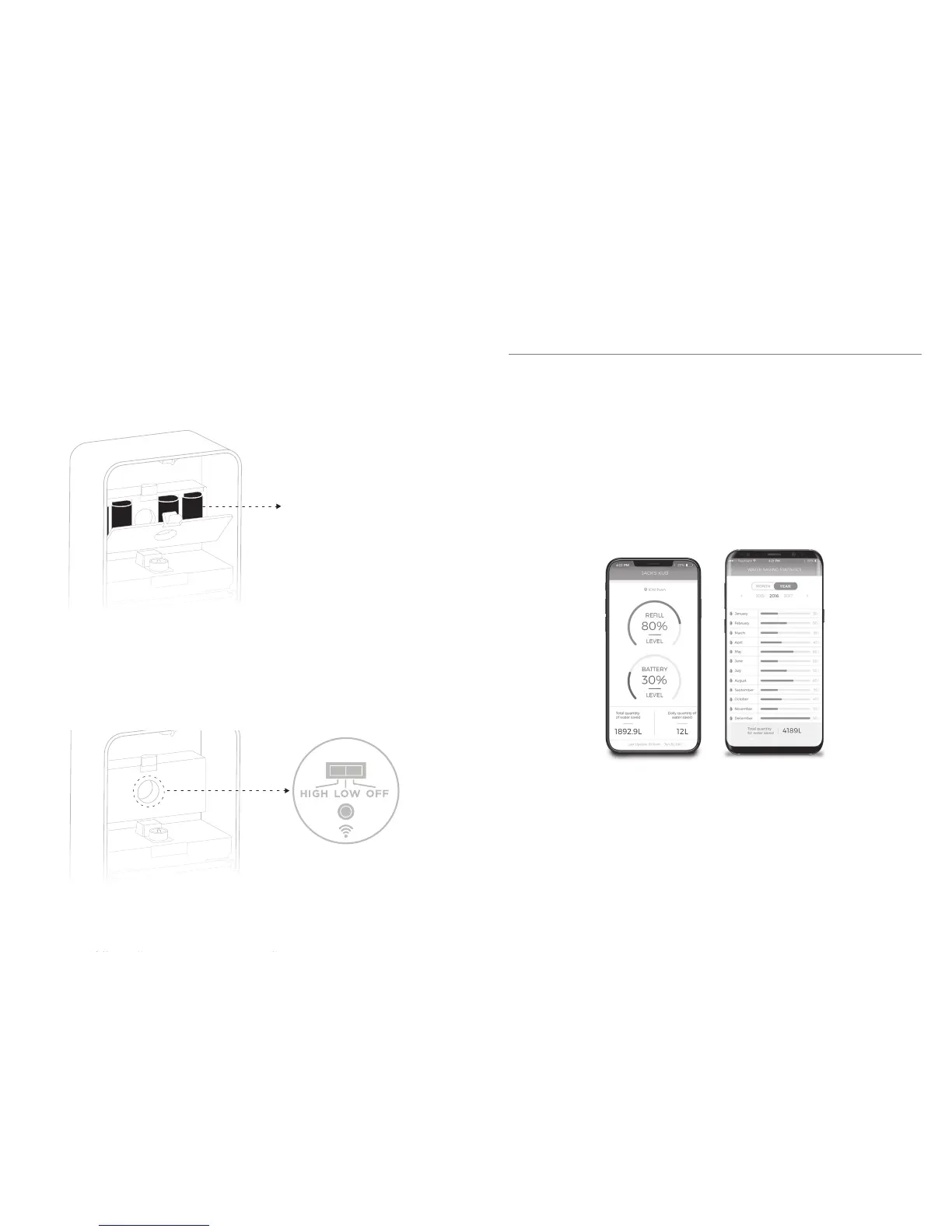
Note: The app will indicate you to push the pairing button that is
located in the inner circle of control (please check photo).
2. Place 4 D batteries by opening the battery box cover.
(Not applicable for KUB Premium – go to next point directly).
Ensure that the 4 D Cell 1,5 Vdc alkaline batteries are inserted correctly aligning
the (+) and (-) terminals as indicated under the battery door. Open the battery
door, insert the batteries and close the battery door. Use the same process to
remove the batteries.
x4 D cell alkaline batteries
3. Your device comes in OFF position. To activate, switch the
indicator to the preferred dosage:
LOW = 0.017 fl oz (0.5 mL) or,
HIGH = 0.027 fl oz (0.8 mL)
OFF = turn off device.
4. Indicator light will blink white twice once dosage has been selected.
IMPORTANT: you must complete step #2 before using your dispenser
with all its smart features. Or pass directly to step 3 if you don’t want
activate its smart features.
STEP 2
Activate smart features by downloading the App.
You will need:
- A Wi-fi enabled device
- Your wi-fi network name and password (wi-fi network
cannot have a permission attached)
- An active e-mail account.


 To Next Page