EasyManua.ls Logo

TouchTronics POWERTouch P1000 Series - User Manual

TouchTronics POWERTouch P1000 Series
4 pages
Print Icon
To Next Page IconTo Next Page
Loading...
NST13308-P1000_A 2020-06-10 Page 1
57315 Nagy Dr
Elkhart, IN 46517
800-294-2570
574-294-2570
www.touchtronics.com
POWERTouch P1000 Series
Radio Frequency (RF) Remote Control System
SERVICE MANUAL
TNC Antenna
(Option)
Not Sealed
P1000-TX4S
P1000-TX6S
With ON/OFF Switch
P1000-TK1 P1000-TK2 P1000-TK4
P1000-TF2-LK P1000-TF4 P1000-TF6
P1000-TM1 P1000-TM2 P1000-TM4
Receiver can be paired to any transmitter below
TK Sealed Transmitters
TF Sealed Transmitters
TM Transmitters
TX Transmitters
P1000-TF2
P1000-TX2S
RANGE
300 feet typical
Up to 600 feet
OUTPUT
OPTIONAL
6 Relays
7 Relays
INPUT
2 (+12v) A1 & A2
6 (+12v or Ground) B1-B6
FREQUENCY 433 MHz
CODES
Rolling Codes
Secure Encryption
VOLTAGE
12 VDC
24 VDC (Special Order)
CURRENT
5 Amps Max per Output
10 Amp Input - Standard
30 Amp Input - Optional
ANTENNA
OPTIONAL
Fixed - Standard
TNC Whip (shown)
Flex Whip / Roof Mount
Flex Whip / Glass Mount
HARNESS
9" Standard, 14 Pin Connector Standard
6 Pin Connector Optional
2 Pin Connector Optional
BATTERY
All transmitter styles (except TX style)*
• Coin Style, Lithium, CR2032
• 100,000 1-second puls
es
• 10 year shelf life
*TX Style - 9V
SYSTEM SPECIFICATIONS
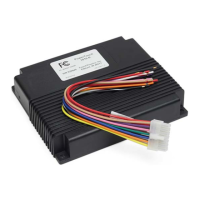
Model # P1010-R6, P1030-R
TM
Question and Answer IconNeed help?

Do you have a question about the TouchTronics POWERTouch P1000 Series and is the answer not in the manual?

Summary

System Specifications Overview

System Operation and Installation

System Output Behavior

Describes how transmitter buttons and input signals control system outputs, including momentary and latching modes.

Receiver Installation Guide

Instructions for determining receiver mounting location and antenna placement for optimal RF reception.

Antenna Range Considerations

Details factors that reduce antenna range and options for increasing it, such as exterior mount antennas.

Transmitter Code Management

Enrolling New Transmitters

Step-by-step procedures for pairing new transmitters to the receiver using self-learning or LEARN switch.

Erasing All Transmitter Codes

Instructions on how to erase all previously paired transmitter codes from the receiver.

Receiver Configuration

DIP Switch Settings

Explanation of how DIP switches 1-6 control outputs 1-6, specifically for momentary or latching operation.

Chassis Grounding Procedure

Guidance on properly preparing and securing the chassis ground connection for system operation.

Product Documentation and Compliance

Warranty Policies and Support

Details on TouchTronics Limited Warranty, technical support contact information, and required details for service.

FCC Compliance Statement

Information on FCC rules, equipment compliance, and measures to prevent harmful radio interference.

Canadian DOC Compliance

Statement regarding compliance with Canadian radio noise emissions standards and Industry Canada regulations.

TouchTronics POWERTouch P1000 Series Specifications

General IconGeneral
Operating Temperature0°C to 50°C
Touch TechnologyProjected Capacitive
Communication PortsUSB 2.0, RS-232, Ethernet
Power Supply12V DC
Ingress ProtectionIP65
SeriesPOWERTouch P1000
Display Size10.1 inches