

EasyManua.ls Logo

TOYODA TUNNEL SHAKER 32 - User Manual

TOYODA TUNNEL SHAKER 32
11 pages
Print Icon
To Next Page IconTo Next Page
Loading...
MANUAL
DTF-TUNNEL
1. Module one. Manual mode
1.1. Dusting Function
1.2. Shaking Function
1.3. Fan Function
1.4. Paper Feeding Function
1.5. Heating Mode
1.5.1. Smoke Purifier Purifier
1.6. Paper Take-up Function
2. Module Two. Instructions for Using the Auto Mode
3. Module Three. Adjustable Parameter
4. Module Four. Other Design Specifications
5. Maintenance
5.1. Filter Change
5.2. Cleaning
2
2
3
3
4
4
5
6
7
7
8
9
9
10
TABLE OF CONTENTS
Toyoda Tunnel
Powder Applicator
and Dryer (32”)
Question and Answer IconNeed help?

Do you have a question about the TOYODA TUNNEL SHAKER 32 and is the answer not in the manual?

Summary

Module One Manual Mode Operations

Dusting Function

Operation of the powder box heating tube and sensor for automatic powdering.

Shaking Function

Activating and stopping the shaking paddle to remove excess powder from the film.

Fan Function

Activating the vacuum roller via the Fan function and its stopping mechanism.

Paper Feeding Function

Activating film feeding for even heating and auto mode criteria.

Heating Mode

Activating mesh belt heating for uniform baking of the film.

Smoke Purifier Purifier

Smoke cleaning function activated automatically when Heating is switched on.

Paper Take-up Function

Activating the roll function to wrap baked film and control winding speed.

Auto Mode Usage Instructions

Operating in Auto Mode

Steps for operating the machine in Auto Mode, including film threading and powder weight.

Adjustable Parameter Settings

Parameter Configuration

Details on adjusting Shaking Strength, Heat Temperature, Feed Speed, Pre Temperature, Roll Interval, Smoke.

Design Specifications

Powder-free Return Device

Function of the powder-free return device for limiting hot melt powder fall.

Maintenance Procedures

Filter Change

Procedure for changing shaker filters every 3-4 months or when airflow is impacted.

Cleaning

Daily cleaning steps for the shaker hood interior and specific side openings.

Overview

The Toyoda Tunnel Powder Applicator and Dryer (32"), also known as the DTF-TUNNEL Shaker 32, is a device designed for the application of hot melt powder and subsequent drying of film in a Direct-to-Film (DTF) printing process. This manual outlines its operation, adjustable parameters, and maintenance procedures.

Function Description

The DTF-TUNNEL Shaker 32 integrates several key functions to automate the powder application and drying process. It features a powder box with a heating tube to keep the hot melt powder dry, ensuring optimal application. The device includes a shaking function to remove excess powder, a fan function for film attachment and suction, a paper feeding function to move the film through the oven, a heating mode for uniform baking, and a paper take-up function for collecting the processed film.

Usage Features

The device can be operated in two primary modes: Manual Mode and Auto Mode.

Manual Mode

In Manual Mode, each function can be activated and deactivated independently via the control panel.

  • Dusting Function: The powder box's heating tube is automatically energized upon machine startup to maintain dry hot melt powder. When operating in Auto Mode, a front sensor detects the film and initiates automatic powdering until the hot melt powder weight parameter reaches 80 or more. Pressing "Dusting" again switches off the function. In Link mode, the dusting function is inactive.
  • Shaking Function: This function is activated to remove excess hot melt powder from the film at a high frequency. Pressing "Shaking" again stops the function. The shaking function continues to operate in Link mode.
  • Fan Function: In Manual Mode, the vacuum roller function is activated, attaching the film to the vacuum roller. Pressing "Fan" again stops this function. In Link mode, the suction roller function continues to work, and pressing "Fan" again switches it off.
  • Paper Feeding Function: Activating "Feeding" in Manual Mode moves the film into the oven at an even speed, ensuring uniform heating of the pattern. Pressing "Feeding" again deactivates it. In Link mode, the Shake Powder function continues to operate, and pressing "Feeding" again turns it off.
  • Heating Mode: The mesh belt heating function is automatically activated in Manual Mode to uniformly bake the film as it moves into the oven at a constant speed. Pressing "Heating" again turns off this function. After activating "Heating," the front preheating plate heating function automatically turns on.
  • Smoke Purifier: This function is automatically activated when "Heating" is switched on. In Link mode, the heating function continues to operate, and pressing "Heating" again turns it off.
  • Paper Take-up Function: In Manual Mode, the "Roll" function is activated, requiring the user to manually wrap the baked film from the tension bar to the winding axis and secure it with tape. The machine controls the winding speed based on the tension sensor. In Link mode, the take-up reel rotates at timed intervals, and the vacuum rear panel opens to maintain film tension.

Auto Mode

To operate in Auto Mode, two conditions must be met: the "Powder" value must be 60 or higher, and the front sensor must detect the membrane. When the film hanging from the printer is approximately 60cm long, the "Fan" function should be opened in advance. The film is then threaded above the front preheating plate and placed on the vacuum roller. After pressing "Powdering" and once the hot melt powder weight parameter reaches 100, the "Auto" mode can be engaged.

Adjustable Parameters

The device allows for several adjustable parameters to fine-tune its operation, accessible via the "Para Set" menu:

  • Shaking Strength: Adjusts the frequency of the Shake Powder blade rotation.
  • Heat Temperature: Adjusts the temperature of the dryer.
  • Feed Speed: Adjusts the speed of the mesh belt paper take-up.
  • Pre Temperature: Adjusts the temperature of the front preheating plate.
  • Roll Interval: Adjusts the working interval of the suction drum.
  • Smoke: Adjusts the size of the air purifier's fan.

Important Technical Specifications

The device includes a "Powder-free return device" which limits the fall of hot melt powder by adjusting the width of its two parts, contributing to a cleaner operation and efficient powder management. The control panel displays real-time temperatures for "Heat Temp" and "Pre Temp," as well as the "Powder" value, allowing operators to monitor key operational parameters.

Maintenance Features

Regular maintenance is crucial for the optimal performance and longevity of the DTF-TUNNEL Shaker 32.

Filter Change

The shaker filters should be changed every 3-4 months, or sooner if smoke is observed or smelled, to ensure proper airflow. This recommendation is based on 8-9 hours of daily usage. The filters are located on the left side of the shaker. To access them, the door needs to be pulled open, and a panel unscrewed.

Cleaning

Daily or as-needed cleaning is recommended.
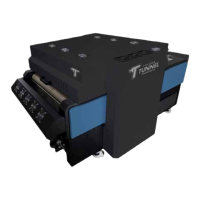
  • Shaker Hood: Lift the shaker hood and wipe down the inside border of the lid with a dry cloth to prevent powder buildup.
  • Left Side Openings: On the left side of the shaker, pull open the door and wipe down the five openings.
  • Oil Build-up Check: During daily maintenance, check the opening for oil build-up. Any accumulated oil should be drained into a bucket through the spout. This residue is not drain-safe and must be disposed of according to local environmental guidelines.

TOYODA TUNNEL SHAKER 32 Specifications

General IconGeneral
BrandTOYODA
ModelTUNNEL SHAKER 32
CategoryDryer
LanguageEnglish