7
OVERVIEW FEATURES/OPERATIONS SAFETY AND EMERGENCY FEATURES
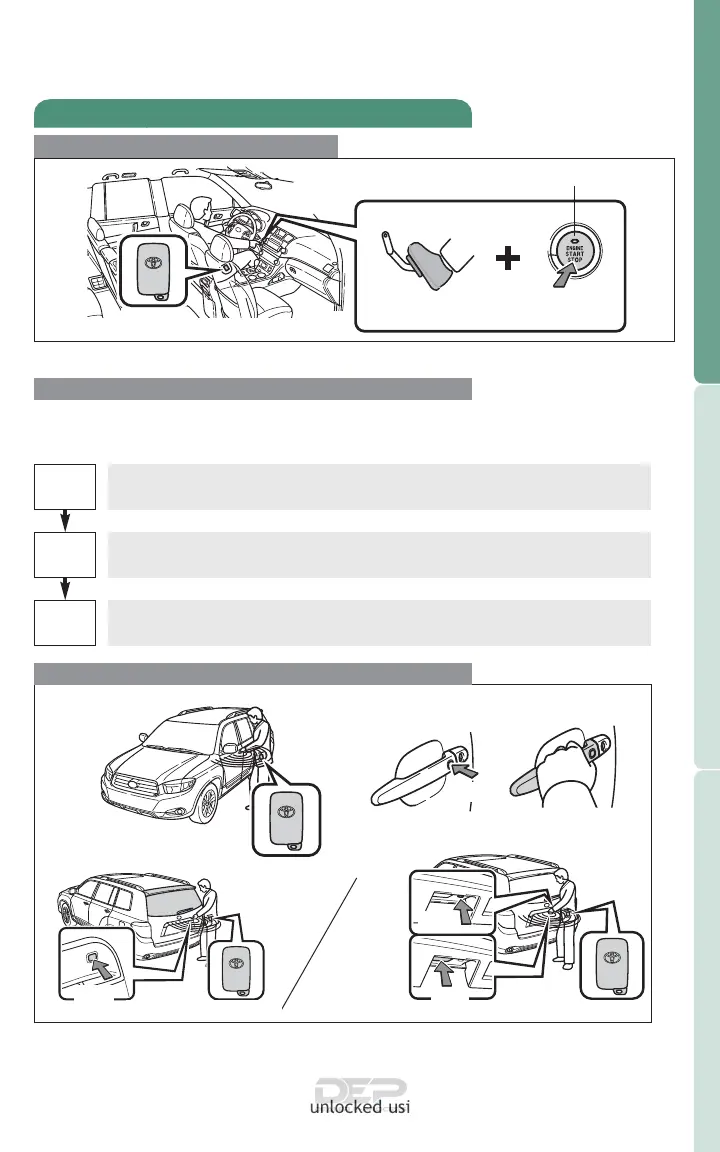
Smart Key* (if equipped)
Start function
Accessories such as the radio will operate.
Power ON; the engine not running.
All systems OFF.
ACC
ON
OFF
NOTE: Gear shift lever must be in Park and brake pedal depressed.
Push
Depress
brake pedal
Carrying
Green indicator ON
Without depressing the brake pedal, pressing the “ENGINE START STOP”
switch will change the operation mode in succession from:
Locking/Unlocking operation
Carry remote
to lock/unlock
Push
Front door unlock*
Grasp
Front door lock
* Driver door unlocking function can be programmed to unlock driver door
only, or all doors. Grasping passenger handle will unlock all doors.
NOTE: Doors may also be locked/unlocked using remote.
Power (without starting engine)
Push
Glass hatch unlock
Back door lock/unlock
Push
Lock
Push
Unlock











 To Next Page