21
OVERVIEW
FEATURES/OPERATIONS
SAFETY AND EMERGENCY FEATURES
(3) Acceleration when there are no longer any preceding vehicles driving
slower than the set speed
The system accelerates until the set speed is reached. The system then
returns to constant speed cruising.
Note: When your vehicle is too close to a vehicle ahead, and sufficient automatic
deceleration via the cruise control is not possible, the display will flash and the
buzzer will sound to alert the driver. An example of this would be if another driver
cuts in front of you while you are following a vehicle. Depress the brake pedal to
ensure an appropriate vehicle-to-vehicle distance.
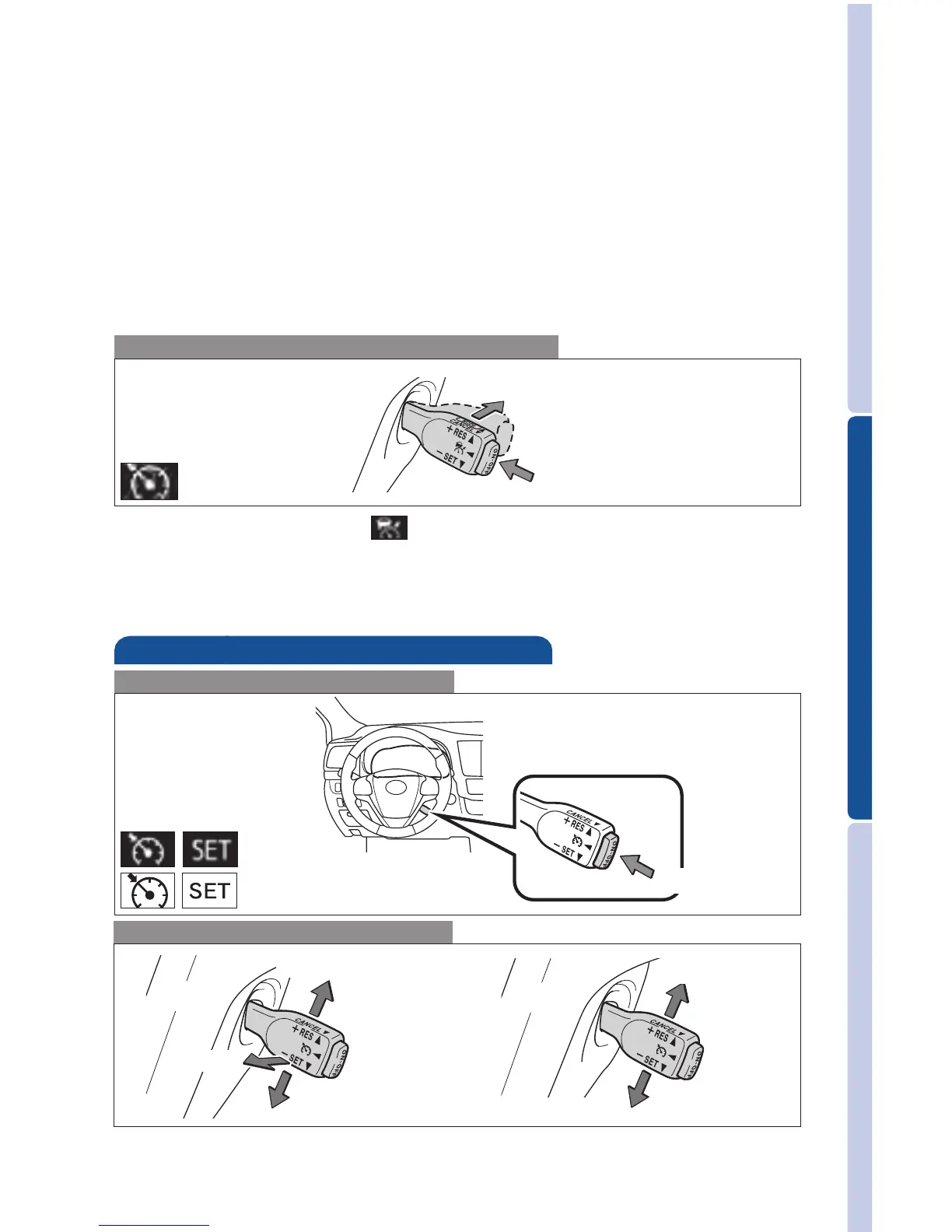
Switching to constant speed control mode
If you are already using DRCC “ ”, push “ON-OFF” button to turn the system off
first, then push and hold “ON-OFF” button for at least 1.5 seconds to switch.
Note: When the engine is turned off, it will automatically default to Dynamic
Radar Cruise Control.
1.5 seconds
Cruise control (if equipped)
1
The set speed may also be cancelled by depressing the brake pedal.
2
The set speed may be resumed once vehicle speed exceeds 25 mph.
Turning system ON/OFF
Functions
System ON/OFF
monchrome
color display
Increase speed
Decrease speed
Cancel
1
Resume
2
Set











 To Next Page