39
Pairing your phone is the first step in connecting with your Toyota for hands-free
calling and for audio streaming via Bluetooth. This pairing process is quick and
easy: all Android mobile digital devices have Bluetooth integrated; all you have to
do is setup the phone and multimedia system to “talk” to each other and form a
connection.
2
Initiate Bluetooth
®
on your Android
®
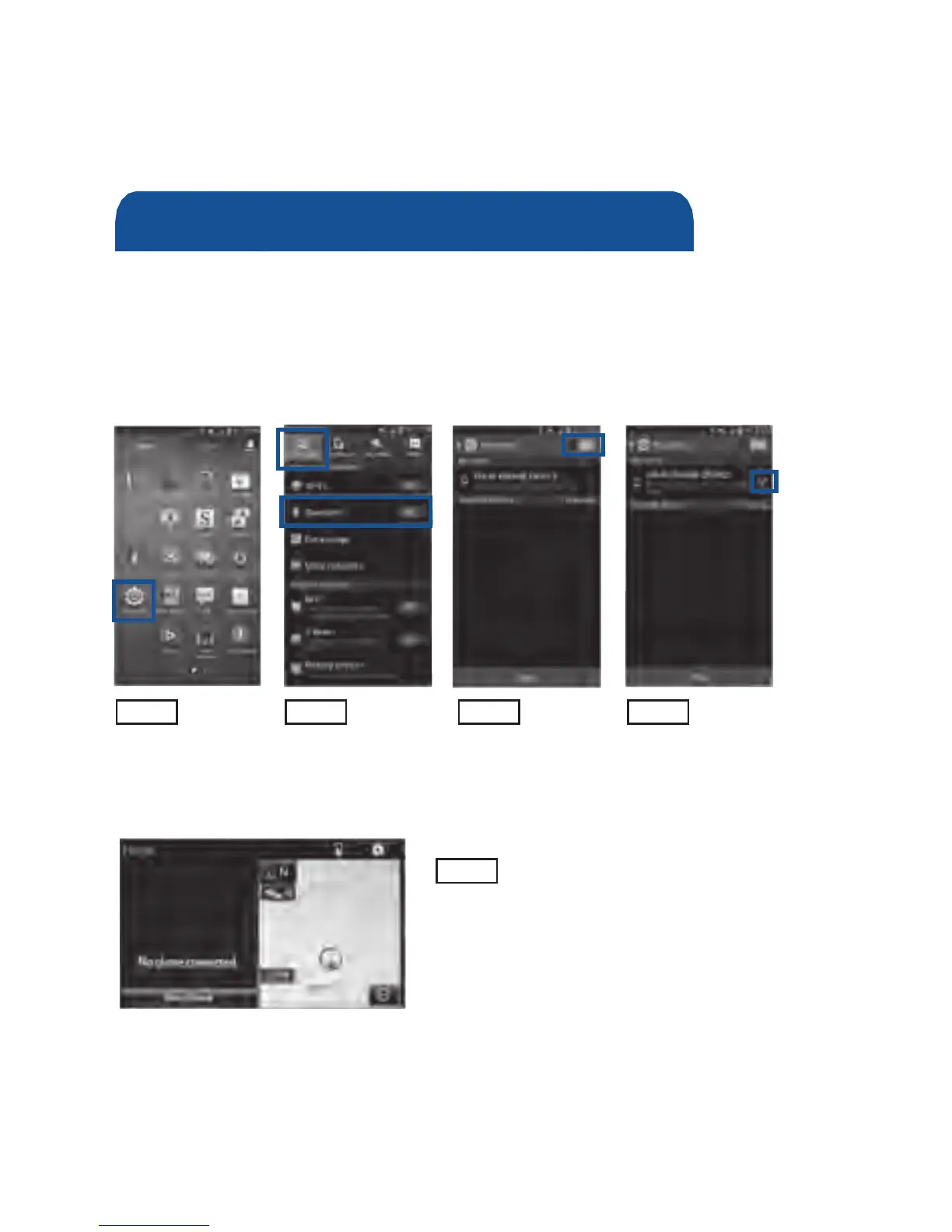
STEP 1 STEP 2 STEP 3 STEP 4
From your APPS
SCREEN, select
SETTINGS.
Select
CONNECTIONS and
select BLUETOOTH.
Ensure
BLUETOOTH
is ON.
Select YOUR PHONE
DEVICE to make it
discoverable.
Phone will seek out
Bluetooth devices while
remaining discoverable.
STEP 5
While your Android device is seeking
out Bluetooth devices, proceed to
your Entune Multimedia Head Unit on
your Toyota vehicle.
Bluetooth
®
Pairing for Android
®
phone
and Entune™ touch screen system
1 To determine which head unit is installed in your vehicle, refer to the Audio section in this guide.
2 Some Android devices may have slightly different SETTINGS screen layout depending on manufacturer of
device and Android OS version.
To begin the Bluetooth
®
Pairing process, press the HOME button on the
faceplate of your Toyota Vehicle Entune™ Multimedia Head Unit.
1












 To Next Page