
 Need help?
Do you have a question about the TP-Link kasa smart KP125M and is the answer not in the manual?
Explains text and link conventions used in the guide.
Provides links for product specifications, technical support, and community forums.
Summarizes core functionalities like Matter integration, energy monitoring, scheduling, timers, and voice control.
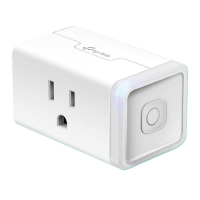
Mini-sized design to avoid blocking adjacent sockets.
Describes button functions like turning on/off and resetting Wi-Fi or the plug.
Explains LED indicators for setup, network connection, and factory reset status.
Guide to download and install the Kasa Smart app from app stores or QR code.
Instructions to log in or create a TP-Link ID within the Kasa Smart app.
Steps to add the smart plug in the Kasa Smart app by selecting the device type.
Information on setting up Matter devices across various smart home ecosystems.
Details on multi-administrator setup and related video resources.
Overview of features supported by the device in different Matter ecosystems.
Resources for troubleshooting issues and obtaining further assistance.
Pre-setup requirements like factory reset, controller, and setup code.
Step-by-step instructions for setting up the device using Matter.
Solutions for common setup failures, including network and configuration issues.
Details the FCC compliance statement for the device and its limitations.
States compliance with IC radiation exposure limits and installation distance.
Provides the Industry Canada statement for the device.
Advises on safe usage, cleaning, and placement of the product.
Lists restricted substances and their presence levels in the product components.
General advice on keeping the device safe from hazards like water, fire, and modification.
Details supported load types, operating, and storage temperature ranges for the device.
Explains the meaning of symbols found on the product label.
 General
| Model | KP125M |
|---|---|
| Frequency | 50/60 Hz |
| Max Load | 15A |
| Energy Monitoring | Yes |
| Type | Smart Plug |
| Wireless Standard | IEEE 802.11 b/g/n, 2.4 GHz Wi-Fi |
| Voltage | 120V |
| Maximum Power | 1.8 kW |
| Compatibility | Amazon Alexa, Google Assistant |
| App Compatibility | Kasa Smart |
| Operating Temperature | 0°C to 40°C (32°F to 104°F) |
| Certification | UL, FCC |
| Operating Humidity | 5% to 90% non-condensing |

 To Next Page