3
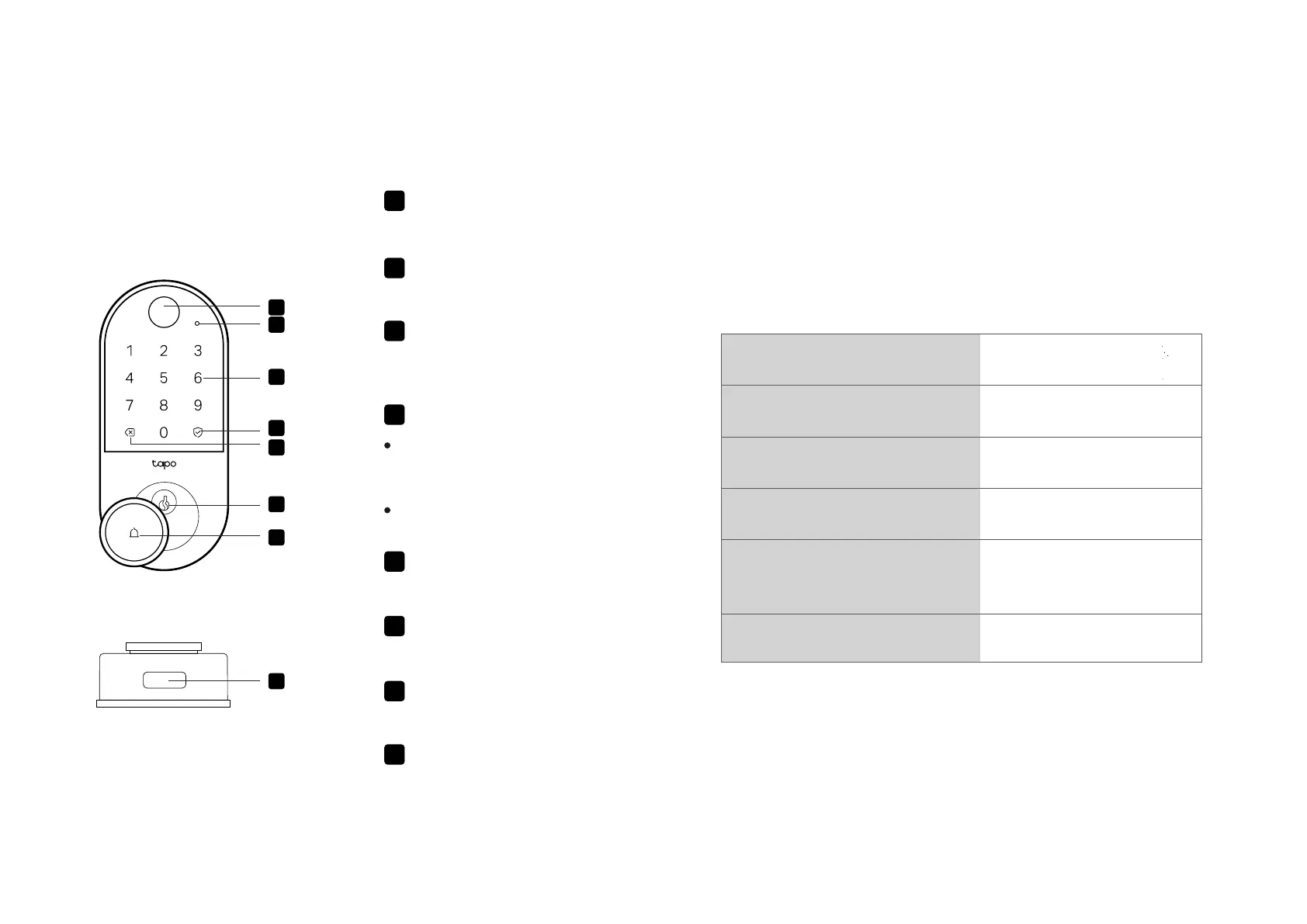
Appearance - Exterior Assembly
2
1
6
4
5
3
7
8
2
Status LED
Indicates the status of your device.
1
Fingerprint Scanner
Lock/unlock with your ngerprint.
7 Ring Button
Press to ring the built-in doorbell.
3
Key Pad
Lock/unlock the door by entering
your PIN code.
4
Unlocking/Locking Button
When you enter your PIN code
starting with scramble digits, press
this button to conrm unlocking.
5
Backspace
Press to delete the digit you entered.
8 Type-C Port
Connect to a power outlet to provide
a temporary power supply.
Press this button independently to
lock the door.
6
Lock Cylinder
Used to unlock via the provided keys.
Status LED Indications
Blinking red and green
Blinking amber
Blinking green
Solid red, then turn o
after 3 seconds
Low battery
Lock updating
Updating failed
Ready for setup
Pulsing green Connecting to Wi-Fi
Blinking red three times Door jammed



 To Next Page