5
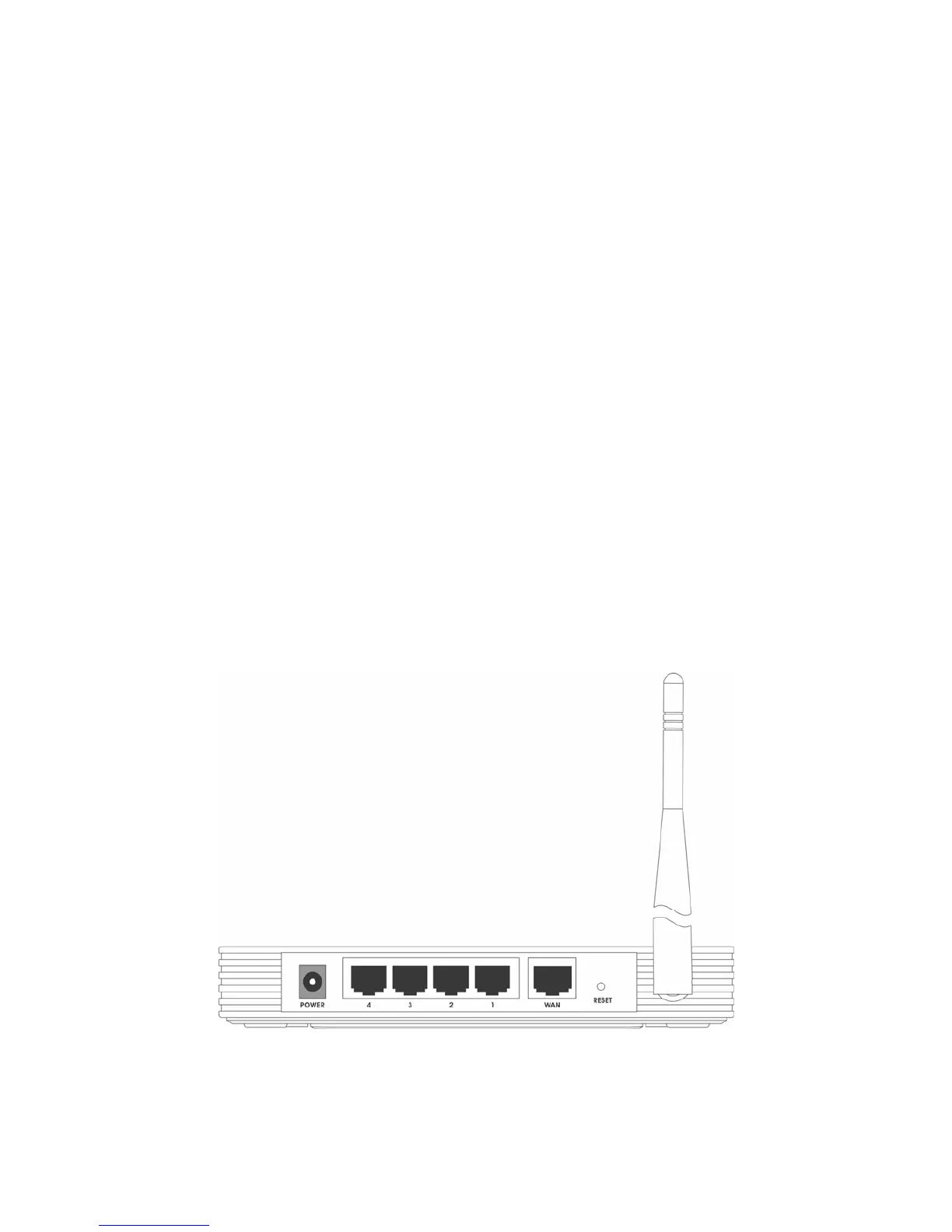
¾ AC power socket:
Please use the power adapter which is supplied with the TL-WR541G
54Mbps Wireless Router only, the use of a different adapter may result
in product damage.
¾ LAN 1,2,3,4:
Four 10/100Mbps RJ45 LAN ports for connecting the router to the local
PC(s)
¾ WAN:
This WAN port is where you will connect the cable/DSL Modem, or
Ethernet
¾ Reset button:
There are two ways to reset the router's factory defaults:
1) Use the Factory Defaults function on System Tools -> Factory Defaults page in the
router's Web-based Utility.
2) Use the Factory Default Reset button: With the router powered on, use a pin to press and
hold the Reset button(about 5 seconds) until the SYS LED becomes quick-flash from
slow-flash. And then release the button and wait the router to reboot to its factory default
settings.
)
Note: Ensure the router is powered on before it restarts completely.
¾ Wireless antenna
Figure 1-2 Rear Panel sketch


 To Next Page
 Loading...