Need help?
Do you have a question about the TP Radio Thor 1 TP9000EX and is the answer not in the manual?
Guidelines for using ATEX equipment safely, including battery handling and accessory usage.
Information on authorized usage, licensing, and geographical limitations.
Details on warranty, sealed units, and user maintenance restrictions.
Procedure for radio servicing by authorized personnel.
Safety advice regarding the use of the radio near pacemakers.
Advice on protecting the radio from environmental factors and physical damage.
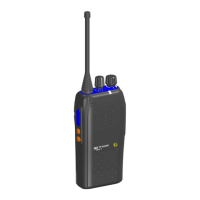
The button used for transmitting voice communications.
Programmable buttons for various radio functions.
Control for selecting different radio channels.
Knob for turning the radio on/off and adjusting volume.
Visual indicator for radio status.
Port for connecting external accessories.
Essential components for radio operation.
Default functions for short press (Mute) and long press (Squelch Open).
Default functions for short and long press (Call Telegram).
Default function for long press (Emergency Call).
LED status for Power ON and battery level indication.
LED status for Stand-by mode.
LED status for transmitting mode.
LED status for receiving mode.
LED status for incoming call.
LED and audio indication for low battery.
Procedure for turning the radio on and off using the control knob.
How to adjust the audio volume level.
Method for choosing the desired radio channel.
Steps for transmitting audio, including microphone distance.
Steps for receiving audio.
Includes frequency range, channel spacing, operation mode, and temperature ratings.
RF output power, max deviation, spurious emission, and distortion.
Sensitivity, intermodulation, spurious response, and channel selectivity.
Electrical parameters for safe operation in hazardous areas.
Declaration of compliance with Directive 2014/53/EU.
Importance of protecting the GORE-TEX® membrane for watertightness.
Visual guide on proper battery installation to prevent damage.
 General
| Frequency Range | 400-470 MHz |
|---|---|
| Power Output | 5W |
| Dimensions | 137 x 57 x 37 mm |
| Battery Type | Li-Ion |
| RF Output Power | 5W |
| Channel Spacing | 12.5/25 kHz |

 To Next Page