Ground
F.G.
+
-
Switching
mode
power supply
DPSA Series
Pressure Sensor
1.
Basic spec of pressure port is Rc(PT) 1/8"and option
pressure port is NPT1/8". Use general one-touch fitting.
2
. Please use seal tape at port plug in
order to prevent pressure leak
3
.
Please connect it by using spanner(13mm) at the metal
part in order not to overload on the body when connecting
Pressure unit change
DPSA - C01 (P) has 7 kinds of pressure ‘unit and DPSA-R1 (P) has 5 k
inds of pressure unit. Please select te proper unit for application.
* DPSA - C01 (P) : kPa, kgf/cm², bar, psi, mmHg, inHg, mmH₂O
* DPSA - R1 (P) : kPa, MPa, kgf/cm², bar, psi
Output mode change
There are 6 kinds of control output modes in order to provide various
detection. Select a mode for your proper application.
1. When the output mode is N.O.
* One-point setting mode [ OPS ] : When pressure detection is required
above a certain pressure.
* Hysteresis mode [ HYS ] : When it is necessary to vary the hysteresis
width for pressure detection.
* Window comparison output mode [ WIN ] : When pressure detection
is required only in a specific section.
2. When output mode is N,C
* One-point setting mode [ OPS ] : When pressure detetion is required
below a certain pressure. is required below a certain pressure.
* Hysteresis mode [ HYS ] : When it is necessary to vary the hysteresis
width for pressure detection.
* Window comparison output mode [ WIN ] : When pressure detection
is required only outside of a specific section.
Response time change -
Chattering prevention
It can prevent chattering of control output by changing response time.
It is able to set 4 kinds of response time (2.5ms, 5msec,100ms, 500ms)
and if the response is getting longer, the sensing will be more stable
by increasing the number of digital filter.
LCD Color change
Change the color of the display to RED or GREEN. Therw are four change
modes. There are consisting of two line displays with opposite colors.
* SoG : When OUT1 is output, the upper line display changes to RED.
*
SoR : When OUT1 is output, the lower line display changes to GREEN.
* GREEN : The upper line display changes to GREEN.
* RED : The upper line display changes to RED.
Zero-point adjustment
This function is to set the display value of pressure at zero when port
is opened to atmospheric pressure. And the zero-point adjustment
also affects the analog output voltage.
Peak hold and bottom hold
By memorizing the max. and min. values of the pressure input from the system
to the pressure sensor, it is possible to determine the abnormal condition of the
system which is not easily recognized by the eye or the diagnous the maximun
and minimum pressure function.
Installation (DPSA Series)
12mm
spanner
Caution
Caution
Caution
4.
PSA Series has 2 kinds of bracket
s so it is
able to install it in two different ways.
5.
At first, please unscrew hexagon wrench
bolt and assemble the bracket on this
unit by fixing the hexagon wrench bolt.
Only for DPSA Series
•
Bracket A
•
Bracket B
DPSA Series is for sensing of non corrosive gas.
Do not use this product at corrosive gas or flammable gas, etc.
Functions(DPSA) Proper usage
Accessory
Piping and mounting method
Tightening torque of one-touch fitting should be 10N.m or less.
It may cause malfunction.
•
Please using this unit within the range of specification, if applying pressure
is larger than specification, it may not be working properly due to damage.
•
After supplying power, it takes 3 sec. to work.
•
When using switching mode power supply, frame ground (F.G.)
terminal of power supply should be grounded.
•
It may cause malfunction by noise, when wiring with power line or high
voltage line.
•
Do not insert any sharp or pointed object into pressure port.
It may cause mechanical problem due to sensor damage.
•
Do not use this unit with flammable gas, because this is not an explosion
proof structure.
•
Be sure that this unit should not be contacted directly with water, oil,
thinner, etc
•
Wiring must be done with power off
1. Pressure port spec. is PT1/8"". Use commercially available one-touch fittings."
2. To pervent leakage, use seal tape at the screw of plug."
3. When connecting a one-touch fitting, to avoid applying force on the body,
use a 12mm spanner at the hex metal peart.
4. The DPSA Series comes with two fixing brackets, so you can mount two
types depending on the installation.
5. DPSA Series are sold separately with panel mounting bracket and front
protective cover. When mounted on the panel, Please see as shows at the
figure.
Caution during use
1. Do not put a point such as a needle into the pressure port.
Sensor will be damaged and normal operation will not be done.
2. Please be careful not to let organic solvents such as thinner, water,oil,
and come in direct contact.
3. Avoid excessive transient(less than 3 seconds) during power input
4. When using a switching mode power supply with power line, be sure to
ground the frame ground(F.G) terminal of the power line.
5. Please avoid it wiring together with power lines or high-voltage lines may
cause malfunctions due to noise.
6. When moving from a cold outdoors to a warm room, please use
it the surface moisture is completely dry after.
7. Do not press each setting button with a sharp end of the needle or like.
8. Do not pull the wiring with tensile force of 30N.m or more.
9. This product can be used under the following environmental condition.
① Inside
③ Pollution Degree 2
* The instructions given in the above handling precautions may cause the product to
malfunction. Please be sure to observe.
② Altitude less than 2,000m
④ Category lll(Installation Category lll)
Error dispaly
Error display Description Troubleshooting
ER1
When external pressure is input
while adjusting zero point
Try again after removing
external pressure
ER2
When overload is applied
on control output
Remove overload
HHH
When applied pressure exceeds
High-limit of display pressure range
Apply pressure within
display pressure range
LLL
When applied pressure exceeds
Low-limit of display pressure range
Spring
washer
Hexagon
wrench bolt
DPSA Series
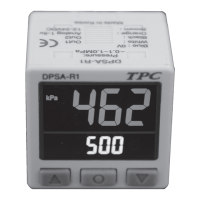
Pressure Sensor
Small size, High accuracy pressure control digital pressure sensor
Features
• High accuracy digital pressure sensor
• High brightness LCD display.
• High resolution : 1/1000
• Convertible pressure unit
- Compound pressure : kPa, kgf/cm
2
, bar, psi, mmHg, mmH
2
O, inHg
- Standard pressure : kPa, kgf/cm
2
, bar, psi, Mpa
• Various output modes : Hysteresis mode, One point selting mode.
Independent 2 output mode, Window comparative output mode
• Chattering prevention for output (Selectable response time : 2.5, 5, 100, 500ms)
• Analog output(1-5VDC) scale function
• Reverse power polarity and overcurrent protection circuit
• Zero-point adjustment function
• Peak and Bottom hold display
Model configuration
Pressure conversion chart
Output type
Appearance
DPS PC01A
No mark NPN Open collect output
P PNP Open collect output
01 -100kPa ~ 100kPa
1 -100kPa ~ 1,000kPa
R Standard pressure
C Compound pressure
A Regular square
Appearance
Ex) For calculating 760mmHg as kPa : According to above chart, 1mmHg is 0.133322kPa, therefore 760mmHg will be 760×0.133322kPa=101.32472kPa.
Please read “Caution for your safety” in operation
manual before using.
to
from
Pa kPa MPa kgf/cm
2
mmHg mmH
2
O psi bar inHg
1Pa 1 0.001 0.000001000 0.000010197 0.007501 0.101972 0.000145038 0.000010000 0.0002953
1kPa 1000.000 1 0.001000 0.010197 7.500616 101.9716 0.145038 0.010000 0.2953
1MPa 1000000 1000 1 10.197162 7500.61683 101971.553 145.038243 10 295.299875
1kgf/cm
2
98066.54 98.066543 0.09806 1 735.5595 10000.20 14.22334 0.980665 28.95878
1mmHg 133.322368 0.133322 0.000133 0.001359 1 13.5954 0.019336 0.001333 0.039370
1mmH
2
O 9.80665 0.00980 - 0.000099 0.0735578 1 0.00142 0.000098 0.002895
1psi 6894.757 6.89757 0.00689 0.070307 51.71630 703.07 1 0.068947 2.036003
1bar 100000.0 100.0000 0.100000 1.019689 750.062 10196.89 14.50339 1 29.52998
1inHg 3386.417 3.388418 0.003386 0.034532 25.40022 345.31849 0.491158 0.033863 1
DPSA Series
Ground
F.G.
+
-
Switching
mode
power supply
7
DPSA Series
Pressure Sensor
1.
Basic spec of pressure port is Rc(PT) 1/8"and option
pressure port is NPT1/8". Use general one-touch fitting.
2
. Please use seal tape at port plug in
order to prevent pressure leak
3
.
Please connect it by using spanner(13mm) at the metal
part in order not to overload on the body when connecting
Pressure unit change
DPSA - C01 (P) has 7 kinds of pressure ‘unit and DPSA-R1 (P) has 5 k
inds of pressure unit. Please select te proper unit for application.
* DPSA - C01 (P) : kPa, kgf/cm², bar, psi, mmHg, inHg, mmH₂O
* DPSA - R1 (P) : kPa, MPa, kgf/cm², bar, psi
Output mode change
There are 6 kinds of control output modes in order to provide various
detection. Select a mode for your proper application.
1. When the output mode is N.O.
* One-point setting mode [ OPS ] : When pressure detection is required
above a certain pressure.
* Hysteresis mode [ HYS ] : When it is necessary to vary the hysteresis
width for pressure detection.
* Window comparison output mode [ WIN ] : When pressure detection
is required only in a specific section.
2. When output mode is N,C
* One-point setting mode [ OPS ] : When pressure detetion is required
below a certain pressure. is required below a certain pressure.
* Hysteresis mode [ HYS ] : When it is necessary to vary the hysteresis
width for pressure detection.
* Window comparison output mode [ WIN ] : When pressure detection
is required only outside of a specific section.
Response time change -
Chattering prevention
It can prevent chattering of control output by changing response time.
It is able to set 4 kinds of response time (2.5ms, 5msec,100ms, 500ms)
and if the response is getting longer, the sensing will be more stable
by increasing the number of digital filter.
LCD Color change
Change the color of the display to RED or GREEN. Therw are four change
modes. There are consisting of two line displays with opposite colors.
* SoG : When OUT1 is output, the upper line display changes to RED.
*
SoR : When OUT1 is output, the lower line display changes to GREEN.
* GREEN : The upper line display changes to GREEN.
* RED : The upper line display changes to RED.
Zero-point adjustment
This function is to set the display value of pressure at zero when port
is opened to atmospheric pressure. And the zero-point adjustment
also affects the analog output voltage.
Peak hold and bottom hold
By memorizing the max. and min. values of the pressure input from the system
to the pressure sensor, it is possible to determine the abnormal condition of the
system which is not easily recognized by the eye or the diagnous the maximun
and minimum pressure function.
Installation (DPSA Series)
12mm
spanner
Caution
Caution
Caution
4.
PSA Series has 2 kinds of bracket
s so it is
able to install it in two different ways.
5.
At first, please unscrew hexagon wrench
bolt and assemble the bracket on this
unit by fixing the hexagon wrench bolt.
Only for DPSA Series
•
Bracket A
•
Bracket B
DPSA Series is for sensing of non corrosive gas.
Do not use this product at corrosive gas or flammable gas, etc.
Functions(DPSA) Proper usage
Accessory
Piping and mounting method
Tightening torque of one-touch fitting should be 10N.m or less.
It may cause malfunction.
•
Please using this unit within the range of specification, if applying pressure
is larger than specification, it may not be working properly due to damage.
•
After supplying power, it takes 3 sec. to work.
•
When using switching mode power supply, frame ground (F.G.)
terminal of power supply should be grounded.
•
It may cause malfunction by noise, when wiring with power line or high
voltage line.
•
Do not insert any sharp or pointed object into pressure port.
It may cause mechanical problem due to sensor damage.
•
Do not use this unit with flammable gas, because this is not an explosion
proof structure.
•
Be sure that this unit should not be contacted directly with water, oil,
thinner, etc
•
Wiring must be done with power off
1. Pressure port spec. is PT1/8"". Use commercially available one-touch fittings."
2. To pervent leakage, use seal tape at the screw of plug."
3. When connecting a one-touch fitting, to avoid applying force on the body,
use a 12mm spanner at the hex metal peart.
4. The DPSA Series comes with two fixing brackets, so you can mount two
types depending on the installation.
5. DPSA Series are sold separately with panel mounting bracket and front
protective cover. When mounted on the panel, Please see as shows at the
figure.
Caution during use
1. Do not put a point such as a needle into the pressure port.
Sensor will be damaged and normal operation will not be done.
2. Please be careful not to let organic solvents such as thinner, water,oil,
and come in direct contact.
3. Avoid excessive transient(less than 3 seconds) during power input
4. When using a switching mode power supply with power line, be sure to
ground the frame ground(F.G) terminal of the power line.
5. Please avoid it wiring together with power lines or high-voltage lines may
cause malfunctions due to noise.
6. When moving from a cold outdoors to a warm room, please use
it the surface moisture is completely dry after.
7. Do not press each setting button with a sharp end of the needle or like.
8. Do not pull the wiring with tensile force of 30N.m or more.
9. This product can be used under the following environmental condition.
① Inside
③ Pollution Degree 2
* The instructions given in the above handling precautions may cause the product to
malfunction. Please be sure to observe.
② Altitude less than 2,000m
④ Category lll(Installation Category lll)
Error dispaly
Error display Description Troubleshooting
ER1
When external pressure is input
while adjusting zero point
Try again after removing
external pressure
ER2
When overload is applied
on control output
Remove overload
HHH
When applied pressure exceeds
High-limit of display pressure range
Apply pressure within
display pressure range
LLL
When applied pressure exceeds
Low-limit of display pressure range
Spring
washer
Hexagon
wrench bolt
DPSA Series
Pressure Sensor
Small size, High accuracy pressure control digital pressure sensor
Features
• High accuracy digital pressure sensor
• High brightness LCD display.
• High resolution : 1/1000
• Convertible pressure unit
- Compound pressure : kPa, kgf/cm
2
, bar, psi, mmHg, mmH
2
O, inHg
- Standard pressure : kPa, kgf/cm
2
, bar, psi, Mpa
• Various output modes : Hysteresis mode, One point selting mode.
Independent 2 output mode, Window comparative output mode
• Chattering prevention for output (Selectable response time : 2.5, 5, 100, 500ms)
• Analog output(1-5VDC) scale function
• Reverse power polarity and overcurrent protection circuit
• Zero-point adjustment function
• Peak and Bottom hold display
Model configuration
Pressure conversion chart
Output type
Appearance
DPS PC01A
No mark NPN Open collect output
P PNP Open collect output
01 -100kPa ~ 100kPa
1 -100kPa ~ 1,000kPa
R Standard pressure
C Compound pressure
A Regular square
Appearance
Ex) For calculating 760mmHg as kPa : According to above chart, 1mmHg is 0.133322kPa, therefore 760mmHg will be 760×0.133322kPa=101.32472kPa.
Please read “Caution for your safety” in operation
manual before using.
to
from
Pa kPa MPa kgf/cm
2
mmHg mmH
2
O psi bar inHg
1Pa 1 0.001 0.000001000 0.000010197 0.007501 0.101972 0.000145038 0.000010000 0.0002953
1kPa 1000.000 1 0.001000 0.010197 7.500616 101.9716 0.145038 0.010000 0.2953
1MPa 1000000 1000 1 10.197162 7500.61683 101971.553 145.038243 10 295.299875
1kgf/cm
2
98066.54 98.066543 0.09806 1 735.5595 10000.20 14.22334 0.980665 28.95878
1mmHg 133.322368 0.133322 0.000133 0.001359 1 13.5954 0.019336 0.001333 0.039370
1mmH
2
O 9.80665 0.00980 - 0.000099 0.0735578 1 0.00142 0.000098 0.002895
1psi 6894.757 6.89757 0.00689 0.070307 51.71630 703.07 1 0.068947 2.036003
1bar 100000.0 100.0000 0.100000 1.019689 750.062 10196.89 14.50339 1 29.52998
1inHg 3386.417 3.388418 0.003386 0.034532 25.40022 345.31849 0.491158 0.033863 1
DPSA Series
* When entering the parameter setting mode, "Setting item" is displayed on the lower line display and " Previous setting value" is flashing on the upper line display every 1 second.
* Use the [ ] key to select the color of the display to be used.
* If you press the [ ] key for more than 3 seconds at any point during parameter setting, the set value is stored in the EEPROM memory and the operation mode is restored.
Also, if tere is no key input for 30 seconds during setting, going on setting is ignored and retains previous settings.
* The set conditions are stored in the EEPROM memory and are pr
eserved even when the power is turned off. However, please note that the guaranteed life of EEPROM is up to 100,000 times.
* Preset Value setting
1. Sets the input detection level.
2. Keep in mind that the set number differs depending on the type of output operation mode.
<When in hysteresis mode and window comparator mode>
* The lower line display shows the previously set values.
* If you use the [ ] key to change the pressure detection level 1, L-1 and the set value alternately cycle for 1 second and flashing for 3 seconds.
* When the flashing stops, the set value is saved.
* When changing the detection level of OUT2, L-1 changes to L-2.
* The lower line display shows the previously set values.
* If you use the [ ] key to change the pressure detection level 1, [ H-1 ] and the set value alternately cycle for 1 second and flashing for 3 seconds.
* When the flashing stops, the set value is saved.
* When changing the detection level of OUT2,H-1 changes to H-2.
<When One-point setting mode >
* The lower line display shows the previously set values.
* If you use the [ ] key to change the pressure detection level 1, L-1 and the set value alternately cycle for 1 second and flashing for 3 seconds.
* When the flashing stops, the set value is saved.
,
* When changing the detection level of OUT2, P-1 changes to P-2.
Run mode
Return to operation mode
Press key over 3 second
Run mode
,
,
Preset value setting(DPSA)
Hysteresis mode [ ] and Window comparison mode [ ]
One point mode [ ]
and previously set
value will flash in
turn every 0.5 sec.
Press[ ] or [ ]key to select [ ] setting value.
and previously
set value will flash
in turn every
0.5 sec.
and previously
set value will flash
in turn every
0.5 sec.
Press[ ] or [ ]key to select
[ ] setting value.
Press [ ] or [ ] key to selet
[ ] setting value.
setting range: Min. display pressure < <= Max. display pressure
setting range: Min. display pressure < <= Max. display pressure
setting range: Min. display pressure < <= Max. display pressure
Pressure sensing level 1[ ]
Pressure detecting level[ ]
Pressure detecting level 2 [ ]
,
5
DPSA Series
Pressure Sensor
ously for more than 1 second after opening the pressure port.
2. When zero setting is completed, 0 is displayed.
d, Er1 flashes while pressing the key.
* Please perform zero adjustment periodically.
Output operation mode(DPSA)
The pressure detection level(P-1) can be set to any value.
pressure
OUT1(NO mode): When applying pressure is large than P-1 value, it will be ON
OUT1(NC mode): When applying pressure is lower than P-1 value, it will be ON
OUT1(NO mode): When applying pressure is larger than [H-1], it will be ON.
OUT1(NC mode): When applying pressure is lower than [L-1], it will be ON.
OUT1(NO mode): It will be ON between high limit value [H-1] and low limit value [L-1].
OUT1(NC mode): It will be ON when it is over high limit value[H-1] and low limit value [L-1].
Time
OUT1
ON
OFF
ON
OFF
NO Mode
NO Mode
NC Mode
* DPS Series has 3 output operation mode.
Use the proper operation mode in accordance with the desired application of detection.
* The 3 output operation mode have two kinds of OUT mode(NO/NC mode).
* One Point Setting Mode [ ]
① The upper limit value[H-1] and lower limit value[L-1] of the pressure detection level can be set.
② The detection response is fixed to 1 digit.
① The pressure sensing level [H-1] and sensing difference [L-1] can be set to any value.
② The detection response is fixed to 1 digit.
* Hysteresis mode [ ]
* Window comparison output mode[ ]
P-1
pressure
P-1
Time
OUT1
pressure
OUT1
ON
OFF
ON
OFF
NC Mode
H-1
pressure
H-1
L-1L-1
Time
OUT1
NO Mode
pressure
OUT1
ON
OFF
NC Mode
pressure
H-1
L-1
ON
OFF
H-1
L-1
Time
OUT1
* When entering the parameter setting mode, "Setting item" is displayed on the lower line display and " Previous setting value" is flashing on the upper line display every 1 second.
* Use the [ ] key to select the color of the display to be used.
* If you press the [ ] key for more than 3 seconds at any point during parameter setting, the set value is stored in the EEPROM memory and the operation mode is restored.
Also, if tere is no key input for 30 seconds during setting, going on setting is ignored and retains previous settings.
* The set conditions are stored in the EEPROM memory and are pr
eserved even when the power is turned off. However, please note that the guaranteed life of EEPROM is up to 100,000 times.
* Preset Value setting
1. Sets the input detection level.
2. Keep in mind that the set number differs depending on the type of output operation mode.
<When in hysteresis mode and window comparator mode>
* The lower line display shows the previously set values.
* If you use the [ ] key to change the pressure detection level 1, L-1 and the set value alternately cycle for 1 second and flashing for 3 seconds.
* When the flashing stops, the set value is saved.
* When changing the detection level of OUT2, L-1 changes to L-2.
* The lower line display shows the previously set values.
* If you use the [ ] key to change the pressure detection level 1, [ H-1 ] and the set value alternately cycle for 1 second and flashing for 3 seconds.
* When the flashing stops, the set value is saved.
* When changing the detection level of OUT2,H-1 changes to H-2.
<When One-point setting mode >
* The lower line display shows the previously set values.
* If you use the [ ] key to change the pressure detection level 1, L-1 and the set value alternately cycle for 1 second and flashing for 3 seconds.
* When the flashing stops, the set value is saved.
,
* When changing the detection level of OUT2, P-1 changes to P-2.
Run mode
Return to operation mode
Press key over 3 second
Run mode
,
,
Preset value setting(DPSA)
Hysteresis mode [ ] and Window comparison mode [ ]
One point mode [ ]
and previously set
value will flash in
turn every 0.5 sec.
Press[ ] or [ ]key to select [ ] setting value.
and previously
set value will flash
in turn every
0.5 sec.
and previously
set value will flash
in turn every
0.5 sec.
Press[ ] or [ ]key to select
[ ] setting value.
Press [ ] or [ ] key to selet
[ ] setting value.
setting range: Min. display pressure < <= Max. display pressure
setting range: Min. display pressure < <= Max. display pressure
setting range: Min. display pressure < <= Max. display pressure
Pressure sensing level 1[ ]
Pressure detecting level[ ]
Pressure detecting level 2 [ ]
,
* When entering the parameter setting mode, "Setting item" is displayed on the lower line display and " Previous setting value" is flashing on the upper line display every 1 second.
* Use the [ ] key to select the color of the display to be used.
* If you press the [ ] key for more than 3 seconds at any point during parameter setting, the set value is stored in the EEPROM memory and the operation mode is restored.
Also, if tere is no key input for 30 seconds during setting, going on setting is ignored and retains previous settings.
* The set conditions are stored in the EEPROM memory and are pr
eserved even when the power is turned off. However, please note that the guaranteed life of EEPROM is up to 100,000 times.
* Preset Value setting
1. Sets the input detection level.
2. Keep in mind that the set number differs depending on the type of output operation mode.
<When in hysteresis mode and window comparator mode>
* The lower line display shows the previously set values.
* If you use the [ ] key to change the pressure detection level 1, L-1 and the set value alternately cycle for 1 second and flashing for 3 seconds.
* When the flashing stops, the set value is saved.
* When changing the detection level of OUT2, L-1 changes to L-2.
* The lower line display shows the previously set values.
* If you use the [ ] key to change the pressure detection level 1, [ H-1 ] and the set value alternately cycle for 1 second and flashing for 3 seconds.
* When the flashing stops, the set value is saved.
* When changing the detection level of OUT2,H-1 changes to H-2.
<When One-point setting mode >
* The lower line display shows the previously set values.
* If you use the [ ] key to change the pressure detection level 1, L-1 and the set value alternately cycle for 1 second and flashing for 3 seconds.
* When the flashing stops, the set value is saved.
,
* When changing the detection level of OUT2, P-1 changes to P-2.
Run mode
Return to operation mode
Press key over 3 second
Run mode
,
,
Preset value setting(DPSA)
Hysteresis mode [ ] and Window comparison mode [ ]
One point mode [ ]
and previously set
value will flash in
turn every 0.5 sec.
Press[ ] or [ ]key to select [ ] setting value.
and previously
set value will flash
in turn every
0.5 sec.
and previously
set value will flash
in turn every
0.5 sec.
Press[ ] or [ ]key to select
[ ] setting value.
Press [ ] or [ ] key to selet
[ ] setting value.
setting range: Min. display pressure < <= Max. display pressure
setting range: Min. display pressure < <= Max. display pressure
setting range: Min. display pressure < <= Max. display pressure
Pressure sensing level 1[ ]
Pressure detecting level[ ]
Pressure detecting level 2 [ ]
,
3
DPSA Series
Pressure Sensor
① Pressure unit subdisplay : The current set pressure unit is displayed.
Settings other than Mpa and Kpa are possible but not displayed.
② 2 color main dispaly : Detecting pressure value, Various display setting value
and erro contents.
③ Setting value indicator : Set pressure value, Various display setting mode.
④ Out 1 lamp : Lights during OUT1 operation.
⑤ Out 2 lamp : Lights during OUT2 operation.
⑥ UP key : Used to change the setting value in the measurement mode to higher
lever or to change the pressure unit, output mode, output mode setting,
response time, LCD color setting etc.
⑦ SET key : Enter parameter setting and save setting value.
⑧ DOWN key : Used to change the setting value in the measurement mode to
lower lever or to change pressure unit, output mode, output mode setting,
response time, LCD color setting etc.
(DPSA Series)
※
There is no short-circuit protection in analog voltage output. Do not connect this output to power supply or capacitive load directly.
※
Please observe input impedance of connected equipment when use analog voltage output.
And be sure to check voltage drop caused by resistance of extended wire.
Zero point adjustment(DPSA Series)
1. In operation mode, press the <up>key and <down>key simultaneously for more than 1 second after opening the pressure port.
2. When zero setting is completed, 0 is displayed.
* If zero setting is going on while external pressure is applied, Er1 flashes while pressing the key.
* Please perform zero adjustment periodically.
Control output diagram(DPSA)
Front panel identification
Setting(DPSA)
NPN open collector output type PNP open collector output type
Main circuit
Overcurrent
protection
Overcurrent
protection
(Blue)0V
1kΩ
(White)OUT1
(Black)OUT2
(Orange)Analog
voltage output
(Brown)+V
12-24VDC
Load
Load
+
-
Main circuit
Overcurrent
protection
Overcurrent
protection
1kΩ
12-24VDC
Load
Load
+
-
(Blue)0V
(Black)OUT2
(Orange)Analog
voltage output
(Brown)+V
(White)OUT1
DPSA Series
Pressure Sensor
Small size, High accuracy pressure control digital pressure sensor
Features
• High accuracy digital pressure sensor
• High brightness LCD display.
• High resolution : 1/1000
• Convertible pressure unit
- Compound pressure : kPa, kgf/cm
2
, bar, psi, mmHg, mmH
2
O, inHg
- Standard pressure : kPa, kgf/cm
2
, bar, psi, Mpa
• Various output modes : Hysteresis mode, One point selting mode.
Independent 2 output mode, Window comparative output mode
• Chattering prevention for output (Selectable response time : 2.5, 5, 100, 500ms)
• Analog output(1-5VDC) scale function
• Reverse power polarity and overcurrent protection circuit
• Zero-point adjustment function
• Peak and Bottom hold display
Model configuration
Pressure conversion chart
Output type
Appearance
DPS PC01A
No mark NPN Open collect output
P PNP Open collect output
01 -100kPa ~ 100kPa
1 -100kPa ~ 1,000kPa
R Standard pressure
C Compound pressure
A Regular square
Appearance
Ex) For calculating 760mmHg as kPa : According to above chart, 1mmHg is 0.133322kPa, therefore 760mmHg will be 760×0.133322kPa=101.32472kPa.
Please read “Caution for your safety” in operation
manual before using.
to
from
Pa kPa MPa kgf/cm
2
mmHg mmH
2
O psi bar inHg
1Pa 1 0.001 0.000001000 0.000010197 0.007501 0.101972 0.000145038 0.000010000 0.0002953
1kPa 1000.000 1 0.001000 0.010197 7.500616 101.9716 0.145038 0.010000 0.2953
1MPa 1000000 1000 1 10.197162 7500.61683 101971.553 145.038243 10 295.299875
1kgf/cm
2
98066.54 98.066543 0.09806 1 735.5595 10000.20 14.22334 0.980665 28.95878
1mmHg 133.322368 0.133322 0.000133 0.001359 1 13.5954 0.019336 0.001333 0.039370
1mmH
2
O 9.80665 0.00980 - 0.000099 0.0735578 1 0.00142 0.000098 0.002895
1psi 6894.757 6.89757 0.00689 0.070307 51.71630 703.07 1 0.068947 2.036003
1bar 100000.0 100.0000 0.100000 1.019689 750.062 10196.89 14.50339 1 29.52998
1inHg 3386.417 3.388418 0.003386 0.034532 25.40022 345.31849 0.491158 0.033863 1
DPSA Series
4
ously for more than 1 second after opening the pressure port.
2. When zero setting is completed, 0 is displayed.
d, Er1 flashes while pressing the key.
* Please perform zero adjustment periodically.
DPSA Series
Pressure Sensor
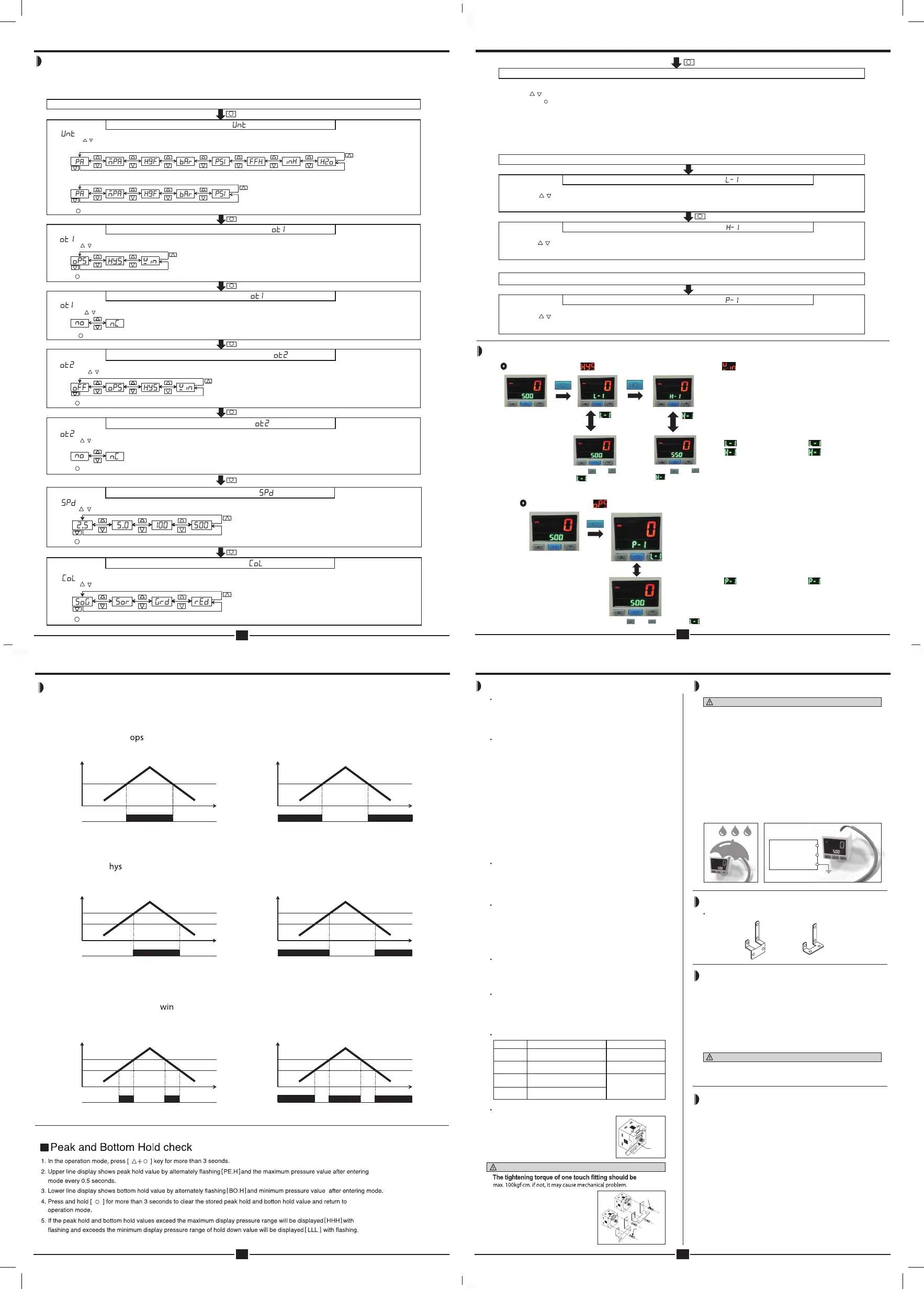
Parameter setting(DPSA)
1. Set the pressure display unit, OUT1 operation mode, OUT1 OUTPUT,OUT2 operation mode, OUT2 output, response time
(chattering prevention), and the LCD color.
2. When the key lock is set, be sure to release the key lock and set the parameter.
(kPa) (MPa) (kgf/cm²) (bar) (psi)
(kPa) (MPa) (kgf/cm²) (bar) (psi)
* When the standard pressure.
Press [ ] once briefly to set the selected unit and enter the next mode.
Press [ ] key once briefly to set the selected unit and enter the next mode.
* [ ] is displayed in the lower line display and the pressure unit flashes in 0.5 second increments in the upper line display.
* Use the [ ] key to select the output method to be used.
Press [ ] key once briefly to set the selected unit and enter the next mode.
Press [ ] key once briefly to set the selected unit and enter the next mode.
* [ ] is displayed in the lower line display and the pressure unit flashes in 0.5 second increments in the upper line display.
* Use the [ ] key to select the output method to be used.
* [ ] is displayed in the lower line display and the pressure unit flashes in 0.5 second increments in the upper line display.
* Use the [ ] key to select the output method to be used.
* If output mode setting is selected OFF in the OUT2, the output mode is not selectoe and go to the next mode.
* [ ] is displayed in the lower line display and the pressure unit flashes in 0.5 second increments in the upper line display.
* Use the [ ] key to select the output method to be used.
* [ ] is displayed in the lower line display and the pressure unit flashes in 0.5 second increments in the upper line display.
* Use the [ ] key to select the color of the display to be used.
RUN Mode
* [ ] is displayed in the lower line display and the display unit flashes in 0.5 second increments in the upper line display.
* Use the [ ] key to select the pressure unit to be used.
* When the negative pressure and compound pressure.
*[ ] is displayed in the lower line display and the pressure unit flashes in 0.5 second increments in the upper line display.
* Use the [ ] key to select the output method to be used.
OUT2: Output operation mode setting[ ]
OUT1 : Output method[ ]
OUT1: Output operation mode setting[ ]
Display unit[ ]
OUT2: Output method[ ]
Press key over 3 second
Press [ ] key once briefly to set the selected unit and enter the next mode.
(unit : ms)
Press [ ] key once briefly to set the selected unit and enter the next mode.
(unit : ms)
Press [ ] key once briefly to set the selected unit and enter the next mode.
LED Color setting[ ]
Response timing setting[ ]
. .
Tanhay
5
DPSA Seires
Pressure Sensor
Parameter setting(DPSA)
1. Set the pressure display unit, OUT1 operation mode, OUT1 OUTPUT,OUT2 operation mode, OUT2 output, response time
(chattering prevention), and the LCD color.
2. When the key lock is set, be sure to release the key lock and set the parameter.
(kPa) (MPa) (kgf/cm²) (bar) (psi)
(kPa) (MPa) (kgf/cm²) (bar) (psi)
* When the standard pressure.
Press [ ] once briefly to set the selected unit and enter the next mode.
* [ ] is displayed in the lower line display and the pressure unit flashes in 0.5 second increments in the upper line display.
* Use the [ ] key to select the output method to be used.
Press [ ] key once briefly to set the selected unit and enter the next mode.
* [ ] is displayed in the lower line display and the pressure unit flashes in 0.5 second increments in the upper line display.
* Use the [ ] key to select the output method to be used.
* [ ] is displayed in the lower line display and the pressure unit flashes in 0.5 second increments in the upper line display.
* Use the [ ] key to select the output method to be used.
* If output mode setting is selected OFF in the OUT2, the output mode is not selectoe and go to the next mode.
* [ ] is displayed in the lower line display and the pressure unit flashes in 0.5 second increments in the upper line display.
* Use the [ ] key to select the output method to be used.
* [ ] is displayed in the lower line display and the pressure unit flashes in 0.5 second increments in the upper line display.
* Use the [ ] key to select the color of the display to be used.
RUN Mode
* [ ] is displayed in the lower line display and the display unit flashes in 0.5 second increments in the upper line display.
* Use the [ ] key to select the pressure unit to be used.
* When the negative pressure and compound pressure.
*[ ] is displayed in the lower line display and the pressure unit flashes in 0.5 second increments in the upper line display.
* Use the [ ] key to select the output method to be used.
OUT2: Output operation mode setting[ ]
OUT1 : Output method[ ]
OUT1: Output operation mode setting[ ]
Display unit[ ]
OUT2: Output method[ ]
Press key over 3 second
Press [ ] key once briefly to set the selected un it and enter the next mode.
Press [ ] key once briefly to set the selected un it and enter the next mode.
Press [ ] key once briefly to set the selected un it and enter the next mode.
(unit : ms)
Press [ ] key once briefly to set the selected un it and enter the next mode.
(unit : ms)
Press [ ] key once briefly to set the selected un it and enter the next mode.
LCD Color setting[ ]
Response timing setting[ ]
,
,
,
,
,
,
,
DPSA Series
Pressure Sensor
Small size, High accuracy pressure control digital pressure sensor
Features
• High accuracy digital pressure sensor
• High brightness LCD display.
• High resolution : 1/1000
• Convertible pressure unit
- Compound pressure : kPa, kgf/cm
2
, bar, psi, mmHg, mmH
2
O, inHg
- Standard pressure : kPa, kgf/cm
2
, bar, psi, Mpa
• Various output modes : Hysteresis mode, One point selting mode.
Independent 2 output mode, Window comparative output mode
• Chattering prevention for output (Selectable response time : 2.5, 5, 100, 500ms)
• Analog output(1-5VDC) scale function
• Reverse power polarity and overcurrent protection circuit
• Zero-point adjustment function
• Peak and Bottom hold display
Model configuration
Pressure conversion chart
Output type
Appearance
DPS PC01A
No mark NPN Open collect output
P PNP Open collect output
01 -100kPa ~ 100kPa
1 -100kPa ~ 1,000kPa
R Standard pressure
C Compound pressure
A Regular square
Appearance
Ex) For calculating 760mmHg as kPa : According to above chart, 1mmHg is 0.133322kPa, therefore 760mmHg will be 760×0.133322kPa=101.32472kPa.
Please read “Caution for your safety” in operation
manual before using.
to
from
Pa kPa MPa kgf/cm
2
mmHg mmH
2
O psi bar inHg
1Pa 1 0.001 0.000001000 0.000010197 0.007501 0.101972 0.000145038 0.000010000 0.0002953
1kPa 1000.000 1 0.001000 0.010197 7.500616 101.9716 0.145038 0.010000 0.2953
1MPa 1000000 1000 1 10.197162 7500.61683 101971.553 145.038243 10 295.299875
1kgf/cm
2
98066.54 98.066543 0.09806 1 735.5595 10000.20 14.22334 0.980665 28.95878
1mmHg 133.322368 0.133322 0.000133 0.001359 1 13.5954 0.019336 0.001333 0.039370
1mmH
2
O 9.80665 0.00980 - 0.000099 0.0735578 1 0.00142 0.000098 0.002895
1psi 6894.757 6.89757 0.00689 0.070307 51.71630 703.07 1 0.068947 2.036003
1bar 100000.0 100.0000 0.100000 1.019689 750.062 10196.89 14.50339 1 29.52998
1inHg 3386.417 3.388418 0.003386 0.034532 25.40022 345.31849 0.491158 0.033863 1
DPSA Series
Tanhay
8
DPSA Seires
Pressure Sensor
ously for more than 1 second after opening the pressure port.
2. When zero setting is completed, 0 is displayed.
d, Er1 flashes while pressing the key.
* Please perform zero adjustment periodically.
Output operation mode(DPSA)
The pressure detection level(P-1) can be set to any value.
pressure
OUT1(NO mode): When applying pressure is large than P-1 value, it will be ON
OUT1(NC mode): When applying pressure is lower than P-1 value, it will be ON
OUT1(NO mode): When applying pressure is larger than [H-1], it will be ON.
OUT1(NC mode): When applying pressure is lower than [L-1], it will be ON.
OUT1(NO mode): It will be ON between high limit value [H-1] and low limit value [L-1].
OUT1(NC mode): It will be ON when it is over high limit value[H-1] and low limit value [L-1].
Time
OUT1
ON
OFF
ON
OFF
NO Mode
NC Mode
* DPS Series has 3 output operation mode.
Use the proper operation mode in accordance with the desired application of detection.
* The 3 output operation mode have two kinds of OUT mode(NO/NC mode).
* One Point Setting Mode [ ]
① The upper limit value[H-1] and lower limit value[L-1] of the pressure detection level can be set.
② The detection response is fixed to 1 digit.
① The pressure sensing level [H-1] and sensing difference [L-1] can be set to any value.
② The detection response is fixed to 1 digit.
* Hysteresis mode [ ]
* Window comparison output mode[ ]
P-1
pressure
P-1
Time
OUT1
pressure
OUT1
ON
OFF
ON
OFF
NC Mode
H-1
pressure
H-1
L-1L-1
Time
OUT1
NO Mode
pressure
OUT1
ON
OFF
NC Mode
pressure
H-1
L-1
ON
OFF
H-1
L-1
Time
OUT1
Tanhay
8
DPSA Seires
Pressure Sensor
ously for more than 1 second after opening the pressure port.
2. When zero setting is completed, 0 is displayed.
d, Er1 flashes while pressing the key.
* Please perform zero adjustment periodically.
Output operation mode(DPSA)
The pressure detection level(P-1) can be set to any value.
pressure
OUT1(NO mode): When applying pressure is large than P-1 value, it will be ON
OUT1(NC mode): When applying pressure is lower than P-1 value, it will be ON
OUT1(NO mode): When applying pressure is larger than [H-1], it will be ON.
OUT1(NC mode): When applying pressure is lower than [L-1], it will be ON.
OUT1(NO mode): It will be ON between high limit value [H-1] and low limit value [L-1].
OUT1(NC mode): It will be ON when it is over high limit value[H-1] and low limit value [L-1].
Time
OUT1
ON
OFF
ON
OFF
NO Mode
NO Mode
NC Mode
* DPS Series has 3 output operation mode.
Use the proper operation mode in accordance with the desired application of detection.
* The 3 output operation mode have two kinds of OUT mode(NO/NC mode).
* One Point Setting Mode [ ]
① The upper limit value[H-1] and lower limit value[L-1] of the pressure detection level can be set.
② The detection response is fixed to 1 digit.
① The pressure sensing level [H-1] and sensing difference [L-1] can be set to any value.
② The detection response is fixed to 1 digit.
* Hysteresis mode [ ]
* Window comparison output mode[ ]
P-1
pressure
P-1
Time
OUT1
pressure
OUT1
ON
OFF
ON
OFF
NC Mode
H-1
pressure
H-1
L-1L-1
Time
OUT1
NO Mode
pressure
OUT1
ON
OFF
NC Mode
pressure
H-1
L-1
ON
OFF
H-1
L-1
Time
OUT1
Tanhay
8
DPSA Seires
Pressure Sensor
ously for more than 1 second after opening the pressure port.
2. When zero setting is completed, 0 is displayed.
d, Er1 flashes while pressing the key.
* Please perform zero adjustment periodically.
Output operation mode(DPSA)
The pressure detection level(P-1) can be set to any value.
pressure
OUT1(NO mode): When applying pressure is large than P-1 value, it will be ON
OUT1(NC mode): When applying pressure is lower than P-1 value, it will be ON
OUT1(NO mode): When applying pressure is larger than [H-1], it will be ON.
OUT1(NC mode): When applying pressure is lower than [L-1], it will be ON.
OUT1(NO mode): It will be ON between high limit value [H-1] and low limit value [L-1].
OUT1(NC mode): It will be ON when it is over high limit value[H-1] and low limit value [L-1].
Time
OUT1
ON
OFF
ON
OFF
NO Mode
NO Mode
NC Mode
* DPS Series has 3 output operation mode.
Use the proper operation mode in accordance with the desired application of detection.
* The 3 output operation mode have two kinds of OUT mode(NO/NC mode).
* One Point Setting Mode [ ]
① The upper limit value[H-1] and lower limit value[L-1] of the pressure detection level can be set.
② The detection response is fixed to 1 digit.
① The pressure sensing level [H-1] and sensing difference [L-1] can be set to any value.
② The detection response is fixed to 1 digit.
* Hysteresis mode [ ]
* Window comparison output mode[ ]
P-1
pressure
P-1
Time
OUT1
pressure
OUT1
ON
OFF
ON
OFF
NC Mode
H-1
pressure
H-1
L-1L-1
Time
OUT1
NO Mode
pressure
OUT1
ON
OFF
NC Mode
pressure
H-1
L-1
ON
OFF
H-1
L-1
Time
OUT1
6
3
DPSA Series
Pressure Sensor
① Pressure unit subdisplay : The current set pressure unit is displayed.
Settings other than Mpa and Kpa are possible but not displayed.
② 2 color main dispaly : Detecting pressure value, Various display setting value
and erro contents.
③ Setting value indicator : Set pressure value, Various display setting mode.
④ Out 1 lamp : Lights during OUT1 operation.
⑤ Out 2 lamp : Lights during OUT2 operation.
⑥ UP key : Used to change the setting value in the measurement mode to higher
lever or to change the pressure unit, output mode, output mode setting,
response time, LCD color setting etc.
⑦ SET key : Enter parameter setting and save setting value.
⑧ DOWN key : Used to change the setting value in the measurement mode to
lower lever or to change pressure unit, output mode, output mode setting,
response time, LCD color setting etc.
(DPSA Series)
※
There is no short-circuit protection in analog voltage output. Do not connect this output to power supply or capacitive load directly.
※
Please observe input impedance of connected equipment when use analog voltage output.
And be sure to check voltage drop caused by resistance of extended wire.
Zero point adjustment(DPSA Series)
1. In operation mode, press the <up>key and <down>key simultaneously for more than 1 second after opening the pressure port.
2. When zero setting is completed, 0 is displayed.
* If zero setting is going on while external pressure is applied, Er1 flashes while pressing the key.
* Please perform zero adjustment periodically.
Control output diagram(DPSA)
Front panel identification
Setting(DPSA)
NPN open collector output type PNP open collector output type
Main circuit
Overcurrent
protection
Overcurrent
protection
(Blue)0V
1kΩ
(White)OUT1
(Black)OUT2
(Orange)Analog
voltage output
(Brown)+V
12-24VDC
Load
Load
+
-
Main circuit
Overcurrent
protection
Overcurrent
protection
1kΩ
12-24VDC
Load
Load
+
-
(Blue)0V
(Black)OUT2
(Orange)Analog
voltage output
(Brown)+V
(White)OUT1
DPSA Series
Pressure Sensor
Small size, High accuracy pressure control digital pressure sensor
Features
• High accuracy digital pressure sensor
• High brightness LCD display.
• High resolution : 1/1000
• Convertible pressure unit
- Compound pressure : kPa, kgf/cm
2
, bar, psi, mmHg, mmH
2
O, inHg
- Standard pressure : kPa, kgf/cm
2
, bar, psi, Mpa
• Various output modes : Hysteresis mode, One point selting mode.
Independent 2 output mode, Window comparative output mode
• Chattering prevention for output (Selectable response time : 2.5, 5, 100, 500ms)
• Analog output(1-5VDC) scale function
• Reverse power polarity and overcurrent protection circuit
• Zero-point adjustment function
• Peak and Bottom hold display
Model configuration
Pressure conversion chart
Output type
Appearance
DPS PC01A
No mark NPN Open collect output
P PNP Open collect output
01 -100kPa ~ 100kPa
1 -100kPa ~ 1,000kPa
R Standard pressure
C Compound pressure
A Regular square
Appearance
Ex) For calculating 760mmHg as kPa : According to above chart, 1mmHg is 0.133322kPa, therefore 760mmHg will be 760×0.133322kPa=101.32472kPa.
Please read “Caution for your safety” in operation
manual before using.
to
from
Pa kPa MPa kgf/cm
2
mmHg mmH
2
O psi bar inHg
1Pa 1 0.001 0.000001000 0.000010197 0.007501 0.101972 0.000145038 0.000010000 0.0002953
1kPa 1000.000 1 0.001000 0.010197 7.500616 101.9716 0.145038 0.010000 0.2953
1MPa 1000000 1000 1 10.197162 7500.61683 101971.553 145.038243 10 295.299875
1kgf/cm
2
98066.54 98.066543 0.09806 1 735.5595 10000.20 14.22334 0.980665 28.95878
1mmHg 133.322368 0.133322 0.000133 0.001359 1 13.5954 0.019336 0.001333 0.039370
1mmH
2
O 9.80665 0.00980 - 0.000099 0.0735578 1 0.00142 0.000098 0.002895
1psi 6894.757 6.89757 0.00689 0.070307 51.71630 703.07 1 0.068947 2.036003
1bar 100000.0 100.0000 0.100000 1.019689 750.062 10196.89 14.50339 1 29.52998
1inHg 3386.417 3.388418 0.003386 0.034532 25.40022 345.31849 0.491158 0.033863 1
DPSA Series
DPSA 메뉴얼_211208최종.indd 4 2022. 4. 20. 오전 10:05


 To Previous Page
 Loading...