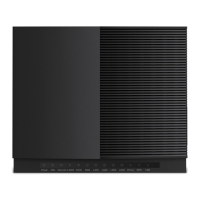
This document provides a quick installation guide for the TPG Home Wireless Broadband WiFi Cube 3 4G modem. It covers setup instructions, light indicators, Wi-Fi connection details, and warranty information.
Function Description
The TPG WiFi Cube 3 4G modem is a home wireless broadband device designed to provide internet access via a 4G mobile network. It acts as a central hub for connecting various devices to the internet, either wirelessly via Wi-Fi or through Ethernet cables. The modem comes with a pre-inserted and activated TPG Nano SIM card, simplifying the setup process. It automatically connects devices to the best available Wi-Fi network (2.4GHz or 5GHz) for optimal performance.
Important Technical Specifications
- Modem Type: WiFi Cube 3 4G modem
- Network Connectivity: 4G mobile network
- Wi-Fi Standards: 2.4GHz and 5GHz Wi-Fi
- Ports:
- POWER port for power supply
- 2 x LAN ports for Ethernet connections (LAN2/WAN port is not supported for internet connections)
- Nano SIM Card slot (pre-inserted)
- Power Input: 12V-2A
- Operating Temperature: 0°C ~ 40°C (32°F ~ 104°F)
- Operating Humidity: 10% ~ 90% non-condensing
- Default IP Address for Modem Dashboard: 192.168.8.1
- Model Number: B628-350
- Manufacturer: SOYEA TECHNOLOGY CO., LTD.
Usage Features
- Quick Installation: The guide emphasizes a straightforward setup process, advising users to plug in the new modem after receiving an email or SMS confirmation and unplugging any old broadband modems.
- Light Indicators: The modem features several light indicators to provide status updates:
- 4G Light:
- On (Green): Modem is connected to the 4G mobile network.
- On (Yellow): Indicates moderate/weak signal strength.
- On (Red): No connection.
- Off: Modem is not connected to the 4G mobile network.
- WiFi Light:
- On: 2.4GHz/5GHz Wi-Fi network is enabled.
- Flashing: Detecting Wi-Fi device that can be connected faster using WPS.
- Power Light:
- On: Modem has power and is turned on.
- Flashing: Modem is restoring to factory settings.
- Off: Modem has no power.
- Placement Guidance: Users are advised to place the modem in a clear space near a window, avoiding direct sunlight, to ensure optimal signal strength. Placing it on the floor or in a cupboard may result in a weak signal. If the 4G light is red, relocating the modem to another spot, ideally near a window, is recommended.
- Power On/Off: The modem is powered on using a button located on its base after connecting the supplied power cable to an outlet.
- Wi-Fi Connectivity:
- Devices can connect using the default Wi-Fi network name (SSID) and password found on the barcode sticker at the base of the modem.
- The modem automatically connects devices to the best possible Wi-Fi network (5GHz if supported, otherwise 2.4GHz).
- WPS (Wi-Fi Protected Setup): The modem supports WPS for faster connection of compatible devices.
- Ethernet Connectivity: Users can connect a computer to any of the two LAN ports using an Ethernet cable for a wired connection.
- Customizable Wi-Fi Settings: Users can customize their Wi-Fi settings by accessing the modem dashboard via a web browser at
http://192.168.8.1. This allows for changing the Wi-Fi network name (SSID) and password.
- Security: The guide recommends always setting a Wi-Fi password and only sharing it with trusted individuals.
Maintenance Features
- Troubleshooting with Light Indicators: The light indicators serve as a primary tool for diagnosing connection issues (e.g., a red 4G light indicates no connection, prompting a change in modem location).
- Reset Functionality: The modem includes a RESET button (located on the base) which can be used to restore factory settings if needed (indicated by the Power light flashing).
- Cleaning: Only a dry cloth should be used to clean the product. Liquids should not be used.
- Safety Information:
- Indoor Use Only: The device is designed for indoor use.
- Environmental Protection: Keep the device away from water, fire, humidity, and hot environments.
- No Disassembly: Do not attempt to disassemble, repair, or modify the device.
- Power Supply: Use only the supplied power supply. Discontinue use if the power supply unit or cable is damaged.
- Physical Damage: Do not use the product if the casing is broken due to electric shock danger.
- Handling: Never touch the product with wet hands.
- Children Safety: Keep children away from the power supply.
- Interference Avoidance: Do not place the modem near automatically controlled devices (like fire alarms) or in areas where wireless devices are restricted (fuel depots, chemical plants, blasting operations).
- Obstruction Prevention: Do not block device openings; ensure a minimum of 10cm clearance around the device for heat dissipation.
- Heat Sources: Keep the product away from heat sources such as radiators and cookers.
- Heavy Objects: Do not place heavy objects on top of the product.
- Unplug When Unused: Unplug the product from the power outlet if it will be unused for a long time.
- Foreign Objects: Never insert metal objects into the product. If a metal object enters, turn off the circuit breaker and contact an authorized electrician.
- Medical Devices: Consult a physician or device manufacturer if operating near medical devices to avoid interference.
- RF Exposure: The device complies with Australian Radiation Protection and Nuclear Safety Agency (ARPANSA) standards for human exposure to electromagnetic fields, provided it is used at a distance of 20cm or more from the body.
- Warranty Information:
- Warranty Period: 24 months from the date of purchase or order.
- Fault Notification: Users must notify TPG of any faults within the warranty period.
- Repair/Replacement: TPG will repair, replace, or provide credit for faulty equipment at no cost if the fault is notified within the warranty period and not caused by a Non Covered Event.
- Non Covered Events: Faults caused by non-covered events (e.g., external damage, misuse, fire, flood) will incur charges for repair or replacement.
- Refurbished Goods: Goods presented for repair may be replaced by refurbished goods of the same type. The warranty for refurbished equipment is the remainder of the original warranty period or thirty days, whichever is longer.
- Consumer Law Rights: The warranty is in addition to rights under the Australian Consumer Law, which includes rights to replacement or refund for major failures and repair/replacement for goods not of acceptable quality.
- Contact Information: TPG Internet Pty Ltd (ABN 15 068 383 737) can be contacted at 13 14 23 or via email at
helpdesk@tpg.com.au for warranty questions.

 Need help?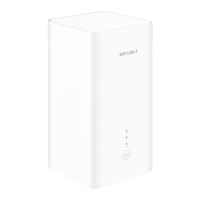

 To Next Page
 General