Need help?
Do you have a question about the Tracerco PED Series and is the answer not in the manual?
Explains how PEDs measure dose equivalent and dose rate.
Describes behavior and indicators during dose rate overload.
Details how PEDs alert users to alarm conditions.
Explains dose alarm levels, sounder, vibration, and LED indications.
Explains dose rate alarm levels, sounder, vibration, and LED indications.
Details the alarm indications and behavior during dose rate overload.
Explains the modes of data logging (periodic, intelligent).
Explains GPS logging functionality for location tracking with data.
Guides on initial setup using DoseVision™™ and device settings.
Explains how PEDs indicate critical errors and lists common error types.
Explains the process of charging the PED battery using various methods.
Explains recommendations and procedures for PED calibration.
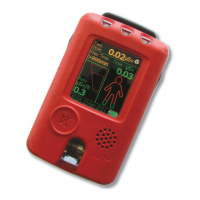
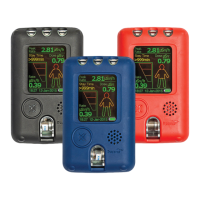
The Tracerco Personal Electronic Dosimeter (PED) is a device designed to measure and record both accumulated dose and dose rate of radiation. It specifically measures the radiation equivalent dose Hp(10), accumulated in X-ray and gamma ray radiation, which represents the equivalent dose at 10 mm below the surface of the upper body. For accurate readings, the PED must be worn on the upper body.
The PEDs measure dose rates in a range from 0 to 100 mSv/h (0 to 10 rem/h), with extended range variants capable of measuring up to 1.0 Sv/h (0 to 100 rem/h). The device offers several display modes: Combined dose and dose rate (default), Dose rate only (including peak dose rate), and Dose only (including stay time). The screen can also be flipped for user convenience.
Key information displayed on the readings screen includes:
The PEDs are equipped with two configurable dose rate alarms and up to four dose alarm levels. These alarms alert users through:
In case of dose rate overload (above 100 mSv/h or 1 Sv/h), the screen displays "Overload" and the dose rate as ">100mSv/h" or ">1 Sv/h". Dose values flash to indicate potential inaccuracies, and a warning symbol with "Dose Error?" appears in the status bar. An alarm sounds continuously until the button is pressed. Once the dose rate falls, the screen returns to normal, but dose values continue to flash, and the warning remains until data is transferred to DoseVision™.
Data logging is a core function, with two modes:
The PEDs also support "Tasks," which monitor dose and peak dose rate for specified periods. Tasks are started and stopped manually, with current task dose displayed on the readings screen. Up to 9999 tasks can be recorded, and the four most recent can be reviewed.
The PEDs are operated using a single button for navigation and selection. A long press turns the device on, opens the menu system, and makes selections, while a short press scrolls through options. The button also silences alarms.
The main menu provides access to:
The settings menu allows configuration of:
PEDs should be worn on the upper body with the screen facing outwards for correct personal dosimetry. Wearing it on the outer layer of clothing ensures easy reading and visibility of alarm lights. A clip can be used to secure the PED to a belt or other clothing.
PEDs display non-critical warnings and critical error messages in the status bar. Non-critical warnings (e.g., "Battery low," "Calibration Due," "Memory low") require action but do not prevent operation. Critical errors (e.g., "Battery critical," "Clock failure," "Detector failure," "System failure") indicate problems preventing accurate operation, triggering an audible alarm, and displaying an error message on screen.
Firmware upgrades can be downloaded from the Tracerco website and installed using DoseVision™.
PEDs contain high-capacity Li-ion batteries. To maintain good battery health:
PEDs can be charged via a charger dock or directly using a micro USB connection. The charger dock supports mains, 12Vdc car, or computer USB power. Tracerco recommends using only Tracerco-supplied accessories. PEDs should be charged in a cool environment (below 35°C/95°F) and out of direct sunlight. During charging, estimated battery capacity and a lightning flash icon are displayed, showing "full charge" above 95%. PEDs do not record data while charging.
The device's mould should be cleaned with a non-abrasive cloth, water, and a mild detergent. The screen of the PED-IS has an antistatic coating, which must be preserved by cleaning only with a non-abrasive cloth, water, and mild detergent. Incorrect cleaning can remove this coating.
Ionising radiation legislation recommends regular inspection, testing, and recalibration. Tracerco PEDs must be calibrated with the display screen facing the radiation beam, with the GM-tube detector window clearly marked. An ISO phantom or correction factor should be used. Calibration is invalid if the PED is not worn on the torso when operating as a dosimeter, unless in handheld mode. Tracerco PEDs are checked and calibrated before dispatch, and the next calibration due date is set in the device.
Repairs to PED-IS devices must be performed by suitably trained personnel according to applicable codes of practice (e.g., IEC/EN 60079-19), using only parts supplied by Tracerco.
Various accessories, including transit cases, protective leather holders, travel chargers, and lanyards, are available.
 General
| Type | Personal Electronic Dosimeter |
|---|---|
| Radiation Type Detected | Gamma and X-ray |
| Display | LCD with backlight |
| Operating Temperature | -20°C to +50°C |
| Ingress Protection | IP67 |
| Dose Range | 0.01 µSv to 10 Sv |
| Alarm Thresholds | Configurable for dose rate and dose |
| Data Logging | Yes |
| Connectivity | Bluetooth |

 To Next Page