4. “LIGHT” (2612/2613/2614)
Turn light on or off. A green indicator light will light steady if the lamp
is on. Flashes rapidly when the group function is activated.
5. “IGNITION” (2612/2613/2614)
Searchlights produced in 2016 and later:
The searchlight is equipped with an automatic ignition system.
This button is – like for the halogen searchlights – not in use.
For searchlights produced before 2016:
Press to ignite the xenon lamp. Activates the ignitor as long as the
button is held. Not used for other lamp types. Do not hold for more
than 1 second, as this may damage the ignitor. The searchlight has a
safety time-out to spare the ignitor and lamp from excessive wear.
6. “NARROW” AND “WIDE” (2612/2613/2614)
Adjusts the lamp focus. Will change the beam from wide to narrow or
backwards. Applicable only for searchlights with motor focus. Press
and hold to change focus. The focus motor will automatically stop at
each end position.
7. POSITION INDICATORS (2612/2613/2614)
Arrow left and right:
Steady light: The searchlight is in the sector left or right for
the home position.
Slow flashing: The searchlight is at the normal left or right
end position.
Fast flashing: The searchlight has stopped due to mechanical
overload or at the end limit switches.
Square:
Steady light: The searchlight is at its horizontal home position.
Slow flashing: The searchlight is at its horizontal and vertical
home position.
Fast flashing: The panel has sent a ‘set home position’ com-
mand to the searchlight.
8. JOYSTICK (2612/2613/2614):
Left – right. Up for light downwards, down for light upwards.
2 OPERATION
9. “FAST” AND “SLOW” (2612/2613/2614):
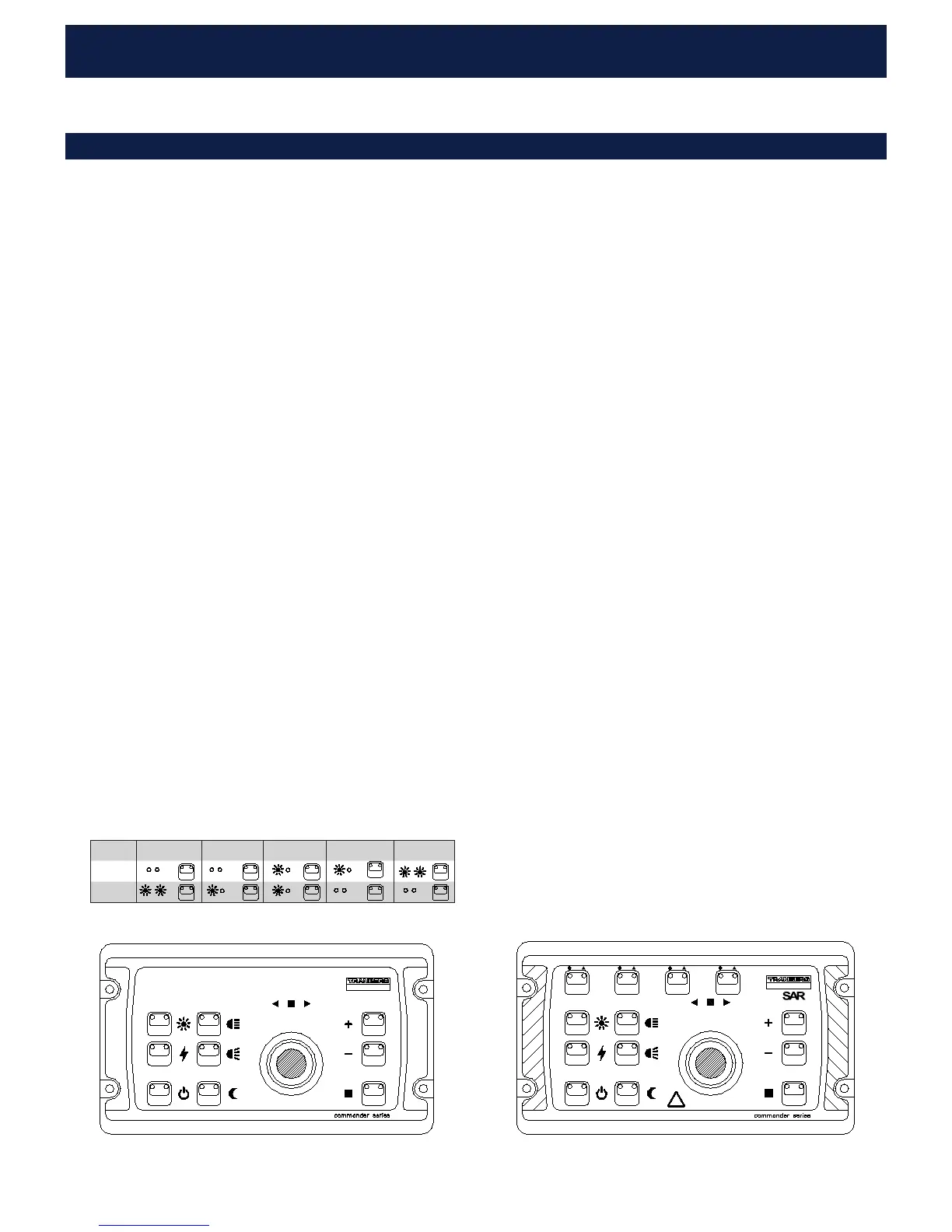
Adjust motor speed. 9 Steps, 5 Indications
10. “HOME / GROUP” (2612/2613/2614):
DUAL FUNCTION:
HOME: Move to “home”
If only one searchlight is selected (or has been used from a panel), a
short press on this button will command the searchlight to go to its
(preset) home-position. A long press (> 5s) will set the searchlight’s
current position as the new home position for that searchlight.
GROUP: Move several searchlights
If two or more searchlights have been turned on from the same panel,
a short press on this button will start the group-function. The selected
searchlights will then move simultaneously.
INDICATOR TEST:
1. To see if all indicators on the front of the panel are working, pro
ceed as follows:
2. Turn off panel with the ‘ON/STBY’ button.
3. Press and hold the ‘ON/STBY’ button for at least 5 seconds.
4. While holding the ‘ON/STBY’ button, press (and release) the
‘DIM’ button shortly.
5. Release the ‘ON/STBY’ button. All indicators on the front of the
panel will now flash rapidly.
6. If joystick or buttons are operated during this test, a corresponding
LED (s) will extingwish as long as the button is held.
7. Press (and release) shortly the ‘ON/STBY’ button to exit lamp test
mode and to turn on panel.
NOTE: Slow flashing is 1 sec. on, 1 sec. off. Fast flashing is 2 flashes
per second.
TEF 2612 Single searchlight control panel
MULTI SAR SEARCHLIGHT CONTROL PANEL TEF 2614
LIGHT
IGNITION
ON/STBY
NARROW
WIDE
DIM
FAST
SLOW
GROUP
HOME/
A B
D
WARNING! UV/IR LIGHT
!
C
TEF 2614 SAR searchlight control panel
600A102101
Speed 1 slow 2, 3 4, 5, 6 7, 8 9 fast
Fast
Slow
SINGLE SEARCHLIGHT CONTROL PANEL TEF 2612
LIGHT
IGNITION
ON/STBY
NARROW
WIDE
DIM
FAST
SLOW
GROUP
HOME/


 To Next Page