This document is an operation manual for the TransMotion Medical Model TMM3 Series Video Fluoroscopy Chair. It provides comprehensive information regarding the chair's function, technical specifications, usage, and maintenance.
Function Description:
The TMM3 Series Video Fluoroscopy Chair is a medical device designed to facilitate patient positioning for video fluoroscopy procedures. It functions as both a chair and a stretcher, offering various configurations to accommodate patient comfort and medical imaging requirements. The chair features motorized adjustments for the back, leg, and seat sections, allowing for precise positioning and easy patient transfer. A quick-release mechanism for the back section is included for emergency situations. The chair is intended for indoor use only and should be operated by qualified, trained medical personnel.
Important Technical Specifications:
- Maximum Patient Weight: 350 lbs (158 kg). Exceeding this limit can damage the chair.
- Back Surgical Bar Weight Capacity: Each back surgical bar has a maximum weight capacity of 50 lbs. The total weight of the patient plus equipment should not exceed the chair's overall 350 lbs capacity.
- Wheel Base Length:
- "S" Option (Short Base): 26.0 inches
- Standard Wheel Base: 30.0 inches
- Oxygen Cylinder Accommodation: The chair is designed to accommodate up to an E-size oxygen cylinder (4-3/8" outer diameter x 25" length).
- EMI Immunity Level: The chair has been tested to a 20 V/m immunity level, providing protection against common sources of radiated electromagnetic energy.
- Power Options:
- "B" Option (Battery Pack): Utilizes rechargeable battery packs. An additional battery and wall-mountable charger are included.
- "A" Option (AC Power): Equipped with a hospital-grade three-prong plug for direct AC wall outlet connection, which also charges on-board batteries.
- Accessories: The chair can be equipped with accessory belts and allows for mounting accessories to back surgical rails, provided they are approved by TransMotion Medical and compatible with a .365" thick by 1.125” wide surgical rail.
Usage Features:
- Caster Brake Operation:
- Brake Mode: Locks all four casters, preventing swiveling and spinning. Activated by pressing the red end of the brake pedal.
- Neutral Mode: Allows all four casters to swivel and spin freely. Activated by placing the brake pedal in a horizontal orientation.
- Steer Mode: Locks one caster (near the patient's right foot) parallel to the base for directional control, while allowing it to spin. Other three casters swivel and spin freely. Activated by pressing the green end of the brake pedal.
- Side Rail Operation: Side rails can be lowered, stowed, and raised. They automatically lock into the "up" position. The angle of the side rails can be adjusted by loosening and rotating jam nuts under the seat.
- Pendant (Controller): The hand pendant is used for motorized adjustments and is not intended for patient use. It features buttons for:
- Back Section Adjustment: Raises or lowers the back.
- Leg Section Adjustment: Raises or lowers the leg section.
- Seat Height Adjustment: Raises or lowers the entire seat section.
- Simultaneous Leg and Back Section (Auto Contour) Operation: Allows for quick conversion between stretcher (leg up, back down) and chair (leg down, back up) configurations.
- Patient Ingress/Egress: Patients should always enter and exit the chair from the side, with their body weight centered over the seat section, and the chair in its lowest, upright-chair position with casters locked and side rails lowered/removed.
- Patient Transfer: Patient transfers between the chair (in stretcher orientation) and another horizontal surface should be made to the right side of the TMM3-Series chair, with the chair's height matched to the other surface, casters locked, and side rails lowered/removed.
- Push Bar Operation: The push bar can be lowered or raised by pulling a red release knob. It automatically locks into the "up" position.
- Seat Rotation: The seat can be rotated 90 degrees counterclockwise (or 1/4-turn to the operator's right) for imaging procedures. This feature is engaged by pulling out a black seat lock knob. While rotated, the chair cannot be lowered, and the back and leg sections can only be adjusted slightly. Patient transport or transfer is not permitted when the seat is rotated.
- "F" Option (Folding Footrest): This option includes a foldable footrest. Users should be aware of pinch points when positioning the footrest and stow it before articulating the chair into a supine position for patient comfort.
Maintenance Features:
- Labeling Diagrams: Labels should be inspected periodically (every three months) for legibility and condition. Replacement labels can be ordered from TransMotion Medical Customer Service.
- Cleaning Instructions:
- Cushion Pads, All Rails, Base Cover, Actuators, Battery Pack, Pendants: Should be wiped/scrubbed with a damp cloth using detergent, water, and hospital-grade disinfectants after each use (or as required for base cover, actuators, and battery pack).
- All Medical Accessories: Clean according to the manufacturer's manual.
- Important Cleaning Notes: Do NOT steam clean or pressure wash the chair. Avoid machine/pressure/power wash procedures. Clean exterior surfaces only with minimal water for actuators and battery pack.
- Pad Removal Instructions: Cushions are removed by pulling laterally, not from top to bottom.
- Preventive Maintenance (Regular Basis):
- Cushion Pads: Inspect for tears; discard if torn.
- All Rails: Every three months, inspect for chipped paint, burrs, and rough edges. Remove burrs with a metal file and touch up paint as needed to prevent personnel cuts.
- All Fastened Joints: Every three months, inspect all fasteners for proper fit and tightness; retighten as needed. Tools required include wrenches, Allen wrenches, and screwdrivers.
- All Labels: Every three months, inspect for tattered, torn, missing, and illegible labels. Contact customer service for new labels.
- Pendants: Every three months, test the function of each button and inspect the pendant label for readability. Contact service if the pendant is not functioning or the label is unreadable.
- Battery Care:
- "B" Option (Battery Pack): If stored for more than 3 weeks, remove the battery pack.
- "A" Option (AC Power): If stored for more than 1.5 weeks, leave the chair plugged into an AC wall outlet or unplug the battery pack from the control box.
- Charging: Plug the chair in overnight or 24 hours prior to service to ensure sufficient power. The pendant will not illuminate when charging.
- Disposal: Batteries contain lead and sulfuric acid and must be disposed of properly according to regulations. Wear proper skin and eye protection when handling. Do NOT short-circuit battery terminals.
- Life: Battery capacity diminishes over time; regular charging and replacement every two years (or as required) are recommended.
- Back Section Quick Release: Activate every thirty days to ensure proper operation. Contact customer service if it does not operate properly. Do not twist or adjust the damper.

 Need help?
 General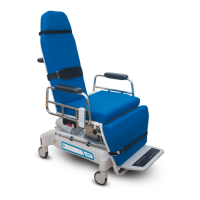

 To Next Page
