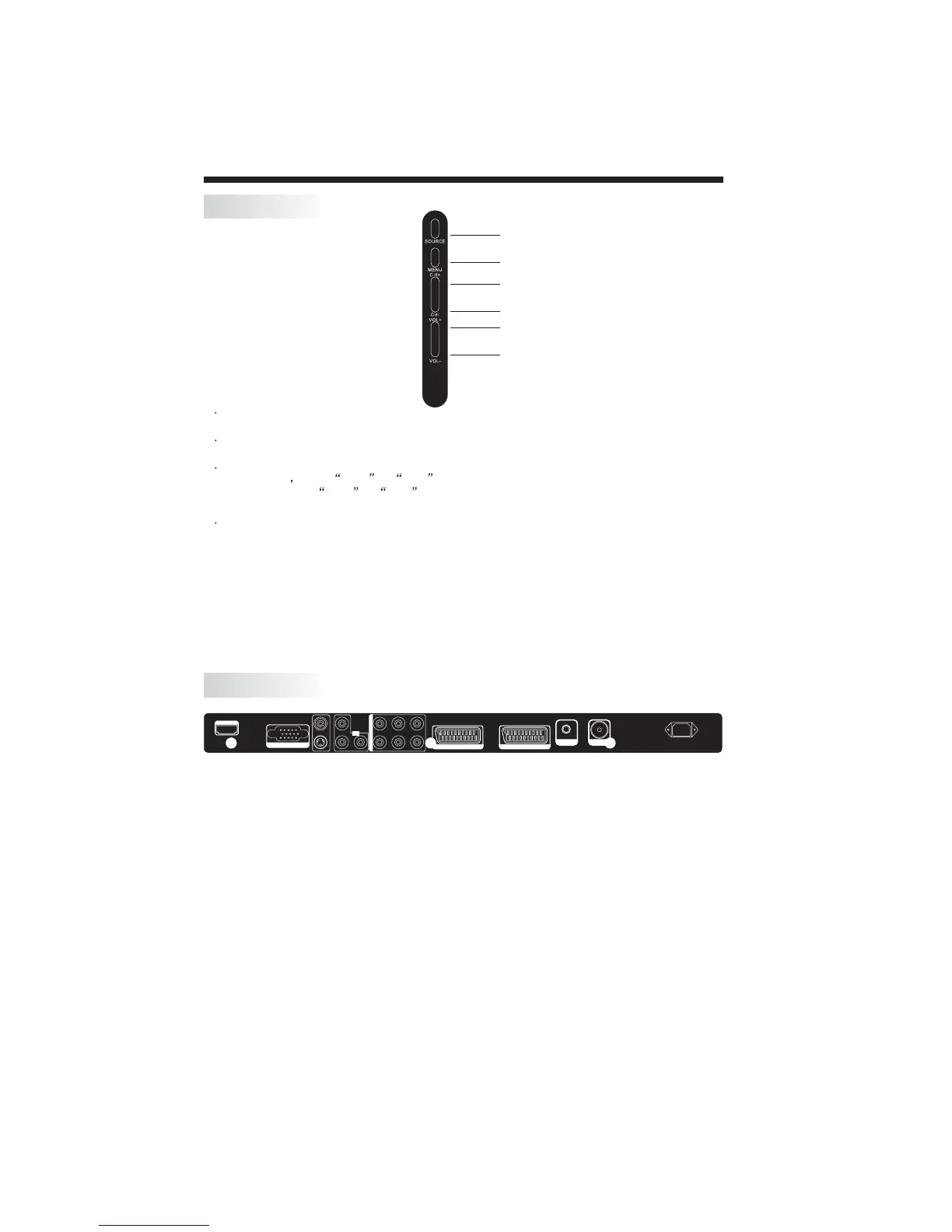
All the terminals are(from left to right):
HDMI, VGA , ,YPbPr,PC AUDIO,
SCART1, HALF SCART2 , HEADPHONE, ANTENNA,
Note: CVBS and S-VIDEO share one audio channel.
CVBS/S-VIDEO YPbPr AUDIO,AV AUDIO
FULL AC POWER.
SCART1(Full) is a scart with CVBS and RGB input.
SCART2(Half) is a scart with CVBS input only
.
INSTALLATION
KEYBOARD
REAR TERMINALS
-5-
SOURCE
MENU
CH+
CH-
VOL+
VOL-
1 SOURCE
2MENU
3 CH+/CH-
4 VOL+/VOL-
Display the input source menu.
To display main MENU.
In TV mode press CH+ or CH- to change the channel up and down.
In MENU,press CH+ or CH- to select items in MENU.
In standby mode, it can turn on the TV.
Adjust sound level.
In MENU,adjust the item that you selected.
S-VIDEO
AV-VI DEO
YLLL
Y.P b. Pr
INPUT
Pb Pr
RRR
PC Y.Pb.Pr AV
AUDIO INPUT
AC-INPUT
100-240V~ 50/60Hz
ANT
SCART 1(FULL)
SCART 2(HALF)
VGA INPUT
HDMI INPUT
EAR PHONE
S-VIDEO
AV-VI DEO
YLLL
Y.P b. Pr
INPUT
Pb Pr
RRR
PC Y.Pb.Pr AV
AUDIO INPUT
AC-INPUT
100-240V~ 50/60Hz
ANT
SCART 1(FULL)
SCART 2(HALF)
VGA INPUT
HDMI INPUT
EAR PHONE


 To Next Page