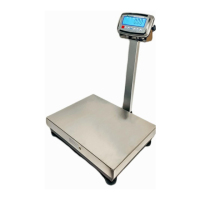
EN-10 FBx Series Bench Scale
conditions may require that the scale be recalibrated. Temperature
changes, geographic gravity variations and rough handling are few
reasons why a scale may need recalibration.
Notes: 1. Make sure that appropriate calibration masses are available
before beginning calibration.
2. Make sure that the scale is level and stable during the entire
calibration process.
3. Calibration is unavailable with J13 interface is not shorted CAL
jumper .
4. Allow the scale to warm up for more than thirty (30) minutes after
stabilizing to room temperature.
5. To abort calibration, press key anytime during the process.
3.3.1 Any Value Calibration (AnyCal)
AnyCal Calibration uses two points to adjust the scale. One point is called
the zero value where there is no weight on the scale. The other point is
any value that can be set, but it is recommended that the value is not less
than half of the full capacity. The value closest to the full capacity is
recommended to give the best performance over the entire weighing
range.
Follow the steps below to calibrate the FBx scale:
Step 1: To enter the parameter menu mode:


 To Next Page