LCT SERIES Operation Manual
14
Rev 3, 5.30.17
Key Functions:
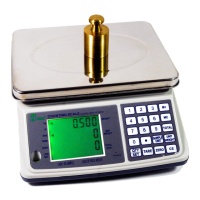
The “Zero” key function allows the subtraction of multiple container values
through the weight range and is used to set or re-adjust to zero.
The “Tare” key function allows the user to subtract the container value and will
also set the scale at zero.
The Numeric keys (0-9) is used for setting numeric data for sample number,
sample weight or to set HI/LO settings.
The Decimal Point “(.)” key function is used to set the decimal position of the
sample weight.
The “Sample Unit” key function is used when setting the counted sample
numbers on the weighing pan into weighing scale memory.
The “Unit Weight” key function is used when setting the known unit weight data
into the weighing scale in normal operation.
The “CE” key function is used for canceling the numeric setting data or cancels
the previous unit weight data.
The “Qty. Set” key function is used for alternating the normal count and quantity
check operation.
The “M+” Memory key function is used to store the accumulated count data, and
has a storage limit of 99 items.
Program Options
The weighing scale can perform additional applications such as: piece counting, high /
low check-weighing, and weight unit conversion.
Piece Counting
Sample Setting: There are two sample setting methods:
Number setting: Counting pieces with an unknown unit weight
Select your unit of measure (kg. or lb.), to choose between these measures
press the “sample unit” key.
Place a pre-counted number of items ( i.e. 10 units) on the weighing pan, either
directly or, using a container (do not forget to tare the container weight first)
The total weight will be displayed on the scale.
Enter the corresponding number of items (i.e. 10 units) using the numeric keys
and press the “Sample Unit” key.
Process is complete.
Press M+ to save the accumulated total (if desired)
Press “CE” key to clear any previous setting or to cancel the previous unit weight
and sample setting.
Press “CE” to return to normal operation.
Unit weight setting: Counting pieces with a known unit weight



 To Next Page