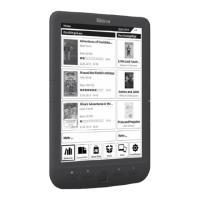
Need help?
Do you have a question about the TrekStor eBook-Reader 3.0 and is the answer not in the manual?
Details physical buttons, ports, and indicators for basic interaction.
Instructions for linking the eBook-Reader to a PC via USB for data transfer.
Guide for transferring various file types to and from the device.
Explains the automatic charging process when connected to a computer.
Procedures for safely removing the device from a computer to prevent data loss.
Covers powering the device, adjusting screen orientation, and changing volume levels.
Explains how to navigate menus, options, and select files for reading or playback.
Guide on how to access the detailed manual stored within the device.
Essential guidelines for protecting the device from environmental hazards and improper use.
Warnings about high volume, hearing protection, and using while driving.
Information on how to contact TrekStor support for product inquiries.
 General
| Display Size | 6 inches |
|---|---|
| Display Technology | E Ink |
| Resolution | 800 x 600 pixels |
| Internal Memory | 4 GB |
| Storage | 4 GB |
| Connectivity | USB 2.0 |
| Card Reader | microSD (up to 32 GB) |
| Supported Formats | PDF, TXT, HTML, FB2 |

 To Next Page