EasyManua.ls Logo

TrendGeek TG-HR2 - User Manual

TrendGeek TG-HR2
13 pages
Print Icon
To Next Page IconTo Next Page
Loading...
TrendGeek
®
* User Manual
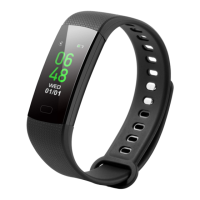
Fitness Wristband TG-HR2
The manufacturer Technaxx Deutschland GmbH & Co.KG hereby declares
that this device, to which this user manual belongs, complies with the essential
requirements of the standards referred to the Directive RED 2014/53/EU. The
Declaration of Conformity you find here: www.technaxx.de/ (in bar at the
bottom “Konformitätserklärung”). Before using the device the first time, read
the user manual carefully.
Service phone No. for technical support: 01805 012643 (14 cent/minute from
German fixed-line and 42 cent/minute from mobile networks).
Free Email: support@technaxx.de
This device has a rechargeable battery. It must be fully charged before
first use. NOTE: Charge the battery of the device every 23 month if it is
not used!
Keep this user manual for future reference or product sharing carefully. Do the
same with the original accessories for this product. In case of warranty, please
contact the dealer or the store where you bought this product.
Warranty 2 years
Enjoy your product * Share your experience and opinion on one of the
well-known internet portals.
Features
Fitness Wristband to monitor your heart rate, blood
pressure, your fitness, your sleep & your active phases
Displays heart rate, blood pressure, steps, distances,
burned calories, sleep time, clock, date & weather
Notification: calls, SMS, Email, WhatsApp, social media,
achieved goals, activity reminder, drink reminder
Free FunDo Pro APP in Google Play Store and Apple
AppStore
Anti-lost function: find your mobile phone or the wristband
IP67 Waterproof
Easy handling via touch button
Choice of 3 different display settings
Question and Answer IconNeed help?

Do you have a question about the TrendGeek TG-HR2 and is the answer not in the manual?

Summary

Product Features and Overview

Key Product Features

Lists functionalities like health monitoring, notifications, app integration, anti-lost, and waterproofing.

Technical Specifications and Charging

Device Specifications

Details display, processor, sensors, connectivity, power supply, and dimensions.

Charging Procedure

Visual guide on how to remove the wristband and connect it to a USB port for charging.

Product Overview and Setup

Product Components

Identifies the display, touch button, heart rate sensor, and USB plug on the device.

Initial Startup and Connection

Instructions for turning on the wristband and automatic Bluetooth connection.

Companion App Installation

Guide on how to search for and install the FunDo Pro APP on a smartphone.

Using the Wristband Functions

Connecting to the FunDo Pro App

Steps to connect the wristband to your smartphone via the app.

Activity Tracking Modes

Details on using Pedometer, Sleep Monitor, and Heart Rate/Blood Pressure measurements.

Advanced Functions and Notifications

Sport Mode Selection

How to select and start different sport tracking modes.

Message and Notification Handling

Viewing push notifications like calls, SMS, and social media alerts.

Additional Options

Accessing Find Phone, About, and Power Off functions.

Safety and Environmental Information

Usage Hints and Precautions

Tips on Bluetooth connection and handling the device carefully.

Safety Instructions

Warnings against modification, immersion in water, and battery hazards.

Environmental Protection

Guidelines for proper disposal, cleaning, and distributor information.

Regulatory Compliance (FCC)

FCC Compliance Statement

Information regarding compliance with FCC rules and potential interference.

TrendGeek TG-HR2 Specifications

General IconGeneral
BrandTrendGeek
ModelTG-HR2
CategoryHeart Rate Monitor
LanguageEnglish