EC 889
10_
ENGLISH
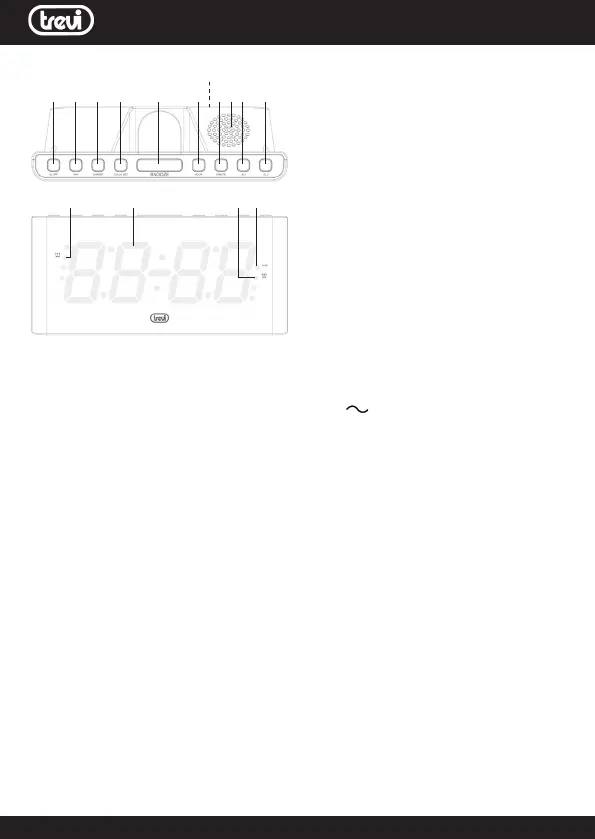
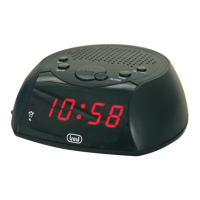
COMMANDS DESCRIPTION
1. AL OFF button, alarm switch Off
2. NAP Button
3. DIMMER button, display brightness
adjustment
4. CLOCK SET button
5. SNOOZE button
6. HOUR button, hour adjustment
7. MINUTE button, minutes adjustment
8. Speaker
9. AL1 button
10. AL2 button
11. Battery compartment (on the back)
12. Led Alarm 1 indicator
13. LED Display
14. Led Alarm 2 indicator
15. Led indicator NAP function
INSTALLATION
Insert two “AAA” batteries in the compartment (11) on the back of the device,
respecting the indicated polarity.
Insert the plug of the power cable into a 230V 50Hz socket; the display will
ashuntilthetimeisset.
TIME ADJUSTMENT
1. Hold down the CLOCK SET button (4) for a long time until the time starts
ashing;
2. Press the HOUR button (6) several times to set the current time;
3. Press the MIN key (7) several times to set the current minutes;
4. PressCLOCKSETbutton(4)toconrm.
ALARM ADJUSTMENT AND ACTIVATION
1. Press the AL1 button (9), the display, indicating the alarm time, and the
alarm1indicatorLED(12)willbegintoash;
2. Press the HOUR button (6) several times to adjust the alarm time;
3. Press the MIN key (7) several times to set the minutes of the alarm;
4. PresstheAL1button(9)toconrmthesetting.
The alarm indicator (12) will light up on the display.
5. To set ALARM2 follow steps 1 to 4 by pressing the AL2 key instead of AL1.
To view the alarm set time or activate the alarm, press the AL1 (9) or AL2 (10)
button and wait a few seconds to return to the normal time display.
To disable the indicator (12) or (14) press the Alarm1 or Alarm2 button twice.
SNOOZE FUNCTION AND ALARM DEACTIVATION
1. During the alarm sound, press the SNOOZE button (5) to temporarily stop
thealarm,thealarmindicator(12/24)willbegintoash.After9minutesthe
alarm will resume sounding.
2. During the alarm sound, press the AL OFF button (1) to permanently stop
1 2 3 4 5 6 7 8 9 10
12 13 1415
11



 To Next Page