29
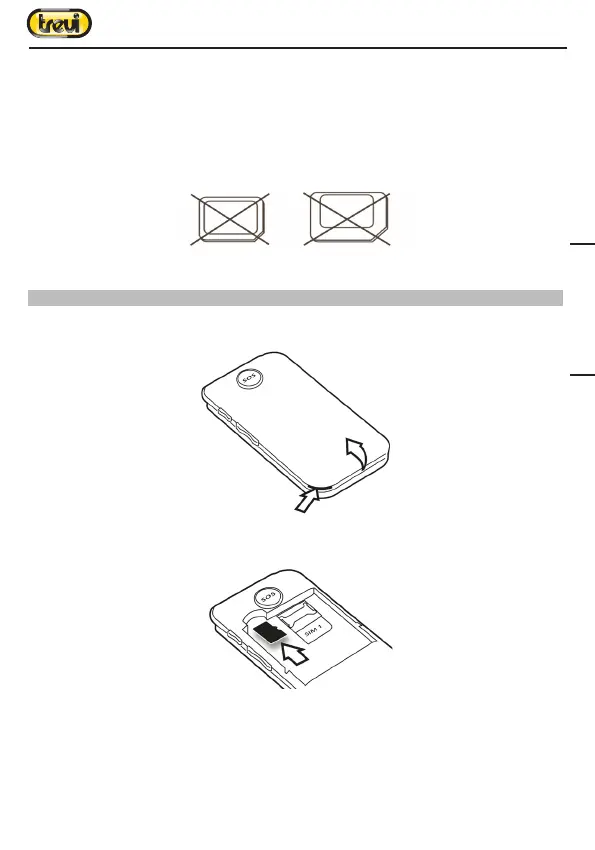
damage to the device and the micro/nano SIM itself.
Warning:
• TREVI not liable for damages caused by the use of adapters for micro/nano-SIM.
• TREVI reserves the right to refuse free assistance in warranty on defective products that
have ‘caused by the use of the SIM adapters for micro/nano-SIM.
• Do not insert memory card into the SIM card slot.
3. Inserting the micro SD card
To store photos, videos, and music should insert a micro SD external memory.
1. Carefully remove the back cover;
2. Insert the microSD card keeping the surface with the electrical contacts facing down
(display side);
3. Replace the back cover.
Notes:
• Some card brands may not be compatible with the phone. The use an incompatible
memory may be damaged or the card memory itself.
• The appliance only supports memory formatted in FAT. If you enter formatted cards
differently the phone will ask you to reformat the memory card.
Nano SIM card with adapter
ENGLISH


 To Next Page