26
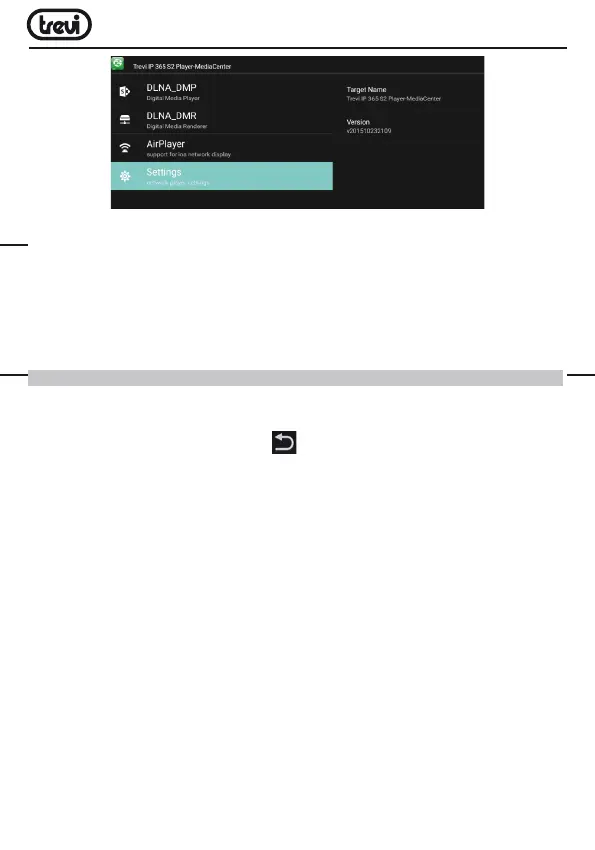
•SelectingDLNA_DMP(DigitalMediaPlayer)willdisplaythelistofdevicesnetworked,
justselecttheoneyouwanttodisplaythefilethatcontainsandplaythemonTV.
•SelectingDLNA_DMR (DigitalMediaRendered)youcansettheDMR.
•SelectAirPlayer if you have Apple devices. AirPlayer is an Apple ‘s application dedicated
users. With AirPlayer you can play the image and videos of your apple device directly
on TV.
Note: The AirPlay function can be precluded due to continuous iOS software updates).
SETTING
The“Settings”menuallowsyoutoconfigureorchangethesettingsofyourAndroiddevice.
•Frommainpageselect“Setting”-“Moresettings”.Toreturntotheprevious
page or to cancel a command, press Quit(24)ontheremotecontrol.
Wi-Fi
ToactivateandsearchWi-Finetworks.ThiswilldisplayaavailableWi-Finetworkslist,
chooseoneandenterthepasswordifrequired.
BLUETOOTH
ToturnonandsearchBluetoothdevices.Youwillseealdeviceslist,pairtheIP365S2to
a device and enter your PIN if requested.
DATA USAGE
Thediagramshowingtheflowofuseddataandtheapplicationslistthathavebenefited
the most.
MORE
Possibility of using IP 365 S2 as Portable hotspot or use a VPN net.
DISPLAY
To set the font size and activate the “Transmit screen.”
SOUND & NOTIFICATION
Toadjustthevolumes,choosetheringtonenotificationsandactivatetheTouchsounds.
ENGLISH



 To Next Page