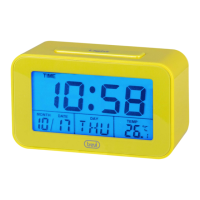
SLD 3P50
DESCRIPTION
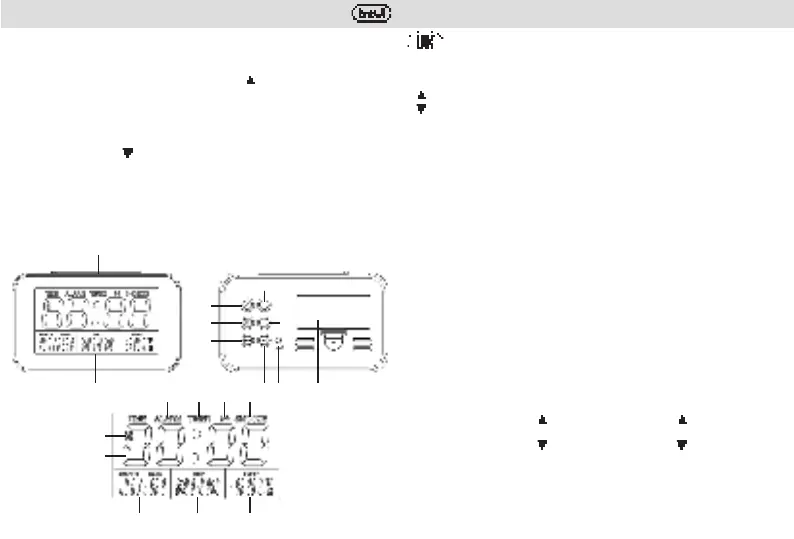
1. LIGHT button, illumination/ momentary interruption alarm
2. Display
3.
up button
4. down button
5. MODE button
6. SNZ (Snooze) button
7. Reset button
8. Battery compartment
9. ALM button
10. SET button
A. AM/PM indicator
B. Display current time
C. Current month
D. Current day
E. Temperature indicator
F. Icon SNOOZE function active
G. Ringtone indicator
H. Icon TIMER function active
J. Icon ALARM function active
INSERT THE BATTERIES
1. Remove the battery compartment cover (8).
2. Insert two 1.5V "AAA" batteries. Make sure the negative and positive polarities of the batteries
are correct according to the markings
3. Close the battery compartment cover (8).
TIME SETTING
1. Under normal time display mode, hold "MODE" key (5) for 2 seconds to enter into time
setting mode. The setting sequence is 12HR/24HR -> Hour -> Minute -> Year -> Month ->
Date -> Exit;
2. Press"SET"key(10)toconrmandexistthesetting;
3. During setting process, press "
" key (3) once and ahead; hold " " key (3) for 2 seconds,
go ahead more quickly;
4. During setting process, Press " " key (4) once and back; press " " key (4) for 2 seconds,
go back more quickly;
5. The weekday display will be changed as per time setting;
6. Thesettingwillbeconrmedandexitedwithoutanyoperationin60seconds.
ALARM AND SNOOZE SETTING
1. Press "MODE" key (5) twice or press "ALM" key (9) directly to enter into alarm setting mode.
5. Alla data selezionata l'apparecchio suonerà automaticamente la canzone "HAPPY BIRTHDAY"
per 5 minuti.
IMPOSTAZIONE TIMER
1. In modalità visualizzazione dell'ora, premere il tasto "MODE" (5) 4 volte per accedere alla
modalità timer. Premere il tasto "SET" (10) e poi il tasto "
" (3) per impostare l'ora e i minuti;
2. Premere il tasto "MODE" (5) per tornare alla visualizzazione dell'ora; la scritta "TIMER" (H)
suldisplaycominceràalampeggiare:
3. Una volta trascorso il tempo impostato, l'apparecchio emetterà un suono di avviso.
SELEZIONE SUONERIA
In modalitàdivisualizzazione dell'ora, potete modicare lasuoneria in qualsiasi momento,
premere più volte il tasto " " (4) per scegliere una delle suonerie disponibili, l'icona (G) sul
display si attiverà.
DATI TECNICI
Alimentazione: ................................... 2 batterie formato “AAA”
Dimensioni: ..................................... 119 x 71 x 49 mm
1
2
3
4
5
6 7 8
9
10
C D E
B
A
J H G F


 To Next Page
 Loading...