35
Hold the Beeper so that the switches are on the top edge of the
compartment, as shown in the diagram. You do not need to switch
the Beeper off to change the settings or to make the new settings
take effect.
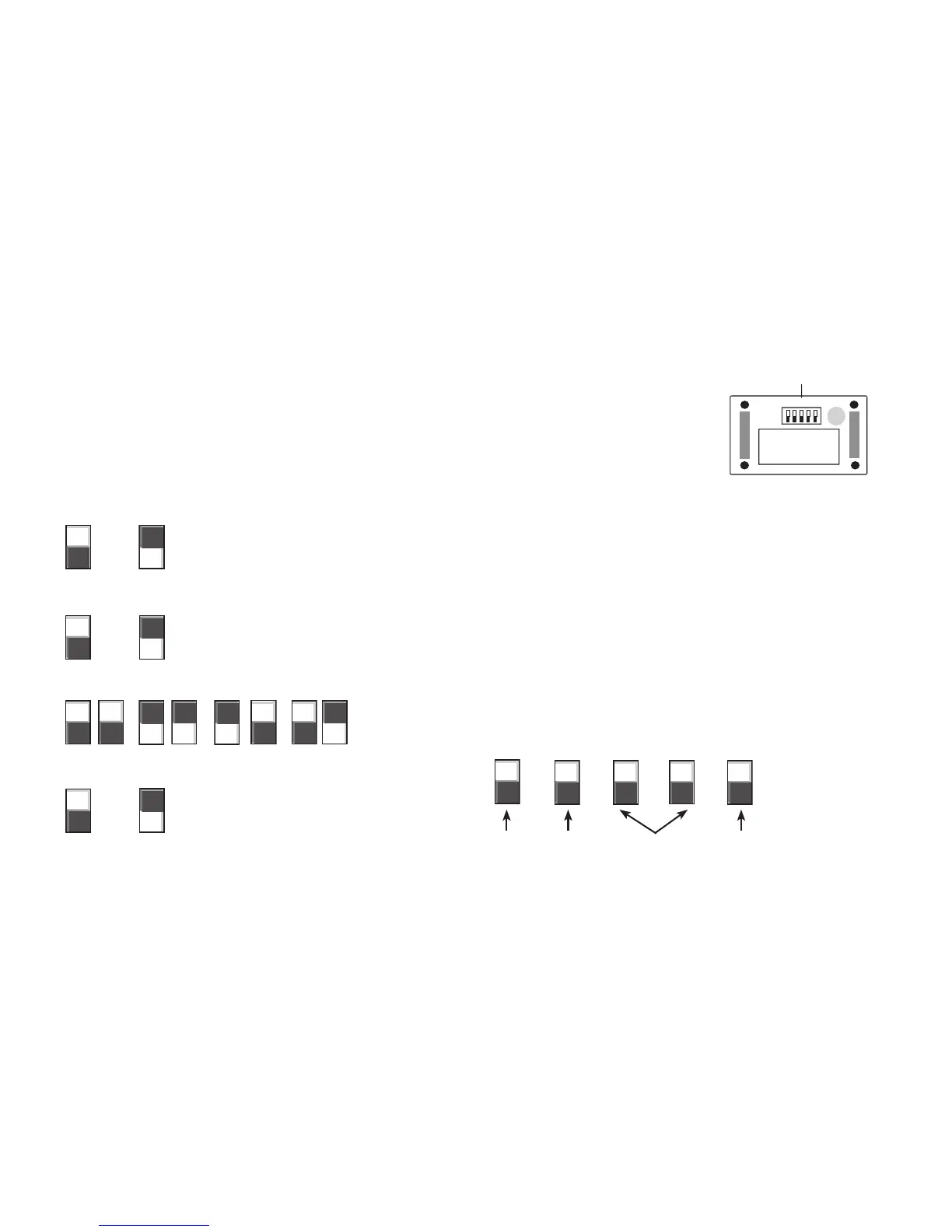
To select your settings, set the switches in the positions shown in the
diagram. The switch setting is indicated by the dark rectangle in the
diagram section. All switches except the volume switch make a
conrming “chirp” when their positions are changed. Replace the
battery compartment cover when done.
Low High
Range/Point Point-Only
Single Beep Double Beep Triple Beep Tracking Tone
Single Tone Hawk Scream
Remove Battery Compartment Cover. Hold the Beeper upside down and unscrew the four Phillips
head screws on the bottom of the Beeper. Slide the battery compartment cover along the collar strap
to expose the battery compartment and the Beeper switches.
Volume Modes Run Tones Point Tones
9-volt battery
Switches
When setting switches,
hold the Beeper as shown
1 2 3 4 5



 To Next Page