EN
|05
- Bluetooth Pairing: The white indicator ashes slowly.
- Connection Successful: The white indicator turns o.
- Low Battery: The white indicator quickly ashes twice every 20 seconds.
Put the earbuds back into the charging case, and close its cover to start charging. It
takes about 90 minutes to get the earbuds fully charged.
Earbud Indicator Light Instruction
Charging the Earbuds
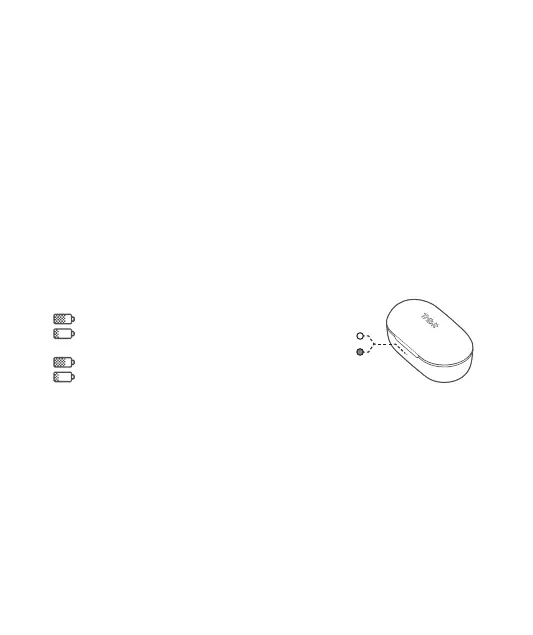
Charging Case Indicator Light Instruction
When the charging case isn’t in the charging state:
>10%: The white indicator turns on.
<10%: The red indicator turns on.
When the charging case is in the charging state:
>15%: The white indicator ashes slowly.
<15%: The red indicator ashes slowly.
Aer being fully charged (in about 90 minutes): The white indicator glows sturdily.
Pairing the Le Earbud with the Right Earbud
If the le and right earbuds are disconnected occasionally, please click the touch area
of either earbud for 3 times. The white indicator will ash quickly, and a few seconds
later the le earbud indicator will ash in white slowly while the right earbud indicator
will turn off, indicating the two earbuds have been connected with each other
successfully.
Note: Before pairing the left and right earbud, make sure that the earbuds are
disconnected from the device.


 To Next Page