EasyManua.ls Logo

Tricity Bendix CDW 086 - Using Your Dishwasher; Control Panel Overview; Programme Selection

Tricity Bendix CDW 086
14 pages
Print Icon
To Next Page IconTo Next Page
To Previous Page IconTo Previous Page
Loading...
USE
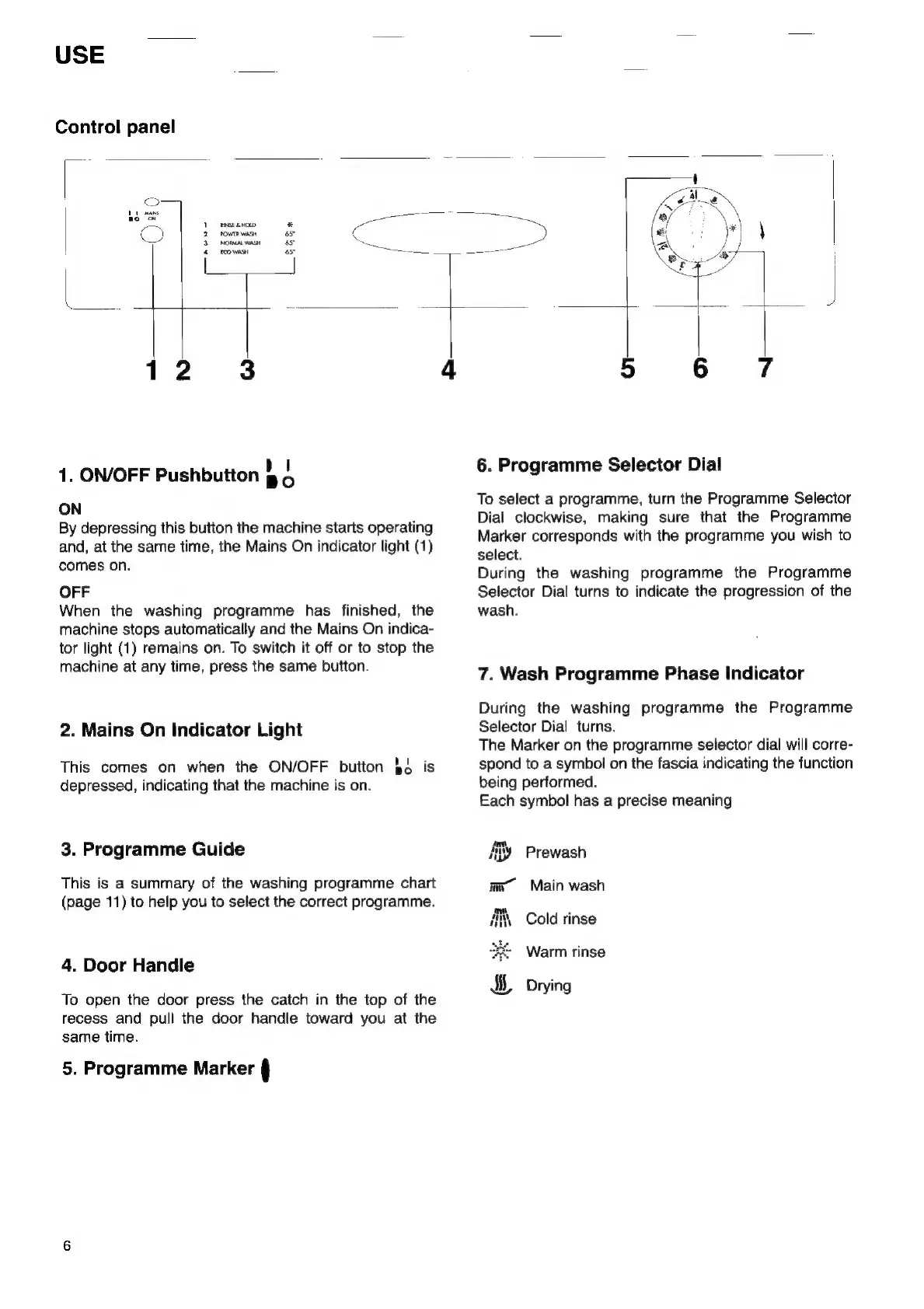
Control
panel
menos
y
rownwiss
ast
¢
NORMAL
WASH
6s
~~
scons
re
~~
1.
ON/OFF
Pushbutton
§
4
ON
By
depressing
this
button
the
machine
starts
operating
and,
at
the
same
time,
the
Mains
On
indicator
light
(1)
comes
on.
OFF
When
the
washing
programme
has
finished,
the
machine
stops
automatically
and
the
Mains
On
indica-
tor
light
(1)
remains
on.
To
switch
it
off
or
to
stop
the
machine
at
any
time,
press
the
same
button.
2.
Mains
On
Indicator
Light
This
comes
on
when
the
ON/OFF
button
§4
is
depressed,
indicating
that
the
machine
is
on.
3.
Programme
Guide
This
is
a
summary
of
the
washing
programme
chart
(page
11)
to
help
you
to
select
the
correct
programme.
4.
Door
Handle
To
open
the
door
press
the
catch
in
the
top
of
the
recess
and
pull
the
door
handle
toward
you
at
the
same
time.
5.
Programme
Marker
§
6.
Programme
Selector
Dial
To
select
a
programme,
turn
the
Programme
Selector
Dial
clockwise,
making
sure
that
the
Programme
Marker
corresponds
with
the
programme
you
wish
to
select.
During
the
washing
programme
the
Programme
Selector
Dial
turns
to
indicate
the
progression
of
the
wash.
7.
Wash
Programme
Phase
Indicator
During
the
washing
programme
the
Programme
Selector
Dial
turns.
The
Marker
on
the
programme
selector
dial
will
corre-
spond
to
a
symbol
on
the
fascia
indicating
the
function
being
performed.
Each
symbol
has
a
precise
meaning
Ay
Prewash
im
Main
wash
ii,
Cold
rinse
Warm
rinse

Related product manuals