Operation
Basic Procedures
$Press the key once
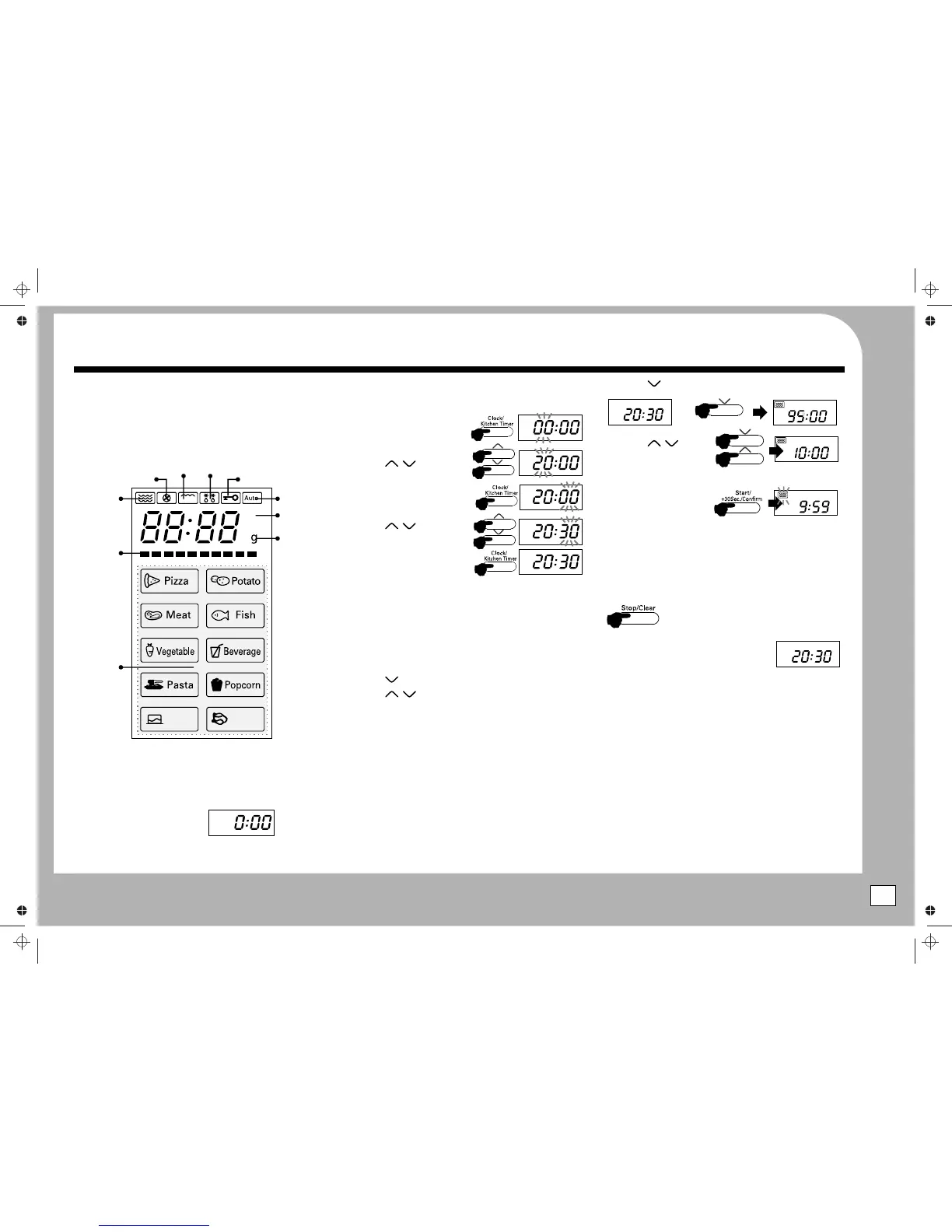
The Display Screen
SETTING THE CLOCK
Around the perimeter of the screen there are icons. These icons,
The clock is a 24 hour clock. To enter a time of 8:30 pm
singly or in combination give you a visual indication of the
$Press the Clock/Kitchen Timer
process which the oven is carrying out.
button once.
When executing a program the display indicates the amount of
$Press the / keys
cooking time remaining on the program.
to set 10 minutes.
$Press the / keys
to set the hours
$Press Start/+30 sec./Confirm.
to start cooking
$Press the Clock/Kitchen Timer
button again.
STOPPING THE OVEN
$Press the / keys
to set the minutes.
Open the door to interrupt cooking. To continue cooking, close
the oven door and press the Start/+30 sec./Confirm. button.
$Press the Clock/Kitchen Timer
Press Stop/Clear:
button again.
The cooking process is interrupted.
The time is now set.
To continue cooking press the Start/+30 sec./Confirm button.
BASIC COOKING
Pressing Stop/Clear twice will stop the oven
and any cooking programme will be erased.
$Open the oven door.
$Place the food in a suitable container. Site the container
WHEN COOKING HAS ENDED
centrally within the rim of the turntable.
The oven will beep 5 times and the clock time
$Close the door.
restores
$Press the key once
$Open the door and remove the food. Close the door.
$Press the / keys to set a cooking time from 5 seconds to
QUICK START (EXPRESS) COOKING
a maximum of 95 minutes.
By pressing the Start/+30 sec./Confirm button repeatedly you
Each key press increases/decreases the operating time:
can program the oven for Express cooking. at FULL power(100%).
0 -1 min : 5 seconds:
$Each press of the Start/+30 sec./Confirm button increases
1- 5 min : 10 seconds:
USING THE OVEN
the cooking time in 30 second intervals.
5 -10 min : 30 seconds
$The oven will start almost as soon you press the Start/+30
SWITCHING ON
10 - 30 min : 1 minute:
sec./Confirm button so be prepared!!
30 - 95 min : 5 minute intervals
$Unwrap and uncoil the power cord fully.
$During the cooking cycle, you can top up the remaining time
$Press Start/+30 Sec./Confirm. The oven will commence
$Plug the mains plug into a suitable wall socket.
to a maximum of 95 minutes by further presses of the
cooking at full power. The clock displays the remaining time
$Switch the mains power on.
Start/+30 sec./Confirm button.
left for the cooking programme.
$The oven will display
$Express cooking is a very good way of rapidly heating small
Example: Cook food at 50% power for 10 min.
portions of food, or easily adding a small amount of cooking
$Your oven is now ready to be programmed
time to finish dishes that are slightly undercooked.
5
Auto Cook
Menus
Microwave
Weight
Auto Cook
Defrost
Cake Chicken
ºC
Convection
Grill
Child Lock
Temp in °C
Convection
Oven Temp.
X1
X2


 To Next Page
 Loading...