Using this procedure you can set these programs e.g.
MULTI-STAGE COOKING QUERIES
$Defrost Microwave
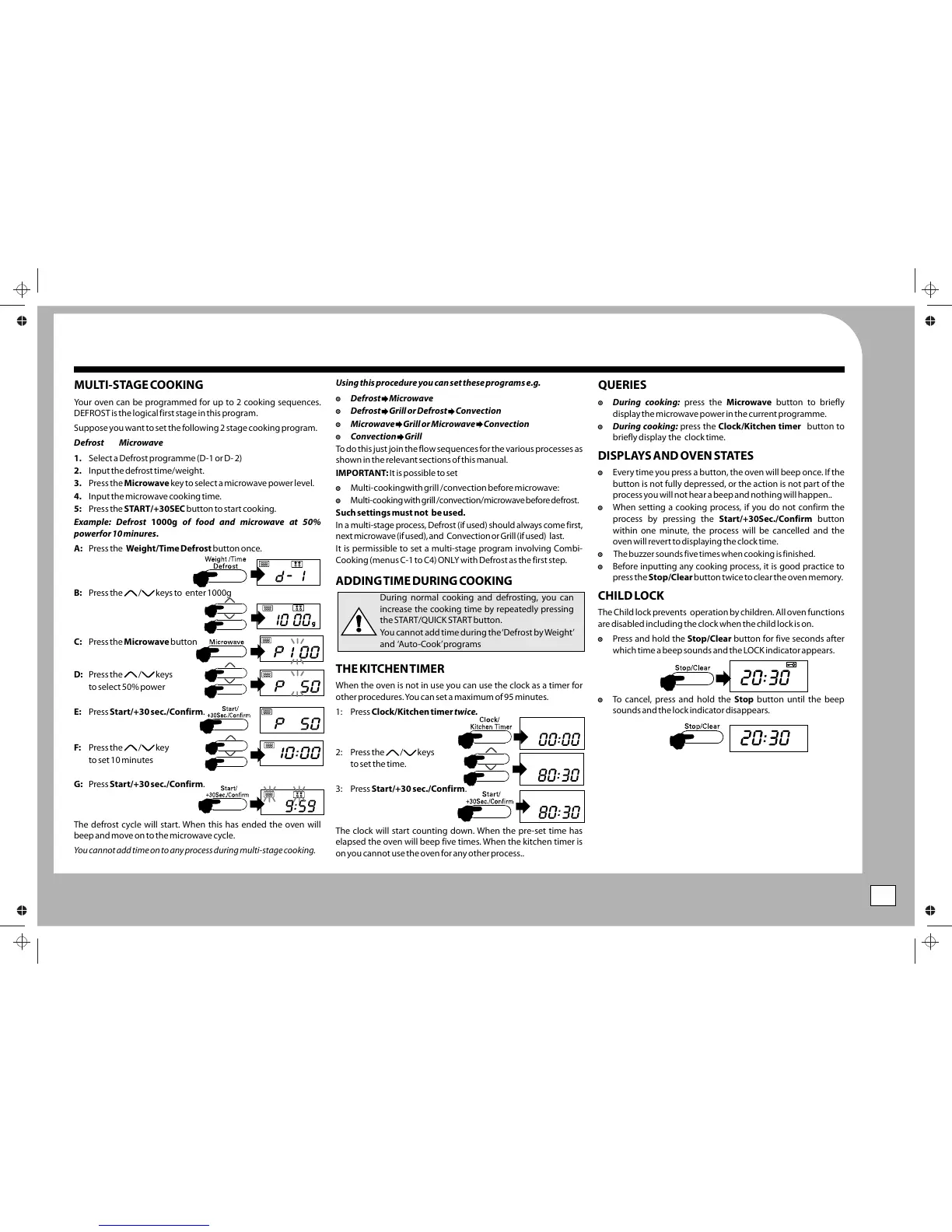
Your oven can be programmed for up to 2 cooking sequences.
$During cooking: press the Microwave button to briefly
$Defrost Grill or Defrost Convection
DEFROST is the logical first stage in this program.
display the microwave power in the current programme.
$Microwave Grill or Microwave Convection
$During cooking: press the Clock/Kitchen timer button to
Suppose you want to set the following 2 stage cooking program.
$Convection Grill
briefly display the clock time.
Defrost Microwave
To do this just join the flow sequences for the various processes as
1. Select a Defrost programme (D-1 or D- 2)
shown in the relevant sections of this manual.
2. Input the defrost time/weight.
$Every time you press a button, the oven will beep once. If the
IMPORTANT: It is possible to set
3. Press the Microwave key to select a microwave power level.
button is not fully depressed, or the action is not part of the
$Multi-cookingwith grill /convection before microwave:
process you will not hear a beep and nothing will happen..
4. Input the microwave cooking time.
$Multi-cooking with grill /convection/microwave before defrost.
$When setting a cooking process, if you do not confirm the
5: Press the START/+30SEC button to start cooking.
Such settings must not be used.
process by pressing the Start/+30Sec./Confirm button
Example: Defrost 1000g of food and microwave at 50%
In a multi-stage process, Defrost (if used) should always come first,
within one minute, the process will be cancelled and the
powerfor 10 minures.
next microwave (if used), and Convection or Grill (if used) last.
oven will revert to displaying the clock time.
A: Press the Weight/Time Defrost button once.
It is permissible to set a multi-stage program involving Combi-
Cooking (menus C-1 to C4) ONLY with Defrost as the first step.
$Before inputting any cooking process, it is good practice to
press the Stop/Clear button twice to clear the oven memory.
ADDING TIME DURING COOKING
B: Press the / keys to enter 1000g
CHILD LOCK
During normal cooking and defrosting, you can
increase the cooking time by repeatedly pressing
The Child lock prevents operation by children. All oven functions
the START/QUICK START button.
are disabled including the clock when the child lock is on.
You cannot add time during the ‘Defrost by Weight’
$Press and hold the Stop/Clear button for five seconds after
C: Press the Microwave button
and ‘Auto-Cook’ programs
which time a beep sounds and the LOCK indicator appears.
THE KITCHEN TIMER
D: Press the / keys
When the oven is not in use you can use the clock as a timer for
to select 50% power
other procedures. You can set a maximum of 95 minutes.
$To cancel, press and hold the Stop button until the beep
sounds and the lock indicator disappears.
E: Press Start/+30 sec./Confirm.
1: Press Clock/Kitchen timer twice.
F: Press the / key
2: Press the / keys
to set 10 minutes
to set the time.
G: Press Start/+30 sec./Confirm.
3: Press Start/+30 sec./Confirm.
The defrost cycle will start. When this has ended the oven will
The clock will start counting down. When the pre-set time has
beep and move on to the microwave cycle.
elapsed the oven will beep five times. When the kitchen timer is
You cannot add time on to any process during multi-stage cooking.
on you cannot use the oven for any other process..
DISPLAYS AND OVEN STATES
$ The buzzer sounds five times when cooking is finished.
Operation
Multi-Stage Operation
9
5sec
X1
X2
5sec
5sec


 To Next Page
 Loading...