
EasyManua.ls Logo

TrickleStar 188LV-US-7XX - User Manual

TrickleStar 188LV-US-7XX
8 pages
Print Icon
To Next Page IconTo Next Page
Loading...
www.tricklestar.com
For technical support
go to www.tricklestar.com
or call 1-888-700-1098
Quick Start Guide &
Instruction Manual
®
®
Copyright TrickleStar LLC 2015. All rights reserved.
TrickleStar® is a registered trademark of TrickleStar Ltd. All other trademarks are the property of their
respective owners. The information in this document is subject to change without notice.
TrickleStar assumes no responsibility for any errors that may appear in this document.
PRODUCT INFORMATION
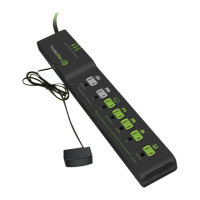
7 Outlet Advanced PowerStrip+,1080 Joules,
Current Sensing, 4ft power cord, Black,
IR + Movement Multi-Sensor.
188LV-US-7XX

Other manuals for TrickleStar 188LV-US-7XX

Questions and Answers

  • J
    Jennifer BrennanAug 14, 2025
    How to turn on switched outlets on TrickleStar 188LV-US-7XX?
    • M
      Mr. Noah DelgadoAug 14, 2025
      To switch on the switched outlets, ensure that the IR Sensor is connected to the APS+ and receives an IR signal from any remote. Alternatively, you can manually switch on the switched outlets by pressing the button on the IR sensor.
  • S
    Steven LoveAug 17, 2025
    What to do if there is no power at switched outlets on TrickleStar 188LV-US-7XX?
    • L
      Lori McgrathAug 17, 2025
      The multi-sensor must be connected to the APS+, and an IR signal from any remote must be received to switch on the switched outlets. Alternatively, you can manually switch on the switched outlets by pressing the button on the multi-sensor.
  • K
    Keith FullerAug 20, 2025
    What to do if TrickleStar Power Strip has no power?
    • A
      Ashley RodriguezAug 20, 2025
      Ensure that the resettable switch is in the reset position.
  • J
    Julia CampbellAug 25, 2025
    Why does my TrickleStar Power Strip TV keep switching off?
    • D
      Debra McculloughAug 25, 2025
      The default power saving timer shuts off the TV and its peripherals after 75 minutes. To extend the timer by another 75 minutes, aim your remote at the IR sensor when the IR sensor’s indicator LED is blinking and press any button on your remote.
  • S
    Stephanie WilsonAug 27, 2025
    What to do if TV peripherals don't switch off with TrickleStar 188LV-US-7XX?
    • T
      Tiffany HughesAug 27, 2025
      Ensure the TV is plugged into the outlet with the green TV icon and that TV peripherals are connected to the green switched outlets (except for TV). The switched outlets will switch off after the TV has been switched off for 1 minute.
  • S
    smithsherryAug 31, 2025
    Why is the IR sensor blinking on my TrickleStar 188LV-US-7XX?
    • M
      Michael EdwardsAug 31, 2025
      The blinking IR sensor on your TrickleStar Power Strip indicates that your TV will shut off in 3 minutes.
  • L
    lisamccormickSep 3, 2025
    Why does my TrickleStar 188LV-US-7XX TV keep switching off after 135 minutes?
    • A
      Alexander AllenSep 3, 2025
      The TrickleStar Power Strip has a default power saving timer that shuts off the TV and connected devices after 135 minutes if no IR signal or movement is detected. To reset the timer for another 135 minutes, press a button on an IR remote control or move in front of the multi-sensor.
  • C
    Colleen WrightSep 6, 2025
    What to do if TV peripherals do not switch off when the TV is off with TrickleStar Power Strip?
    • B
      Brett GonzalezSep 6, 2025
      Ensure the TV is plugged into the outlet with the green TV icon and that your TV peripherals (except the TV itself) are connected to the green switched outlets. The switched outlets will turn off one minute after the TV is switched off.
  • T
    thomas75Sep 10, 2025
    Why is the multi-sensor on my TrickleStar 188LV-US-7XX Power Strip blinking every 5 seconds?
    • K
      knielsenSep 10, 2025
      The blinking multi-sensor on your TrickleStar Power Strip indicates that your TV will shut off in 10 minutes.

Summary

Installation

Programming the Countdown Timer

Explains how to set the countdown timer using the on/off button and LED feedback.

Installation Steps

Details sequential installation steps including device connection, sensor placement, and power strip connection.

Operation - TV Mode

Turn on Switched Outlets

Press any button on the TV remote control to turn on the switched outlets.

Product Overview

IR + Movement Multi-Sensor

Explains the multi-sensor connection, placement, and function for IR command detection.

Power Connection Requirements

Details requirements for connecting to a grounded receptacle for surge protection.

LED Indicators Explained

Explains the function of Surge LED, Ground LED, and Switched Outlets LED.

<tv> Outlet Function

Specifies the outlet for the TV, essential for current sensing and mode detection.

Trouble Shooting

No Power to Outlets

Solution for no power: check resettable switch position.

No Power at Switched Outlets

Troubleshooting steps for no power at switched outlets.

TV Shutting Off After 135 Minutes

Explains default power saving timer and how to reset it.

TrickleStar 188LV-US-7XX Specifications

General IconGeneral
Model188LV-US-7XX
CategoryPower Strip
Number of Outlets7
Surge ProtectionYes
Energy SavingYes
Input Voltage120V
Maximum Load15A
Joules1080
Energy MonitoringNo
Cord Length6 ft