EasyManua.ls Logo

trig TY96 - User Manual

trig TY96
6 pages
Print Icon
To Next Page IconTo Next Page
Loading...
Trig Avionics Limited
Heriot Watt Research Park
Riccarton, Edinburgh EH14 4AP, UK
Tel: +44 (0)131 449 8810
Fax: +44 (0)131 449 8811
support@trig-avionics.com
www.trig-avionics.com
TY96 and TY97 VHF Radio
Operating Manual
01239-00-AA
18 February 2016
Trig Avionics Limited
Heriot Watt Research Park
Riccarton, Edinburgh
EH14 4AP
Scotland, UK
© Copyright 2016
EN

Other manuals for trig TY96

Question and Answer IconNeed help?

Do you have a question about the trig TY96 and is the answer not in the manual?

Summary

Front Panel Overview

Display Functionality

Shows primary/standby frequencies, icons for operating mode, and transmission status.

On;Off, Volume, and Squelch Knob

Controls power, audio volume, and squelch settings for the radio.

Tuning Knobs Operation

Adjusts MHz and kHz portions of the standby frequency for tuning.

Radio Operation and Functions

Flip-flop and Monitor (MON) Buttons

Swaps frequencies and enables dual-frequency listening with scanning.

Playback (PLAY) and Emergency (EMER) Buttons

Replays last ATC transmission and accesses emergency frequency 121.5 MHz.

Operational Notes and Features

Low Temperature Operation and Warnings

Details operation in cold temperatures and common warning messages.

Fault Annunciation

Describes how to identify and handle detected internal radio faults.

Intercom Functionality

Built-in intercom with voice activation and adjustable squelch/volume.

Frequency Management and Configuration

Frequency Databases

Manages pilot-created, recent, and GPS-linked frequency databases.

Entering and Editing Frequencies

Procedure to add, edit, or delete entries in the internal frequency database.

Configuration Mode Options

Adjusts intercom volume, squelch, music volume, muting, and 8.33 kHz enable.
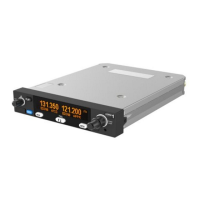
trig TY96 Specifications

General IconGeneral
Brandtrig
ModelTY96
CategoryRadio
LanguageEnglish

Related product manuals