Need help?
Do you have a question about the trig TY91 and is the answer not in the manual?
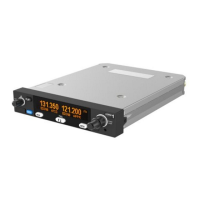
Explains primary/standby frequencies, TX/RX icons, and MONITOR function indicators.
Controls power, audio volume, and squelch. Pressing toggles automatic squelch.
Adjusts MHz/kHz for standby frequency and toggles channel spacing (8.33/25 kHz).
Flip-flop swaps frequencies. MON button activates dual-frequency listen with scanning.
Loads airport frequencies from GPS via MEM button.
Scrolls through airport/internal frequencies using select knobs and MEM button.
Accesses 9 quick reference memory locations if no GPS or remote database is passed.
Steps through memory locations with the small knob; standby window shows stored frequency.
Built-in intercom, voice activated, audio to both headsets. Squelch/volume adjustable.
Stuck mic auto-cutout safety feature. Config mode accessed via MON button for 5s.
Configures intercom volume/squelch, AUX input volume/mute, sidetone volume, and radio squelch.
Configures frequency step size (8.33/25 kHz) and LCD backlight brightness.
Explains synchronized controls, volume priority, and differences in dual control setup.
Advice for cold environments (-20°C certified) and potential display impairment.
How to interpret WARNING messages and inform maintenance. Press flip-flop to clear.
Describes loss of connection (No Radio) or unspecified fault from the remote radio.
Identifies catastrophic failures (FAULT) and dual control fault handling advice.

 To Next Page


 General