EN
2
Tuning Knobs
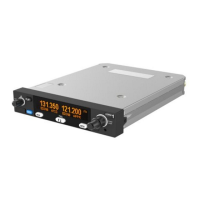
The right hand concentric knobs are used to tune the radio. The large
knob adjusts the MHz portion of the standby frequency, and the
smaller knob adjusts the kHz portion of the standby frequency.
Pressing the end of the small knob changes the channel spacing that
the small knob operates through. If the radio is configured for 8.33
kHz operation, the steps toggle between 8.33 kHz channels and 25
kHz channels. If the radio is configured only for 25 kHz operation, the
steps toggle between 25 kHz and 50 kHz channels.
Changing the step size does not change the behaviour of the radio,
only the tuning knob step size – it helps to quickly tune a frequency.
Flip-flop Button
The flip-flop button swaps the frequency in the standby position into
the active position, and moves the active frequency to the standby
position.
MON Button
The VHF radio includes a dual-frequency listen feature; pressing the
MON button toggles this feature on and off.
When the monitor is active, a +2 icon appears next to the standby
frequency, and the radio will scan between the active and standby
frequencies listening for transmissions. The primary channel has
priority – a transmission on the primary channel will interrupt the
secondary channel. As an aid to identifying which channel is active,
the RX icon will light next to the active channel and the secondary
channel will appear slightly quieter than the primary.
This is useful in an aircraft with only a single radio since it allows you,
for example, to copy the ATIS whilst maintaining a listening watch on
the ATC frequency.
Remote Frequency Database
If a compatible GPS is connected, the controller will be loaded with
airport frequencies from the GPS database. These frequencies are
accessed by pressing the MEM button. The airport frequencies and
selection order are determined by the data sent to the controller from
the GPS.


 To Next Page