EN
1
Front Panel
Display
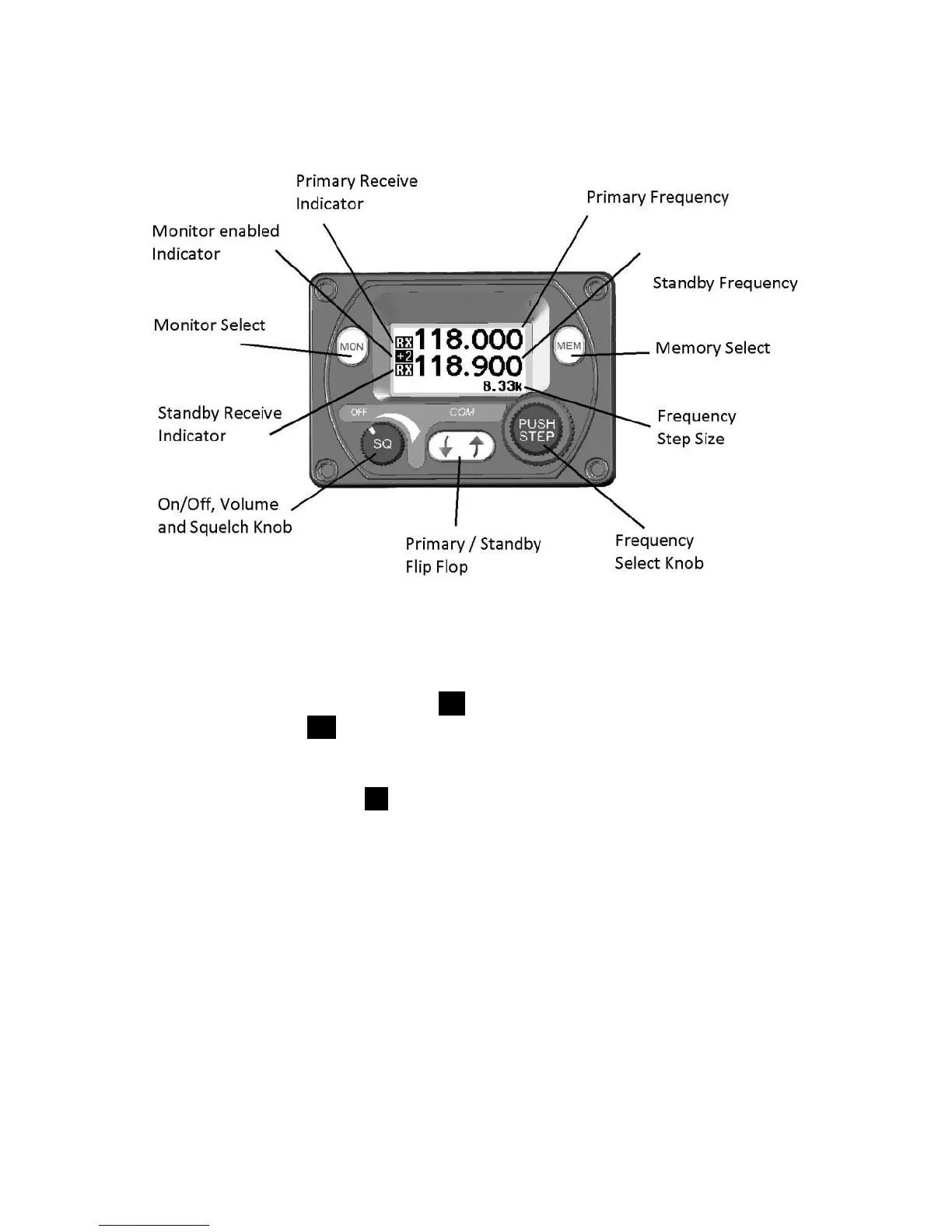
The display shows the primary and standby frequencies and a series
of icons to indicate the operating mode of the radio.
The primary frequency is at the top and the standby frequency is at the
bottom half of the screen. The TX icon shows that the radio is
transmitting. An RX icon shows that the frequency is active and the
audio will be heard through the headphone and speaker outputs. The
standby frequency will only be received during the MONITOR function
which is indicated by a +2 icon when active.
The bottom right hand side indicates what frequency step size is
selected.
On/Off, Volume and Squelch Knob
The left hand knob controls the power to the VHF radio, adjusts the
audio volume, and controls the squelch. Turning this knob clockwise
will switch on the radio and then increase the volume. Turning
anticlockwise will reduce the volume and eventually will click off.
Pressing this knob toggles the automatic squelch on and off, which
can be used to listen for faint stations and as a simple audio test.


 To Next Page