Need help?
Do you have a question about the Trikdis GV17 and is the answer not in the manual?
Detailed technical specifications of the GSM gate controller GV17.
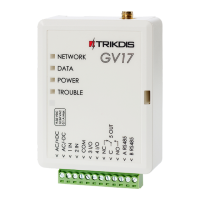
Identification and description of the physical components of the GV17 controller.
Explanation of the purpose and connection for each terminal on the controller.
Description of the status and meaning of each LED indicator on the controller.
List of items included in the standard package of the GV17 controller.
Instructions on how to physically mount and secure the GSM gate controller.
Diagram illustrating the correct connection of the power supply to the controller.
Schematics for connecting various alarm sensors to the controller's inputs.
Diagram showing how to connect external devices via the controller's relay output.
Instructions on how to control the GV17 using standard phone calls.
Using DTMF commands via phone keypad to control controller outputs.
Guide to controlling the GV17 using the Protegus mobile application or web interface.
Detailed commands and procedures for controlling the GV17 using SMS.
How to configure the controller settings remotely using SMS commands.
Explanation of the information displayed in the TrikdisConfig software status bar.
Detailed settings within the 'System Options' window of TrikdisConfig.
Configuring input and output terminal functions and events in TrikdisConfig.
Settings for IP communication and reporting to alarm receiving centers.
Managing authorized users, their permissions, and notifications in TrikdisConfig.
Viewing and interpreting the event log for system activity and errors.
Procedure for resetting the GV17 controller to its factory default settings.
 General
| Brand | Trikdis |
|---|---|
| Model | GV17 |
| Category | Controller |
| Language | English |

 To Next Page